Top 10 TiviMate Alternatives in 2025 – Best IPTV Apps Reviewed
If you’ve been using TiviMate and are now looking for powerful alternatives, you’re in the right place. In 2025, there are plenty of high-quality IPTV players that offer competitive features like multi-playlist support, EPG integration, video-on-demand support, and cross-platform access. Below, we review 10 of the best TiviMate alternatives with in-depth analysis.
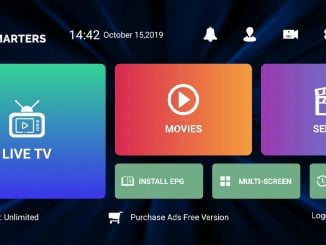
1. IPTV Smarters Pro
IPTV Smarters Pro is one of the most popular IPTV apps that rivals TiviMate in both design and function. It supports M3U playlists and Xtream Codes API, making it compatible with most IPTV providers. The app includes an intuitive interface, live TV, movies, series, and catch-up TV options. One of its standout features is the built-in media player, plus external player integration like VLC or MX Player.
Parental control, multiple screens, and multi-user support make this a family-friendly solution. It’s available on Android, iOS, and Smart TVs. Though it’s free with limited features, a premium upgrade unlocks multiple user accounts and EPG timeline view.
OTT Navigator offers a highly customizable IPTV experience. It is known for its smooth playback, EPG grid, catch-up support, and the ability to filter channels by genres, categories, or custom rules. Unlike other apps, it is focused on performance and supports different data sources simultaneously.
OTT Navigator is perfect for power users who want to create a tailored IPTV dashboard. While the UI may feel complex at first, its responsiveness and control options win over tech-savvy users. It’s completely ad-free and available on Android platforms, including Android TV and Firestick.
3. Perfect Player
Perfect Player is a favorite among experienced IPTV users due to its simple layout and powerful backend configuration. It supports M3U and XSPF playlists and can read XMLTV and JTV EPG formats. You can also integrate logos and channel groups manually.
This app is particularly suited for users who want complete control over their IPTV experience. It works smoothly with remote controls and provides various decoding options for better performance. However, it lacks a built-in playlist manager, so some manual setup is required.
4. Televizo
Televizo offers a slick interface for users who prefer ease of use and clean design. It supports M3U playlists and Xtream Codes and offers advanced features like time-shift and favorites. The premium version provides multiple profiles and EPG support.
It’s ideal for families or shared devices where each person can have their own user profile. Setup is quick, and users can easily import IPTV credentials via a URL or file upload. Televizo is available on Android and Fire TV devices.
5. GSE Smart IPTV
GSE Smart IPTV is a feature-rich cross-platform IPTV player. It supports JSON, M3U, and database playlist formats, and includes a powerful built-in player. You can cast directly to Chromecast, and the app allows subtitle and language customization.
Security-conscious users will appreciate its parental control and built-in VPN proxy support. Available on iOS and Android, GSE Smart IPTV is well-suited for mobile and tablet use. The app is free with ads, and a premium version removes advertisements and unlocks additional features.
6. iMPlayer
iMPlayer focuses on stability and multi-source streaming. It supports live TV, catch-up, movies, and series from different playlist sources. With EPG, recording support, and a sleek UI, it’s great for long-term IPTV users.
iMPlayer allows custom themes, profiles, and advanced sorting. Though it requires a one-time activation fee, it provides one of the most polished and stable IPTV environments, especially for Android TV users.
7. Smart IPTV
Smart IPTV is known for its compatibility with Samsung and LG Smart TVs. It supports M3U URLs and playlist uploads via a web portal. Its interface is simple and remote-friendly, making it ideal for living room setups.
The app requires a one-time activation fee (~$6) and doesn’t offer trial features. Despite limited playlist management, its reliability on Smart TVs has earned it a loyal following. Note: it does not support Xtream Codes login.
8. XCIPTV Player
XCIPTV Player is a clean, modern IPTV player that supports both M3U and Xtream Codes. It comes with two built-in media players and includes EPG, VOD, catch-up TV, and recording options.
This app is great for those who want IPTV and video-on-demand in one package. The user interface is attractive, and content is grouped neatly for easy navigation. Available for Android devices, it works exceptionally well on Fire TV.
9. TPlayer
TPlayer is more of a media player that integrates well with IPTV sources. While not an IPTV manager by itself, it’s often used as an external player in apps like IPTV Smarters or GSE Smart IPTV. It offers hardware acceleration, subtitle support, and fast decoding for smooth playback.
If you already have a preferred IPTV app but are looking for a better media experience, TPlayer is a great companion app to install.
10. Flix IPTV
Flix IPTV is a premium-looking app available on Android, Samsung, LG, and Fire TV devices. It supports M3U playlists and Xtream Codes, with robust features like customizable subtitles, catch-up, and parental controls.
The app requires a one-time activation fee after a 7-day trial. Its aesthetic design and feature set make it a serious alternative to TiviMate for users who want a polished streaming interface without monthly fees.
Frequently Asked Questions (FAQs)
1. Why do people look for alternatives to TiviMate?
Users often seek alternatives due to pricing changes, device compatibility, or a need for more customization and features.
2. Are these TiviMate alternatives legal?
Yes, these apps are legal IPTV players. However, legality depends on the content streamed and the IPTV provider used.
3. Do these apps come with content?
No, all the apps listed are just IPTV players. You must provide your own playlist or IPTV subscription.
4. What is the best free alternative to TiviMate?
OTT Navigator and IPTV Smarters Pro are two of the best free alternatives offering solid features without payment.
5. Which alternative supports Xtream Codes?
IPTV Smarters Pro, Flix IPTV, XCIPTV Player, and Televizo support Xtream Codes login, making them easy to set up.
6. Which is the best option for Smart TVs?
Smart IPTV and Flix IPTV are highly optimized for Smart TV platforms like Samsung and LG.
7. Can I use an EPG with these alternatives?
Yes, most of the alternatives support EPG in XMLTV or JTV formats, allowing you to load TV guides easily.
Also useful: two current players that run the apps in this guide well on the big screen.
- Google TV Streamer 4K: a simple Google TV box with Ethernet and the full Play Store. Amazon UK | Amazon US | Amazon DE | Amazon FR | Amazon IT
- Amazon Fire TV Stick 4K Max: the current Wi-Fi 6E model; check the listing says Fire OS rather than Vega OS before you pay. Amazon UK | Amazon US | Amazon DE | Amazon FR | Amazon IT
Best IPTV boxes to buy
These are media boxes and sticks that can run players and licensed apps. The first six are Google certified Android TV or Google TV devices with Google Play. The three Fire TV Sticks run Amazon’s own systems with the Appstore instead of Google Play: the 4K Max and 4K Plus run Fire OS, which is Android based, while the new Fire TV Stick 4K (2026) runs Vega OS, which does not allow sideloading Android apps, only Appstore apps. The last one, the Formuler, runs its own Android and is not certified. They are not pirate hardware. They do not come with channels or playlists. I am not claiming I personally lab-tested every SKU this month.
Pick a Google TV box when you want Play Store apps on a proper TV OS or a dedicated player behind the sofa. Pick a Fire TV Stick when Prime Video and the Appstore already cover what you watch. If you need an Android player from outside the Appstore, skip the Vega OS stick.
- NVIDIA SHIELD TV Pro: the premium pick, a certified Android TV player with AI upscaling, Dolby Vision/Atmos and Gigabit Ethernet for the main living-room telly. Amazon UK | Amazon US | Amazon DE | Amazon FR | Amazon IT
- Google TV Streamer 4K: solid Google TV living-room default with Ethernet, 32GB storage and Dolby Vision/Atmos. Amazon UK | Amazon US | Amazon DE | Amazon FR | Amazon IT
- Xiaomi TV Box S (3rd Gen): Google TV box with 32GB storage, Wi-Fi 6 and Dolby Vision/Atmos, the cheaper box route than the Streamer. Amazon UK | Amazon US | Amazon DE | Amazon FR | Amazon IT
- Xiaomi TV Stick 4K (2nd Gen): budget Google TV stick with Wi-Fi 6 and Dolby Vision/Atmos when you want HDMI-simple, not a full box. Amazon UK | Amazon US | Amazon DE | Amazon FR | Amazon IT
- Budget Google TV 4K player: a cheaper certified Google TV player for a second telly. The model differs by store, so each link names the one you get there. MECOOL KD3 (Amazon UK) | onn. Google TV 4K Streaming Box (Amazon US) | Strong LEAP-NOVA-X (Amazon DE) | Strong LEAP-NOVA-X (Amazon FR) | Strong LEAP-NOVA-X (Amazon IT)
- MECOOL MEon1: Google TV certified 4K box with AI upscaling and 32GB storage for a dedicated player behind the sofa. Amazon UK
- Fire TV Stick 4K Max: the most powerful Fire TV Stick, with Wi-Fi 6E, Dolby Vision/Atmos and 16GB storage. It runs Fire OS, which is Android based, so you get Appstore apps and can still sideload an Android player. Amazon UK | Amazon US | Amazon DE
- Fire TV Stick 4K Plus: the older Fire OS stick with Wi-Fi 6 and Dolby Vision/Atmos. It is being phased out, so buy it only while stock lasts. Like the Max, it can still sideload Android apps. Amazon UK | Amazon US | Amazon DE | Amazon FR | Amazon IT
- Fire TV Stick 4K (2026): the newest and slimmest 4K stick, with a new remote. It runs Vega OS, which does not allow sideloading Android apps, only Appstore apps, so check your player is in the Appstore before you buy. Amazon UK | Amazon US | Amazon DE | Amazon FR | Amazon IT
- Formuler Z12 Ultra SE: the newest Formuler box, built around MYTVOnline 4 for IPTV playlists. It runs Formuler’s own Android rather than certified Google TV, so there is no Netflix in HD and no Google certification. Formuler Z12 Ultra SE (Amazon UK) | Formuler Z12 Ultra SE (Amazon US) | Formuler Z12 Ultra SE (Amazon DE) | Formuler Z12 Ultra SE (Amazon FR) | Formuler Z12 Ultra SE (Amazon IT)
Whichever you pick, check that the app you need is in its store before you pay. And none of these boxes or sticks magically make unlicensed streams legal.