November 22, 2026

Husham.com

The Husham.com Website

  • Home
    • About Dr Husham Memar | Husham.com living history
    • Contact Page
  • APK
    • Entertainment APK
      • Sport APK
    • IPTV APK
    • Firestick
  • IPTV
    • IPTV What is it? IPTV FAQ
  • KODI
    • Kodi Addons
    • Installing KODI
      • Fire TV or Fire TV Stick
      • KODI BUFFERING FIX
  • News
    • ISP
    • IPTV news
    • Sports News
    • Internet / Network
    • Tivimate
    • Hulu
    • Stremio
    • Entertainment News
  • Reviews
    • Amazon
      • Discounts
    • Unboxing
    • Smart Phones
    • SmartTV
  • Apple
  • VPN
  • FAQ
News Ticker
  • [ November 21, 2026 ] Kodi 21 to 22: Upgrade Without Losing Everything Reviews
  • [ November 20, 2026 ] IPTV CRACKDOWN NEWS 2026: Users Caught, Sellers Jailed – What You Need to Know Reviews
  • [ November 18, 2026 ] Back Up Kodi BEFORE It Breaks (Official Way) Reviews
  • [ November 15, 2026 ] The 10 Apps I Put on a New Fire Stick Reviews
  • [ November 13, 2026 ] Kodi Ate My Storage: Free Up Space the Safe Way Reviews
  • [ November 11, 2026 ] How to Set Up Plex, Jellyfin or Kodi on Android TV / Fire Stick Reviews
  • [ November 9, 2026 ] Watch 3D Movies on Kodi: The Built-In 3D Mode Nobody Uses Reviews
  • [ November 8, 2026 ] Top 10 Ways to Stop IPTV Buffering on Fire Stick & Android TV Reviews
  • [ November 7, 2026 ] Best IPTV Players 2026: Official Downloads by Platform IPTV
  • [ November 7, 2026 ] How to Set Up TiviMate for IPTV on Fire Stick & Android TV (2026) Reviews
HomeAPKDownload Google Play Store (how to) – Install google play store apk

Download Google Play Store (how to) – Install google play store apk

August 3, 2018 Comments Off on Download Google Play Store (how to) – Install google play store apk
Contents hide
1 Download Google Play Store
1.1 Step 1: Check your current version
1.2 Step 2: Download Google Play Store via an APK
1.3 Step 3: Enable Unknown Sources
1.4 Wrap up

Download Google Play Store

Install google play store apk


The Google Play Store is grown to be the top APP store for smart devices, including Smart phones and Smart TV’s.


Update Your Google Platstore

Step 1: Check your current version

The first thing you’ll want to do is see which version you have to make sure you’re downloading Google Play Store’s latest version.

This can be done as follows:

  • Open your Google Play Store app.
  • Open the settings.
  • At the bottom you’ll see build number. That’s your current version.

At the time of this writing. The latest version is Play Store 8.0.23. Keep in mind before attempting to update that you are sure your version of Android is compatible with the latest store version, though this shouldn’t really be a problem unless you are rocking a super ancient version of Android like Gingerbread — if that’s the case, time to replace your phone!
Step 2: Download Google Play Store via an APK

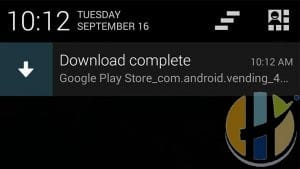
The Google Play Store comes in APK format like any other Android app. Here are some tips for this step:

  • Only download Google Play Store APKs from trusted sources. Downloading from untrustworthy sources may be that the APK been tampered with which is bad news. You’ll want an APK that is signed by Google.
  • You can download it on your device or your computer.

At the time of writing, you can download Google Play Store with the latest version (8.x) right here.
Step 3: Enable Unknown Sources

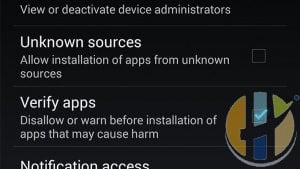
The Unknown Sources setting has been a part of Android for ages. When disabled, it prevents users from installing applications from anywhere aside from the Google Play Store. It’s a measure that is in place by default and you’ll have to enable the setting in order to install an APK.

  • Enter your device settings.
  • Go to “Security”.
  • Find the Unknown Sources option and check the box. A warning will pop up which you should definitely read. Once done, hit “OK” and this will enable you to install APKs from Unknown Sources.

If Unknown Sources isn’t in the Security settings, try finding it in the Privacy settings or Application (Apps) settings.
Wrap up

You now know how to download Google Play Store to ensure you have the latest version. This method will work on almost any Android device, Android BOX or KODI BOX, but there may be slight variances depending on your Android version and OEM.  If you have any extra issues, Leave comments below and will respond to it as soon as I review it or just use the contact page above and I will be able to help you.
  • access google play store
  • create google play store account
  • find me google play
  • get android app
  • get google play app
  • get play store
  • get play store app
  • go to google play store
  • google app store for android
  • google google play store
  • google play apk download
  • google play app download
  • google play app download for android
  • google play app download for android free
  • google play app download free
  • google play app free download
  • google play app install
  • google play application
  • google play devices
  • google play latest version
  • google play my apps
  • google play store account
  • google play store app for android
  • google play store app install for pc
  • google play store app sign up
  • google play store devices
  • google play store download for pc
  • google play store free
  • google play store latest version
  • google play store online
  • google play store sign up
  • google play store website
  • google play website
  • google store
  • google store android
  • google store app download
  • how do i install play store
  • how to download apps from google play
  • how to download play store app
  • how to get google play
  • instal google play
  • instal play store
  • Install google play store apk
  • install google store
  • latest google play store
  • load play store
  • my google play store
  • open google play store
  • open google play store app
  • play google play
  • play store app download for android
  • play store app download free android
  • play store app for android
  • play store devices
  • play store download android
  • play store my apps
  • play store search
  • playgoogle in
  • search google play store
  • what is play store
Reformed Music Pirates Increasingly Choose Legal Streaming ServicesPrevious

Reformed Music Pirates Increasingly Choose Legal Streaming Services

Next

WBJLG Keyboard 108 Crucial Cherry MX Change Comprehensive-Sizing Mechanical Keyboard Anti-Ghosting (British isles QWERTY Format),Redswitch

Related Articles

Warm editorial living-room shot of a streaming box with US $150 and UK £99 price tags and husham.com logo bottom-right
News

Google TV Streamer US Hits $150: UK Is Still £99 for Now

September 8, 2026 Comments Off on Google TV Streamer US Hits $150: UK Is Still £99 for Now
Google raised the US Google TV Streamer to $149.99 on 31 August. The UK Google Store is still £99. Here’s what changed, why it matters, and whether to buy before Britain catches up.

[…]

APK

SRTV APK New 2018 Free IPTV Live TV for Smart phones and Smart TV

March 26, 2018 Comments Off on SRTV APK New 2018 Free IPTV Live TV for Smart phones and Smart TV
SRTV APK New 2018 Free IPTV Live TV for Smart phones and Smart TV SRTV APK New 2018 Free IPTV Live TV for Smart phones and Smart TV Kodi: Download SRTV after signup to the […]

TV Guide

Husham TV Guide

📺 Visit TV Guide 2026

Get the latest Husham TV BOX

husham-android-tv-boxhusham

RSS feed: Forum Feed Forum Feed

  • ⚡ STALLION IPTV | FREE TRIAL | 50,000+ Channels | 4K PPV | VOD + Series | Anti-Freeze™ 3.0 | 10% OFF "4KIPTV" November 22, 2026
  • 🔥 A2Z IPTV — BLACK FRIDAY DEALS 🔥 Flexible plans for viewers, resellers, and operators Choose the service that fits your needs: November 22, 2026
  • A2Z IPTV — Subscriptions • Restream • Reseller Panels Your Entertainment. Your Customers. Your Next Step November 22, 2026
  • A2Z IPTV | Subscriptions, Restream & Reseller Panels | Local & International TV November 22, 2026
  • 🌍 ONE POWERFUL STREAMING PLATFORM — LIVE TV, VOD, SPORTS & GLOBAL ENTERTAINMENT November 21, 2026
  • شلون تفعّل Developer Options على Fire TV و Fire Stick 🔴 #Shorts November 21, 2026
  • 🎇🔥Best Quality iptv with excellent server.your best choice & Truset . November 21, 2026
  • 👑📺Best Price – High-Quality IPTV Restream service November 21, 2026
  • 🔯 PREMIUM LOCAL RESTREAM & RESELLER PANEL SERVICE 🔯 November 21, 2026
  • DizcoTV — RESTREAM, RESELLER & PERSONAL PLANS November 21, 2026
  • ♛IPTV 20000 ch ♛Ultra HD 4K 150 channels 25 € - 1 year each November 21, 2026
  • 👑📺Special Deals on Premium IPTV Restream Services 🔥 November 21, 2026
  • 𝗩𝗮𝘂𝗹𝘁𝗫 𝗦𝗶𝗹𝗼 & 𝗘𝗺𝗯𝘆 - 𝗩𝗼𝗗 𝗼𝗻𝗹𝘆 𝘀𝗲𝗿𝘃𝗶𝗰𝗲 November 21, 2026
  • 🔥 Best Offer Price—👑High-Quality IPTV Restream Service 📺 November 21, 2026
  • 𝗛𝗲𝗹𝗹𝗼 , 𝗥𝗲𝘀𝘁𝗿𝗲𝗮𝗺𝗲𝗿𝘀 , 𝗹𝗼𝗼𝗸𝗶𝗻𝗴 𝗳𝗼𝗿 𝘀𝘁𝗮𝗯𝗹𝗲 𝗮𝗻𝗱 𝗯𝗲𝘀𝘁 𝘀𝗲𝗿𝘃𝗶𝗰𝗲? November 21, 2026
  • Best Free Apps to Install on Android TV & Fire Stick (That Actually Work) November 21, 2026
  • How is the streaming performance on Xuper TV? November 21, 2026
  • ANTI-BUFFERING SPEED, PERFOMRANCE MODEM & PROFESSIONAL BEST FOR GENERAL LOCAL STREAM AND SUBCRIPTION PANEL November 21, 2026
  • TopFlightStreams BEST STREAMS AND SUPPORT BUY FROM TRUSTED SELLER November 21, 2026
  • 🌍📺 EUROPEAN IPTV ENTERTAINMENT SOLUTIONS — PREMIUM SUBSCRIPTIONS, FLEXIBLE PACKAGES & BUSINESS OPPORTUNITIES ACROSS EUROPE 📺🔥 November 21, 2026

Articles

© 2026 Husham.com. Written by Dr Husham Memar.

About | Contact | Privacy Policy | Terms | Disclaimer

As an Amazon Associate, husham.com earns from qualifying purchases.

  • Home
  • KODI
  • APK
  • News
  • Kodi Addons
  • Reviews
  • ARABIC
  • IPTV
  • Unboxing
  • Live

© 2026 Husham.com