Most Vega OS news so far has been a list of things that stopped working. No sideloading, no Downloader, no APK files, a smaller Appstore. So it makes a pleasant change to write about an app that has started working instead.
NVIDIA now lists support for its cloud gaming service, GeForce NOW, on all three Fire TV Sticks that use Amazon’s Vega OS. NVIDIA announced it in its GFN Thursday post of 19 November 2026, and its system requirements page now lists the sticks. Prices and offers can change, so treat everything below as correct on 28 November 2026 and check NVIDIA’s pages before you pay. Before you clear the coffee table for a gaming marathon, here is what you actually get, what it costs in the UK, and who should not bother.
Which Fire TV devices are covered
NVIDIA’s system requirements page now lists these Fire TV devices:
- Fire TV Stick 4K Select (1st Gen), on OS 2.0 and later (Vega OS)
- Fire TV Stick HD (2026), on OS 2.0 and later (Vega OS)
- Fire TV Stick 4K (2026), on OS 2.0 and later (Vega OS)
- Fire TV Stick 4K Plus (1st Gen), on Fire OS 8.1.6.0 and later
- Fire TV Stick 4K Max (2nd Gen), on Fire OS 8.1.6.0 and later
- Fire TV Stick 4K Max (1st Gen), on Fire OS 7.7.1.1 and later
- Fire TV Stick 4K (2nd Gen), on Fire OS 8.1.6.0 and later
The Android-based Fire OS sticks got GeForce NOW earlier this year, when NVIDIA launched the Fire TV app in February 2026, so the news this month is the three Vega OS models. Notice who is missing from NVIDIA’s list: there is no Fire TV Cube, which is the most capable Fire TV device for gaming. Amazon’s most powerful streamer is left out of a gaming launch. You could not write it.
Buying a stick for this? My Black Friday Fire TV Stick deals guide has the current UK prices.
Careful with the names, too. NVIDIA lists “Fire TV Stick 4K (2026)” as a Vega OS stick, and “Fire TV Stick 4K (2nd Gen)” as an older Fire OS one. They are different sticks, so check the generation name before you buy. My Fire TV Stick 4K model guide explains which is which.
What GeForce NOW actually is
GeForce NOW does not sell you games. It rents you a gaming PC in an NVIDIA data centre and streams the picture to your TV. According to NVIDIA’s FAQ, you play games you already own by linking stores such as Steam, Epic Games Store, Ubisoft Connect, Battle.net, EA app, GOG and Xbox, plus hundreds of free-to-play games. If your game library is empty, so is your GeForce NOW library, apart from the freebies.
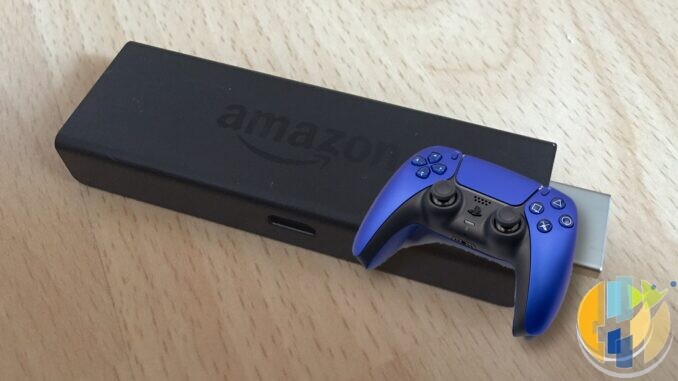
Getting started on Fire TV is, per NVIDIA, three steps: download the GeForce NOW app from the Appstore on a supported device, sign in, and connect a compatible controller. That last one matters. NVIDIA says that on TVs you can use a keyboard and mouse only to navigate the app. To play, you need a supported gamepad.
Controllers: the Fire TV remote will not do
NVIDIA lists three types of controller for Fire TV:
- Microsoft Xbox controllers
- Sony PS5 DualSense and DualShock 4 controllers
- Amazon Luna controller
Other gamepads “may work”, which is the industry’s polite way of saying “good luck”. If you already own an Xbox or PlayStation pad, you are sorted. If not, add the cost of a controller to the price of the “cheap” stick before you call this a bargain console.
UK prices and what each tier gets you
I checked NVIDIA’s UK membership page on 28 November 2026. Prices can change, so confirm them on that page before you buy.
- Free: £0, ad-supported, 1-hour sessions, up to 1080p at 60fps, no priority in the queue and, in NVIDIA’s words, “typically >2 minute wait”. The FAQ says free users see up to two minutes of video ads before each session.
- Performance: £9.99 a month. No ads, 6-hour sessions, up to 1440p at 60fps, priority queue.
- Ultimate: £19.99 a month. RTX 5080-class rigs, 8-hour sessions, up to 5K or up to 360fps, first priority in the queue.
- Day Passes: £3.99 (Performance) or £7.99 (Ultimate) for 24 hours. NVIDIA says the cost can go towards your first month if you sign up within 48 hours.
- 12-month plans: £99.99 (Performance) or £199.99 (Ultimate).
Both paid tiers come with 100 hours of premium playtime a month, with up to 15 unused hours rolling over, according to the FAQ. Run out and you can buy more hours, or drop to the basic free-style experience until your playtime resets. NVIDIA also notes there is no set limit on how many sessions you can start in a day, so the 1-hour free session is a speed bump, not a wall. Expect to queue again, though.
If you think hour limits on cloud gaming are becoming a theme, you are right. Microsoft did something similar with Game Pass, which I covered in my Xbox Cloud Gaming hour limits post. The cloud is infinite. Your allowance is not.
The Black Friday offers, and their small print
Two offers are running, both from NVIDIA’s 19 November post:
- Six-month memberships, 30% off the first term, for new memberships and eligible upgrades in select regions, until 30 November. The offer ends 30 November, while supplies last. On the UK page that is £34.99 for six months of Performance (then £49.99 per six months) or £69.99 for Ultimate (then £99.99 per six months).
- 90% off the first month of Performance or Ultimate when bought directly through Amazon on a supported Fire TV device, from 19 November to Thursday 31 December, in “participating regions”. NVIDIA does not list the regions in that post, so check the offer inside the app on your stick before assuming it applies in the UK.
Both offers can change or end early, so check the live NVIDIA page and the app before you pay.
Note the word “first” in both. The discount ends, the renewal does not. Set a calendar reminder the day you sign up.
The caveats nobody puts on the box
Resolution on a stick. NVIDIA’s Fire TV requirements list internet speeds for HD (720p) and 1080p streams at 60fps only. So do not buy Ultimate expecting 5K or 360fps on a Fire TV Stick. On a stick, you are mostly paying for the queue, the session length and the more powerful cloud rig.
Internet speed. NVIDIA asks for 15 Mbps for 720p at up to 60fps and 25 Mbps for 1080p at 60fps, plus under 80ms of latency to an NVIDIA data centre. Those are minimums for the game alone. If someone else in the house is streaming 4K Netflix, they are your lag now.
Wi-Fi. NVIDIA recommends a wired connection or a 5GHz Wi-Fi router. A stick behind the TV has no Ethernet port of its own, so Wi-Fi quality decides everything. Check the Wi-Fi specification on Amazon’s product page for the stick you are buying, because it differs between models. If your router is two rooms and a fridge away, expect smeary graphics in fast games.
The games. You still need to own them, or stick to free-to-play titles. Not every game in your Steam library is on GeForce NOW either, so search NVIDIA’s games list for your favourites before paying for anything.
Who should skip it
- Competitive players who care about every millisecond. Cloud gaming over Wi-Fi on a stick is not where you win tournaments.
- Anyone on a slow or busy connection, or with a weak Wi-Fi signal at the TV.
- People without a game library or a controller, unless free-to-play titles are all you want.
- Anyone who already owns a supported box such as an NVIDIA Shield, which is on NVIDIA’s supported list too and has Gigabit Ethernet.
- Anyone buying a Vega OS stick only for this. If you also want apps outside the Appstore, read what stops working on Vega OS first.
Best IPTV boxes to buy this month from Amazon
These are media boxes and sticks that can run players and licensed apps. The first six are Google certified Android TV or Google TV devices with Google Play. The three Fire TV Sticks run Amazon’s own systems with the Appstore instead of Google Play: the 4K Max and 4K Plus run Fire OS, which is Android based, while the new Fire TV Stick 4K (2026) runs Vega OS, which does not allow sideloading Android apps, only Appstore apps. The last one, the Formuler, runs its own Android and is not certified. They are not pirate hardware. They do not come with channels or playlists. I am not claiming I personally lab-tested every SKU this month.
Pick a Google TV box when you want Play Store apps on a proper TV OS or a dedicated player behind the sofa. Pick a Fire TV Stick when Prime Video and the Appstore already cover what you watch. If you need an Android player from outside the Appstore, skip the Vega OS stick.
- NVIDIA SHIELD TV Pro: the premium pick, a certified Android TV player with AI upscaling, Dolby Vision/Atmos and Gigabit Ethernet for the main living-room telly. Amazon UK | Amazon US | Amazon DE | Amazon FR | Amazon IT
- Google TV Streamer 4K: solid Google TV living-room default with Ethernet, 32GB storage and Dolby Vision/Atmos. Amazon UK | Amazon US | Amazon DE | Amazon FR | Amazon IT
- Xiaomi TV Box S (3rd Gen): Google TV box with 32GB storage, Wi-Fi 6 and Dolby Vision/Atmos, the cheaper box route than the Streamer. Amazon UK | Amazon US | Amazon DE | Amazon FR | Amazon IT
- Xiaomi TV Stick 4K (2nd Gen): budget Google TV stick with Wi-Fi 6 and Dolby Vision/Atmos when you want HDMI-simple, not a full box. Amazon UK | Amazon US | Amazon DE | Amazon FR | Amazon IT
- STRONG LEAP-NOVA: a certified Google TV stick with Android 14, 32GB storage, Wi-Fi 6 and Dolby Vision, a cheaper stick for a second telly. Amazon UK | Amazon DE | Amazon FR | Amazon IT
- RockTek GX1: a certified Google TV box with 4GB RAM, 32GB storage, Wi-Fi 6, Ethernet and Dolby Vision/Atmos for a dedicated player behind the sofa. Amazon UK | Amazon US | Amazon DE | Amazon FR | Amazon IT
- Fire TV Stick 4K Max: the most powerful Fire TV Stick, with Wi-Fi 6E, Dolby Vision/Atmos and 16GB storage. It runs Fire OS, which is Android based, so you get Appstore apps and can still sideload an Android player. Amazon UK | Amazon US | Amazon DE
- Fire TV Stick 4K Plus: the older Fire OS stick with Wi-Fi 6 and Dolby Vision/Atmos. It is being phased out, so buy it only while stock lasts. Like the Max, it can still sideload Android apps. Amazon UK | Amazon US | Amazon DE | Amazon FR | Amazon IT
- Fire TV Stick 4K (2026): the newest and slimmest 4K stick, with a new remote. It runs Vega OS, which does not allow sideloading Android apps, only Appstore apps, so check your player is in the Appstore before you buy. Amazon UK | Amazon US | Amazon DE | Amazon FR | Amazon IT
- Formuler Z12 Ultra SE: the newest Formuler box, built around MYTVOnline 4 for IPTV playlists. It runs Formuler’s own Android rather than certified Google TV, so there is no Netflix in HD and no Google certification. Formuler Z12 Ultra SE (Amazon UK) | Formuler Z12 Ultra SE (Amazon US) | Formuler Z12 Ultra SE (Amazon DE) | Formuler Z12 Ultra SE (Amazon FR) | Formuler Z12 Ultra SE (Amazon IT)
Whichever you pick, check that the app you need is in its store before you pay. And none of these boxes or sticks magically make unlicensed streams legal.
What I would do this weekend
If you already own a Fire TV Stick 4K Select, Fire TV Stick HD or the new Fire TV Stick 4K (2026), update it, install GeForce NOW from the Appstore, pair an Xbox or PlayStation controller, and try the free tier for an evening with a game you own or a free-to-play title. Run a speed test on the stick’s own network first. If the free tier plays smoothly apart from the queue and the one-hour cut-off, a £3.99 Day Pass is a cheap way to test Performance before you commit to anything monthly.
If it stutters on the free tier, paying will not fix your Wi-Fi. Move the router, add a mesh point near the TV, or play on a device that has Ethernet. Cloud gaming is a clever trick. It is still a trick that runs on your broadband.
Written by Dr Husham Memar