
IPTV SMARTER NOW ON IN WINDOWS
IPTV Smarters is Considered to be one of the best Applications to cut the cord. IPTV Smarters Pro is a free and available for download for free as long as you have an IPTV service Subscription that can support Xtream Codes IPTV Services. Developed by Whmcs Smarters.
The new release of IPTV Smarters 3.0 is in a Windows Version, is the perfect combination that you can use your Windows Machine to be a complete Machine to cut the cord.
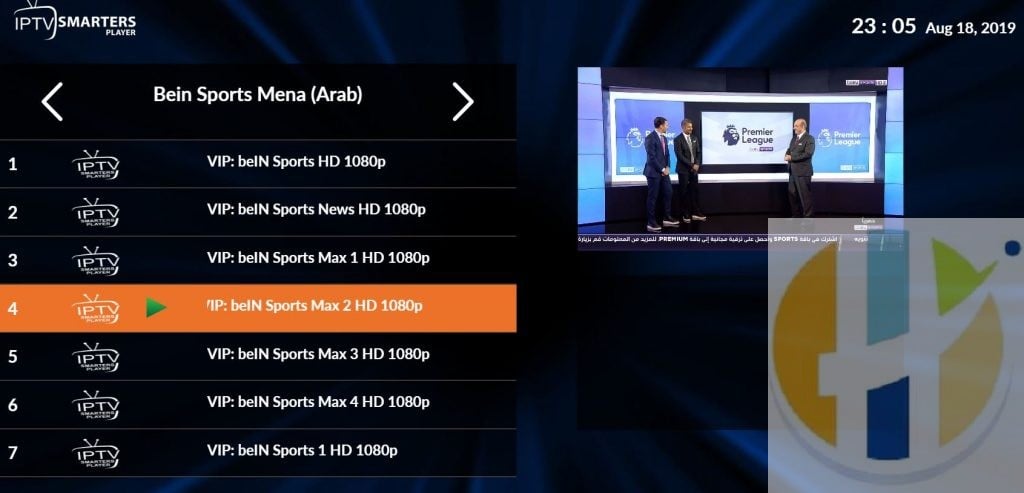


New Full Screen Playback in Windows
The new version is now able to make Full-Screen playback with no lines on top and below which was an issue with the.
Video Guide
Video for this is to be made on youtube and cocoscope soon.
Smarters Applications
Smarters is known to work in Firestick, Android, Apple Store and continued to move on other platforms including Windows.
With the Windows APP, you will get the option to Watch the Movies and Series Section allots better with your IPTV Service.


IPTV EPG
The Application also allows you to use EPG Automatically
So if the IPTV service that you are using with IPTV Smarters, is providing EPG then you will automatically pick it up and will not need to set it up on its own.

IPTV services to order
You can watch from the USA, UK or Arabic tv. The list is very big to choose from. Free IPTV is never going to be guaranteed and this app is best suited with an IPTV Subscription, Click here to get the list of available IPTV service available to use
Download link
IPTV Smarters Windows Version Click here or use this url www.husham.com/iptvsmarterswindows
Also useful: a stick to run the same setup on the TV, and a flash drive for moving files from your PC.
- Xiaomi TV Stick 4K (2nd Gen): a compact Google TV stick that plugs straight into the TV. Amazon UK | Amazon US | Amazon DE | Amazon FR | Amazon IT
- SanDisk Ultra Flair 32GB USB 3.0 flash drive: a small, fast drive for moving installers, backups and media files off your PC. Amazon UK | Amazon US | Amazon DE | Amazon FR | Amazon IT
Best IPTV boxes to buy
These are media boxes and sticks that can run players and licensed apps. The first six are Google certified Android TV or Google TV devices with Google Play. The three Fire TV Sticks run Amazon’s own systems with the Appstore instead of Google Play: the 4K Max and 4K Plus run Fire OS, which is Android based, while the new Fire TV Stick 4K (2026) runs Vega OS, which does not allow sideloading Android apps, only Appstore apps. The last one, the Formuler, runs its own Android and is not certified. They are not pirate hardware. They do not come with channels or playlists. I am not claiming I personally lab-tested every SKU this month.
Pick a Google TV box when you want Play Store apps on a proper TV OS or a dedicated player behind the sofa. Pick a Fire TV Stick when Prime Video and the Appstore already cover what you watch. If you need an Android player from outside the Appstore, skip the Vega OS stick.
- NVIDIA SHIELD TV Pro: the premium pick, a certified Android TV player with AI upscaling, Dolby Vision/Atmos and Gigabit Ethernet for the main living-room telly. Amazon UK | Amazon US | Amazon DE | Amazon FR | Amazon IT
- Google TV Streamer 4K: solid Google TV living-room default with Ethernet, 32GB storage and Dolby Vision/Atmos. Amazon UK | Amazon US | Amazon DE | Amazon FR | Amazon IT
- Xiaomi TV Box S (3rd Gen): Google TV box with 32GB storage, Wi-Fi 6 and Dolby Vision/Atmos, the cheaper box route than the Streamer. Amazon UK | Amazon US | Amazon DE | Amazon FR | Amazon IT
- Xiaomi TV Stick 4K (2nd Gen): budget Google TV stick with Wi-Fi 6 and Dolby Vision/Atmos when you want HDMI-simple, not a full box. Amazon UK | Amazon US | Amazon DE | Amazon FR | Amazon IT
- Budget Google TV 4K player: a cheaper certified Google TV player for a second telly. The model differs by store, so each link names the one you get there. MECOOL KD3 (Amazon UK) | onn. Google TV 4K Streaming Box (Amazon US) | Strong LEAP-NOVA-X (Amazon DE) | Strong LEAP-NOVA-X (Amazon FR) | Strong LEAP-NOVA-X (Amazon IT)
- MECOOL MEon1: Google TV certified 4K box with AI upscaling and 32GB storage for a dedicated player behind the sofa. Amazon UK
- Fire TV Stick 4K Max: the most powerful Fire TV Stick, with Wi-Fi 6E, Dolby Vision/Atmos and 16GB storage. It runs Fire OS, which is Android based, so you get Appstore apps and can still sideload an Android player. Amazon UK | Amazon US | Amazon DE
- Fire TV Stick 4K Plus: the older Fire OS stick with Wi-Fi 6 and Dolby Vision/Atmos. It is being phased out, so buy it only while stock lasts. Like the Max, it can still sideload Android apps. Amazon UK | Amazon US | Amazon DE | Amazon FR | Amazon IT
- Fire TV Stick 4K (2026): the newest and slimmest 4K stick, with a new remote. It runs Vega OS, which does not allow sideloading Android apps, only Appstore apps, so check your player is in the Appstore before you buy. Amazon UK | Amazon US | Amazon DE | Amazon FR | Amazon IT
- Formuler Z12 Ultra SE: the newest Formuler box, built around MYTVOnline 4 for IPTV playlists. It runs Formuler’s own Android rather than certified Google TV, so there is no Netflix in HD and no Google certification. Formuler Z12 Ultra SE (Amazon UK) | Formuler Z12 Ultra SE (Amazon US) | Formuler Z12 Ultra SE (Amazon DE) | Formuler Z12 Ultra SE (Amazon FR) | Formuler Z12 Ultra SE (Amazon IT)
Whichever you pick, check that the app you need is in its store before you pay. And none of these boxes or sticks magically make unlicensed streams legal.

