If you are the person your family rings when the printer “stops working”, update TeamViewer before you help anyone else today. A flaw fixed on 27 October lets a booby-trapped computer attack the helper who connects to it, which flips the usual remote support worry neatly on its head.
Nobody is known to be exploiting it yet, and the fix is free and takes about two minutes. The catch is that TeamViewer only checks for updates once a week by default, so plenty of copies are still sitting on the old version. Here is what changed, who should care, and exactly how to update on Windows, macOS, Linux and Android.
Quick answer
- What is it? CVE-2026-111585, an integer overflow in the part of TeamViewer that draws the other computer’s screen. TeamViewer rates it 8.8 out of 10 (high).
- Who is at risk? The person viewing, not the person being helped. A malicious or compromised computer you connect to can crash your TeamViewer and, depending on the platform, potentially run code on your machine.
- Is it being exploited? TeamViewer says it was not aware of any active exploitation when it published its bulletin. CISA had not added it to its exploited list as of its 30 October catalogue.
- The fix: TeamViewer 15.83 or later on Windows, macOS and Linux, and the TeamViewer Remote Control app 15.83 or later on Android. Older Windows 7 and 8 machines get 15.64.10.
- Two more bugs fixed at the same time: one on Linux and macOS that can be triggered by a booby-trapped session recording (.tvs) file, and one on macOS that lets a local user become root.
What actually went wrong
When a TeamViewer session starts, the computer sharing its screen tells your computer how big that screen is, and your copy of TeamViewer sets aside memory to draw it. According to Remedio, the security firm whose researcher Omri Dar found the bug, TeamViewer did that sum in 32-bit arithmetic, so a deliberately silly screen size makes the number wrap round. The memory set aside ends up far smaller than the picture TeamViewer thinks it is about to paint, and the screen data spills over the edge.
In TeamViewer’s own words, that may let “a malicious remote host” cause a crash or, “depending on the platform, potentially execute arbitrary code with the privileges of the viewer process”. Remedio says it went the whole way in a lab on Windows and ran a program of its choice on the viewing PC, with one caveat: part of its demo used a helper on the attacking machine to prepare memory, which a real attacker would need to do over the wire. Remedio’s researchers, as quoted by SOCtember, put it wonderfully bluntly: “An accepted session is all it takes, and that is the product’s normal mode of operation.”
I do enjoy a remote support tool whose security model was “the other side might be dodgy, so protect them”, only to discover the other side can bite back. It is the software equivalent of a burglar alarm that only covers the garden shed.
Why home users should care
This is not just a corporate help desk problem. The person most likely to connect to a stranger’s screen is often a normal user: the family tech helper, the volunteer at a community centre, or someone selling an old laptop online who is asked to “just connect and see the specs”. Scammers already love remote access tools; this bug gives them a reason to want you to connect to them rather than the other way round.
To be clear, nobody has reported that happening with this flaw. But the fix costs nothing, and the habit it teaches is a good one: only open remote sessions to machines and people you actually know.
Who needs to do what
| You use | Affected before | Update to |
|---|---|---|
| TeamViewer full app on Windows, macOS or Linux | 15.83 | 15.83 or later |
| TeamViewer Portable (Windows) | 15.83 | Download 15.83 or later fresh |
| TeamViewer Host (on the computers you help) | 15.83 | 15.83 or later |
| TeamViewer Remote Control app on Android | 15.83 | 15.83 or later from Google Play |
| Windows 7 or 8 on the 15.64 branch | 15.64.10 | 15.64.10 |
| Old 14.7 or 13.2 installs | See TeamViewer’s bulletin | 14.7.48868; 13.2.36231 (Windows), 13.2.154008 (Linux), 13.2.154007 (macOS) |
If you only ever receive help and never connect out to anyone, CVE-2026-111585 is less of a worry for you, but update anyway: the bulletin also fixes the Linux and macOS bugs, and an out-of-date remote access tool is never a good look.
How to check your version and update
TeamViewer’s own help page recommends leaving auto-update on, and notes that it checks weekly by default. Weekly is a lovely rhythm for bin collections; it is a bit relaxed for a security fix. So do it by hand now.
Windows and macOS (current TeamViewer app)
- Open TeamViewer.
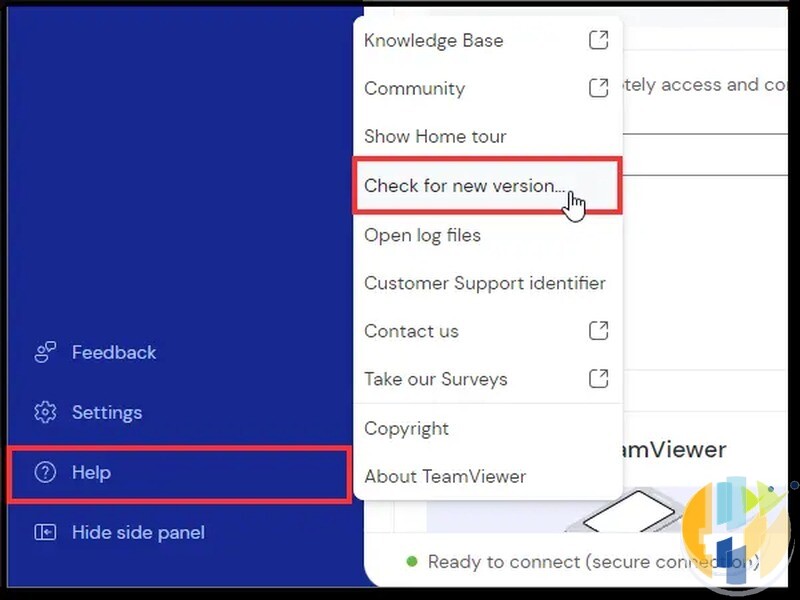
- Click Help in the bottom-left corner, then About TeamViewer to see your version number.
- Click Help again, then Check for new version.
- If an update appears, click Update. TeamViewer restarts on its own.
- Check About TeamViewer once more and confirm it says 15.83 or higher.
TeamViewer Classic
- Open TeamViewer (Classic).
- Click the three-line menu.
- Click Check for new version and confirm with OK.
Make sure auto-update is actually on
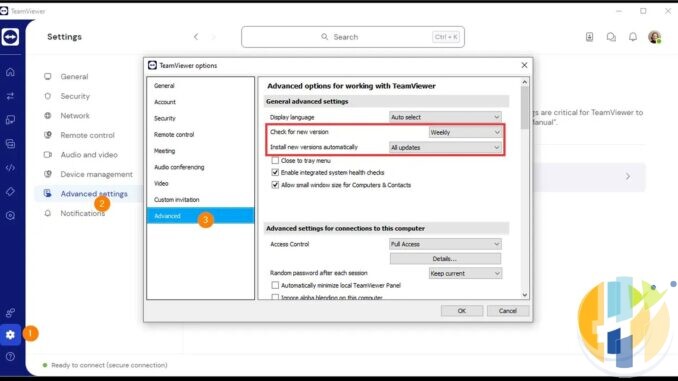
- Go to Settings, then Advanced settings, then Open advanced settings.
- Under Check for new version and Install new versions automatically, check what is selected. “All updates” is the setting shown in TeamViewer’s own guide.
The computers you help (Mum’s laptop included)
Once you are connected to a computer you look after, TeamViewer has a Remote update button in the session toolbar. It shows the current and new versions, you click Update, TeamViewer closes on the other end, installs, and reconnects you. Do your own copy first, then theirs.
Android
- Open the Google Play Store and search for TeamViewer Remote Control.
- Tap Update if it appears. Then check the version under the app’s details: you want 15.83 or later.
Linux
Open TeamViewer and use Help, then Check for new version, exactly as on Windows and macOS. If you installed it from TeamViewer’s .deb or .rpm package and the app will not update itself, download the latest package from TeamViewer’s website and install it over the top, then confirm the version in About TeamViewer.
Portable version
The portable version does not install itself anywhere, so it does not update itself either. Delete the old copy from your USB stick or Downloads folder and download a fresh one.
Common mistakes
Updating only one side. The viewer bug hits the helper, but the Linux and macOS fixes matter on both ends. Update every copy you own.
Forgetting the old laptop in the drawer. That Windows 8 machine you use once a year for the label printer still has TeamViewer on it. It needs 15.64.10.
Opening .tvs recordings from strangers. On Linux and macOS, one of the other fixed bugs could be triggered by a booby-trapped session recording file. If someone you do not know sends you one, do not open it.
Thinking a VPN or antivirus fixes it. They do not. The fix is the update.
A quick word on VPNs
A VPN will not patch TeamViewer, and anyone who tells you otherwise is selling something other than the truth. What a VPN does is encrypt your connection on hotel, airport and café Wi-Fi, which is handy when you are fixing the family PC from a train. If you want one, these are the ones I link to: NordVPN, Surfshark, IPVanish, CyberGhost, PureVPN and Ivacy, compared side by side in my VPN comparison. And since your TeamViewer account guards access to every computer you help, store its password in a password manager such as NordPass and turn on two-factor sign-in.
While you are in update mode
October has been a busy month for “update now” headlines. If you have not already, work through my Brotli bug checklist for Chrome, Discord and VS Code, make sure your Plex Media Server is patched against Plex2Shell, and check your PC is still getting updates with my Windows 11 24H2 end of updates checklist.
Update (1 November 2026): what to watch next. NVD still lists CVE-2026-111585 as awaiting analysis, and it is not on CISA’s exploited list. If that changes, or TeamViewer revises its bulletin, I will add a dated update here. Remote access tools are a favourite of scammers, so the moment anyone reports this being used in the wild is the moment it becomes urgent for everyone.
Sources: TeamViewer security bulletin TV-2026-1011 (issued 27 October 2026, updated 28 October 2026); TeamViewer knowledge base, “Update TeamViewer”; Remedio research by Omri Dar (29 October 2026); SOCtember report on the Remedio findings. Images: TeamViewer interface screenshots from TeamViewer’s own “Update TeamViewer” help article, used for editorial illustration.
Once the laptops are sorted, the telly deserves the same treatment. A streaming box that still gets Play Store updates is a lot easier to keep safe than one the manufacturer forgot about years ago.
Best IPTV boxes to buy
These are media boxes and sticks that can run players and licensed apps. The first six are Google certified Android TV or Google TV devices with Google Play; the last one, the Formuler, runs its own Android and is not certified. They are not pirate hardware. They do not come with channels or playlists. I am not claiming I personally lab-tested every SKU this month.
Buy one of these when: Fire TV sideload is a hassle on your model, you want Play Store apps on a proper TV OS, or you want a dedicated player shell behind the sofa. No Fire TV device is on this shortlist.
- NVIDIA SHIELD TV Pro: the premium pick, a certified Android TV player with AI upscaling, Dolby Vision/Atmos and Gigabit Ethernet for the main living-room telly. Amazon UK | Amazon US | Amazon DE | Amazon FR | Amazon IT
- Google TV Streamer 4K: solid Google TV living-room default with Ethernet, 32GB storage and Dolby Vision/Atmos. Amazon UK | Amazon US | Amazon DE | Amazon FR | Amazon IT
- Xiaomi TV Box S (3rd Gen): Google TV box with 32GB storage, Wi-Fi 6 and Dolby Vision/Atmos, the cheaper box route than the Streamer. Amazon UK | Amazon US | Amazon DE | Amazon FR | Amazon IT
- Xiaomi TV Stick 4K (2nd Gen): budget Google TV stick with Wi-Fi 6 and Dolby Vision/Atmos when you want HDMI-simple, not a full box. Amazon UK | Amazon US | Amazon DE | Amazon FR | Amazon IT
- Budget Google TV 4K player: a cheaper certified Google TV player for a second telly. The model differs by store, so each link names the one you get there. MECOOL KD3 (Amazon UK) | onn. Google TV 4K Streaming Box (Amazon US) | Strong LEAP-NOVA-X (Amazon DE) | Strong LEAP-NOVA-X (Amazon FR) | Strong LEAP-NOVA-X (Amazon IT)
- MECOOL MEon1: Google TV certified 4K box with AI upscaling and 32GB storage for a dedicated player behind the sofa. Amazon UK
- Formuler Z12 Ultra SE: the newest Formuler box, built around MYTVOnline 4 for IPTV playlists. It runs Formuler’s own Android rather than certified Google TV, so there is no Netflix in HD and it is the one box here without Google certification. Formuler Z12 Ultra SE (Amazon UK) | Formuler Z12 Ultra SE (Amazon US) | Formuler Z12 Ultra SE (Amazon DE) | Formuler Z12 Ultra SE (Amazon FR) | Formuler Z12 Ultra SE (Amazon IT)
Still shopping for a Fire TV device? Fine for Prime Video and the Appstore universe. Not the shortlist above. And none of these boxes magically make unlicensed streams legal.
So, who in your family has you on speed dial for computer help, and are you updating their TeamViewer today? Tell me in the comments.
Written by Dr Husham Memar