Here is a fun game. Count how many of your online accounts share the same password, or the same password with a “1” bolted on the end because a website demanded a number. If you ran out of fingers, congratulations, you are completely normal, and every data breach headline is quietly addressed to you. Tech companies have spent twenty years telling us to use long, unique passwords for everything while designing login pages that seem built to make us give up. A password manager is the truce. So what is NordPass, the one from the people behind NordVPN, and is it the right one for you?
I checked NordPass’s official pages on 10 October 2026. Prices move often, promotions arrive with the regularity of a bus timetable written by optimists, and introductory prices are not renewal prices. I will show you both where they are published.
NordPass in plain English
NordPass is a password manager. It stores your logins, passkeys, card details, secure notes and files in an encrypted vault, fills them in for you when you visit a site, and saves new ones as you create them. You remember one strong master password; the app remembers the hundreds of others. It comes from Nord Security, the same group that runs NordVPN, but it is a separate product with a separate job.
How the security works
According to the official NordPass security page:
- Zero-knowledge design. Vault data is encrypted on your device before it is uploaded. NordPass says not even the company can see what you store.
- XChaCha20 encryption. NordPass uses XChaCha20 rather than the more common AES, and says it is currently the only major password manager doing so. Both are strong; this is a design choice, not a magic shield.
- Argon2id key derivation. Your master password is run through Argon2id with a 16-byte salt to produce the key that unlocks your private key. In normal words: guessing your master password by brute force is made deliberately slow and expensive.
- Certifications. NordPass lists ISO 27001 and SOC 2 Type 2 certification, plus a bug bounty programme.
The audits
Every password manager says it is secure. That is the minimum. What you want is someone outside the building checking.
- German security firm Cure53 audited the consumer NordPass apps in stages around launch, finishing in February 2020. The NordPass audit announcement covers the cryptographic design, source code, desktop app, browser extension and the iOS and Android apps.
- Cure53 then audited NordPass Business in 2021. NordPass reported 15 security-relevant issues, one rated high severity, which was fixed and verified by Cure53.
The honest note: those are the most recent public, product-wide NordPass audit reports I could find, and they are not new. NordPass says it runs regular internal and third-party reviews, and the ISO and SOC 2 certifications are current claims on its site, but a fresh public audit report would be welcome. Marketing teams, take note: a PDF beats a slogan.
What NordPass does day to day
- Autosave and autofill across browsers and apps.
- Password generator for long random passwords you will never need to remember.
- Passkeys: store and use them, so you can log in without a password where sites support it.
- Password Health: flags weak, old and reused passwords. It is brutally honest, unlike most password rules.
- Data Breach Scanner: checks whether your details have turned up in known breaches.
- Email Masking: hands out alias addresses so newsletters and sign-up forms never see your real inbox.
- Secure sharing with people you trust, and file attachments in the vault on paid plans.
Platforms
NordPass lists apps for Windows, macOS, Linux, Android and iOS, with browser extensions for Chrome, Firefox, Safari, Edge, Opera and Brave on its download pages. Your vault syncs between them on paid plans.
Plans and prices (checked 10 October 2026)
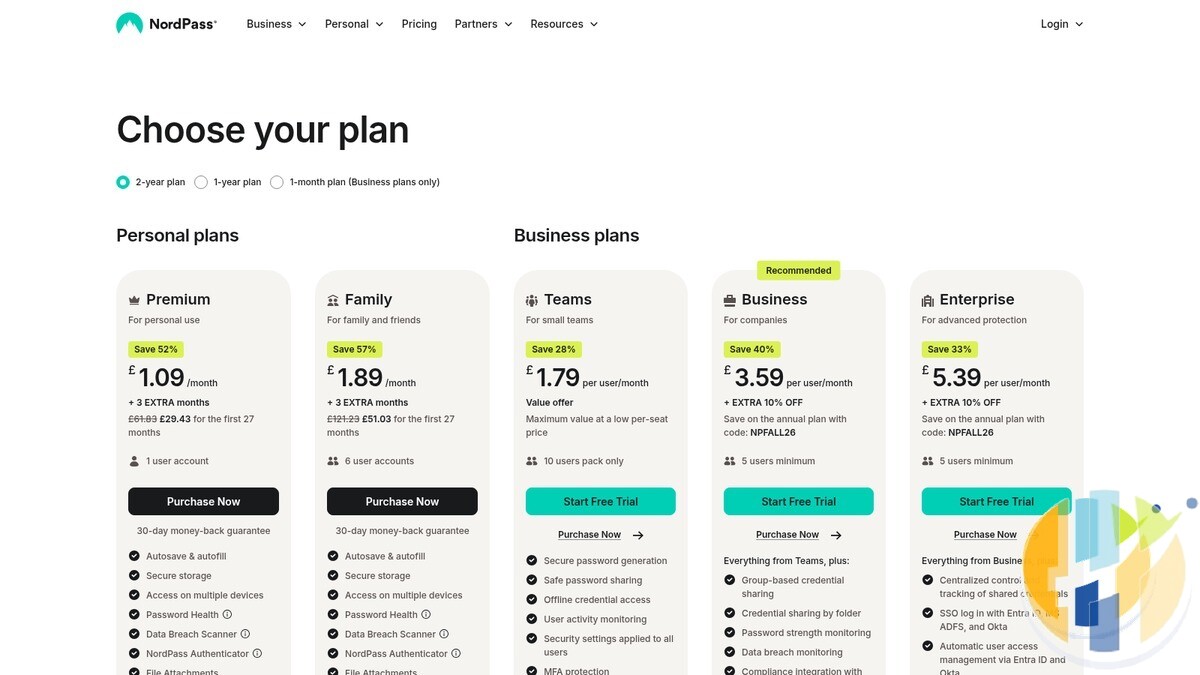
There are three personal tiers. Free stores unlimited passwords but you can only be active on one device at a time. Premium is one user on multiple devices with Password Health, the Data Breach Scanner, file attachments and sharing. Family is six separate Premium accounts. Paid personal plans carry a 30-day money-back guarantee.
United Kingdom (official pricing page, which says prices exclude VAT):
- Premium: £1.09 a month on the 2-year plan (£29.43 for the first 27 months, including 3 extra months), or £1.49 a month on 1 year (£17.88 for the first 12 months, against a struck-through £27.48).
- Family: £1.89 a month on 2 years (£51.03 for 27 months), or £2.79 a month on 1 year (£33.48).
United States (as shown at NordPass checkout on 4 October 2026 and reported by Javis Review, before tax): Premium $1.39 a month on 2 years ($37.53 for 27 months) or $23.88 for the first year, renewing at $35.88 a year. Family $2.49 a month on 2 years ($67.23), a price TechRadar also reported, or $44.28 for the first year, renewing at $71.88.
Eurozone (Germany, France, Italy): NordPass shows euro prices net of VAT and only to eurozone visitors. In late September 2026 German reviewers reported Premium at between €1.29 and €1.39 a month on the 2-year deal and Family at about €2.32 to €2.49 (Toolspick, Cybernews). Add your local VAT on top.
The small print, in large letters: those headline monthly figures are first-term prices. In the US, Premium renews at more than double the 2-year intro rate. Check the renewal line at checkout. If you want today’s deal, see the current NordPass plans; the price on the page the day you click is the one that counts.
Who NordPass suits
- Anyone still reusing passwords, which is nearly everyone.
- Households that keep sharing the streaming, utility and school logins on sticky notes or the family WhatsApp group. Family gives each person their own vault, which beats one shared spreadsheet called “PASSWORDS FINAL v2”.
- People who travel and log in from shared or public networks. Strong unique passwords protect the account; for the network itself you want something else, which I cover in my public Wi-Fi privacy guide.
- Anyone who wants a nudge towards passkeys without learning a new vocabulary.
What NordPass is not for
- Not a VPN. It does not hide your IP address or encrypt your browsing. It protects the keys, not the road.
- Not antivirus. If your computer already has malware logging your keystrokes, a password manager cannot fix that.
- Not a cure for phishing on its own. Autofill refusing to fill on a lookalike site is a great clue, but only if you notice and do not paste the password in manually. Phishing gangs rely on people overriding the warning; the phishing network I covered targeted hundreds of thousands of people.
- Not forgiving about the master password. Zero-knowledge cuts both ways. Write down your recovery code and keep it somewhere sensible.
Worth it?
If you are reusing passwords today, almost any reputable password manager is a big upgrade, and NordPass is easy to use, properly encrypted and cheap on its first term. Its weak spot is that the latest full public audit reports are a few years old, so weigh that against rivals. Try the free tier first, and if you need it on more than one device, compare NordPass Premium and Family here. Then retire that password with the “1” on the end. We all have one.
Best IPTV boxes to buy
These are media boxes and sticks that can run players and licensed apps. The first six are Google certified Android TV or Google TV devices with Google Play. The three Fire TV Sticks run Amazon’s own systems with the Appstore instead of Google Play: the 4K Max and 4K Plus run Fire OS, which is Android based, while the new Fire TV Stick 4K (2026) runs Vega OS, which does not allow sideloading Android apps, only Appstore apps. The last one, the Formuler, runs its own Android and is not certified. They are not pirate hardware. They do not come with channels or playlists. I am not claiming I personally lab-tested every SKU this month.
Pick a Google TV box when you want Play Store apps on a proper TV OS or a dedicated player behind the sofa. Pick a Fire TV Stick when Prime Video and the Appstore already cover what you watch. If you need an Android player from outside the Appstore, skip the Vega OS stick.
- NVIDIA SHIELD TV Pro: the premium pick, a certified Android TV player with AI upscaling, Dolby Vision/Atmos and Gigabit Ethernet for the main living-room telly. Amazon UK | Amazon US | Amazon DE | Amazon FR | Amazon IT
- Google TV Streamer 4K: solid Google TV living-room default with Ethernet, 32GB storage and Dolby Vision/Atmos. Amazon UK | Amazon US | Amazon DE | Amazon FR | Amazon IT
- Xiaomi TV Box S (3rd Gen): Google TV box with 32GB storage, Wi-Fi 6 and Dolby Vision/Atmos, the cheaper box route than the Streamer. Amazon UK | Amazon US | Amazon DE | Amazon FR | Amazon IT
- Xiaomi TV Stick 4K (2nd Gen): budget Google TV stick with Wi-Fi 6 and Dolby Vision/Atmos when you want HDMI-simple, not a full box. Amazon UK | Amazon US | Amazon DE | Amazon FR | Amazon IT
- Budget Google TV 4K player: a cheaper certified Google TV player for a second telly. The model differs by store, so each link names the one you get there. MECOOL KD3 (Amazon UK) | onn. Google TV 4K Streaming Box (Amazon US) | Strong LEAP-NOVA-X (Amazon DE) | Strong LEAP-NOVA-X (Amazon FR) | Strong LEAP-NOVA-X (Amazon IT)
- MECOOL MEon1: Google TV certified 4K box with AI upscaling and 32GB storage for a dedicated player behind the sofa. Amazon UK
- Fire TV Stick 4K Max: the most powerful Fire TV Stick, with Wi-Fi 6E, Dolby Vision/Atmos and 16GB storage. It runs Fire OS, which is Android based, so you get Appstore apps and can still sideload an Android player. Amazon UK | Amazon US | Amazon DE
- Fire TV Stick 4K Plus: the older Fire OS stick with Wi-Fi 6 and Dolby Vision/Atmos. It is being phased out, so buy it only while stock lasts. Like the Max, it can still sideload Android apps. Amazon UK | Amazon US | Amazon DE | Amazon FR | Amazon IT
- Fire TV Stick 4K (2026): the newest and slimmest 4K stick, with a new remote. It runs Vega OS, which does not allow sideloading Android apps, only Appstore apps, so check your player is in the Appstore before you buy. Amazon UK | Amazon US | Amazon DE | Amazon FR | Amazon IT
- Formuler Z12 Ultra SE: the newest Formuler box, built around MYTVOnline 4 for IPTV playlists. It runs Formuler’s own Android rather than certified Google TV, so there is no Netflix in HD and no Google certification. Formuler Z12 Ultra SE (Amazon UK) | Formuler Z12 Ultra SE (Amazon US) | Formuler Z12 Ultra SE (Amazon DE) | Formuler Z12 Ultra SE (Amazon FR) | Formuler Z12 Ultra SE (Amazon IT)
Whichever you pick, check that the app you need is in its store before you pay. And none of these boxes or sticks magically make unlicensed streams legal.
Sources
- NordPass: pricing page (UK prices, checked 10 October 2026)
- NordPass: Free and Premium plans
- NordPass: security
- NordPass: download and browser extensions
- NordPass: comprehensive security audit announcement (Cure53, 2020)
- NordPass: NordPass Business has undergone an independent security audit (20 October 2021)
- Javis Review: NordPass review 2026 (US checkout prices, 4 October 2026)
- TechRadar: NordPass Family pricing
- Toolspick: NordPass Test 2026 (euro prices)
- Cybernews: NordPass euro prices
Prices change and promotions apply. Figures were checked on 10 October 2026; the live checkout page is always the final word.
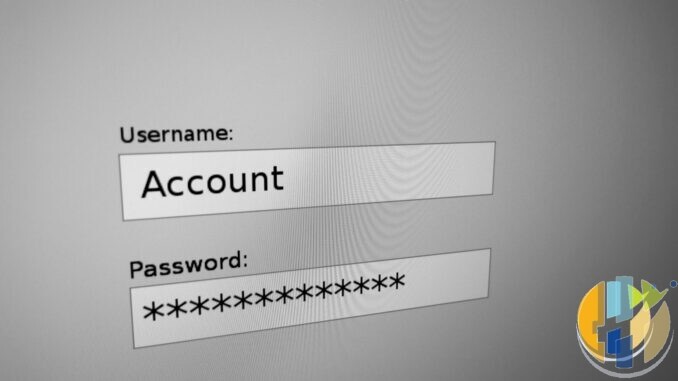
Featured photo: “Username and password” by Santeri Viinamäki, CC BY-SA 4.0, via Wikimedia Commons, cropped. Inline image: screenshot of the NordPass UK pricing page, 10 October 2026.
Written by Dr Husham Memar