Plenty of people still search for All 4 on a Fire Stick and wonder if the app vanished. It did not. Channel 4 dropped the All 4 name when it unified linear and streaming under one brand, and the living-room app you want in September 2026 is simply labelled Channel 4.
The free tier is still real. You get live channels, catch-up, box sets and Film4 titles with ads, on a free Channel 4 account. There is also a paid layer called Channel 4+ if you want cleaner on-demand viewing. This piece is the Fire Stick and smart TV version of that story: what is free, what Plus actually buys, how sign-in works on the sofa, and the quirks that waste an evening.
I am not rehashing the ITVX catch-up guide or the BBC iPlayer uncertified Android TV timeline. Those sit elsewhere if you need them. Tonight we stay on Channel 4.
What “Channel 4 streaming” means now
Channel 4’s own help pages call the service Channel 4 streaming. Official wording is blunt: it is provided completely free, with live channels, catch-up, exclusive shows and a large box-set library. You get a My 4 space for favourites, and mobile or tablet apps can download programmes for offline watching.
The old All 4 branding belongs in muscle memory only. Channel 4’s press material confirmed the single-brand move years ago; by 2026 the Appstore and TV storefronts expect you to search Channel 4, not All 4. If an older help article or a forum post still says All 4, they mean the same product.
Two free-tier truths I keep repeating:
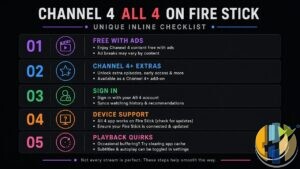
- Registration is free. Channel 4’s TV sign-in FAQ says you will never be asked to pay to download the app or create an account. If a QR reader or a random site asks for a card just to register, walk away. Use the camera app or channel4.com/code only.
- Ads fund the free product. That is the deal. If ads on catch-up drive you mad, Channel 4+ is the official paid answer. If they do not, stay free.
Channel 4+: still offered, with honest limits
Channel 4+ is still live on channel4.com/plus in September 2026. The page lists a 7-day free trial, then £3.99 a month or 39.99 a year (“12 months for 10”). Cancel anytime language sits on the same page. Always confirm the live price and trial wording on the subscribe screen for your account before you tap buy.
Help pages describe Plus as watching the majority of on-demand shows without ads, plus early access to hit shows on the Plus marketing page. The small print matters more than the headline:
- Watch Live is excluded. Channel 4 is explicit: Channel 4+ does not include Watch Live. Live Channel 4, E4, More4, Film4 and friends still behave like broadcast TV with ads.
- Some on-demand titles keep ads or trails for contractual and licensing reasons. Plus is “majority ad-free on demand,” not a total silence promise.
- UK only for the Plus benefits, per the Plus page terms summary.
- The free trial needs payment details up front so Channel 4 can verify a UK card and keep billing smooth after the trial. Cancel at least 24 hours before the trial ends if you do not want the first charge (Channel 4+ terms).
Plus is available across the platforms Channel 4 lists for the main app, including Amazon Fire, Apple TV (tvOS), Google TV and YouView, plus the website. Sign up through your Channel 4 account settings or the Plus page. If you subscribed via Apple, cancel in Apple’s subscription settings, not inside the Channel 4 app.
I treat Plus the same way I treat other UK catch-up paid tiers: buy it for cleaner on-demand evenings, not for an ad-free live Film4 night. That expectation mismatch is what fills my inbox.
Fire Stick and Fire TV: install, then expect the keyboard
Amazon Fire sits on Channel 4’s official supported list for both free streaming and Channel 4+. On a Fire Stick you open the Amazon Appstore, search Channel 4, install, and sign in. Keep the app and Fire TV system software updated before you blame the service for a black screen.
The important Fire quirk: Channel 4 says QR sign-in works across platforms except Roku and Amazon Fire. On Fire you use the on-screen keyboard with the remote. That is official, not a broken install. Patience and careful typing beat twenty failed password attempts.
When Fire Stick Channel 4 misbehaves, I start with the boring stack that matches how most Amazon and reader fixes go:
- Unplug the Stick for a minute, reboot the router, try again
- Settings → Applications → Manage Installed Applications → Channel 4 → Force Stop, then Clear Cache (Clear Data only if you are ready to sign in again)
- Check for a Channel 4 app update in the Appstore, and a Fire TV system update under Settings → My Fire TV → About
- Uninstall and reinstall from the Appstore if it is still sick
- Turn any VPN off while testing UK catch-up. Free broadcaster apps are built for UK viewing, and VPN exits are a common reason streams fail in the wild
Rooted Android devices are not supported on Channel 4’s Android requirements for security and rights reasons. Fire OS tablets need Fire OS 6 or above in the same minimum-requirements FAQ.
Smart TVs and the rest of the official list
Channel 4’s minimum-requirements FAQ is the source of truth. Current TV, console and set-top highlights:
- Amazon Fire, Apple TV, Google TV, Roku, NOW
- Samsung Tizen mid-2015 and above
- LG TV (named on the “What is Channel 4 streaming?” platform list)
- Freeview Play, Freely, YouView, Sky, Virgin Media
- PlayStation 4 / 5, Xbox One and Xbox Series X and S (Series machines appear on the streaming overview list)
Watch Live is supported on most platforms Channel 4 names, including Amazon, Roku, PS4, Samsung Tizen, iOS, Android and channel4.com. Not every linear title has live streaming rights, so gaps happen.
Hardware drop note for 2026: Channel 4 says the streaming app is no longer available on YouView Huawei, selected older Freeview devices (such as Vestel 1st Gen), or Humax 4000T as of April/May 2026. If the TV says the Channel 4 app is no longer available, that is an age / update cut, not a temporary outage. Use another supported device from the list above.
If a built-in TV store will not show Channel 4 at all, a supported stick (Fire Stick, Chromecast with Google TV, Apple TV, Roku) is usually cleaner than hunting unofficial builds. Official app on supported hardware is the path that survives a support ticket.
Sign-in on the big screen
On smart TVs and most connected boxes that support QR, Channel 4 documents three routes after you tap Sign in / Register:
- Scan the QR code with your phone’s camera app (Channel 4 warns against random third-party QR readers that can send you to unaffiliated payment pages)
- Visit channel4.com/code on another device and enter the code shown on the TV
- Sign in with my TV using the remote and on-screen keyboard
Fire Stick and Roku skip the QR path. Use the keyboard or, where the UI offers it, the code flow on a phone or laptop. Register with an email and password on a free account. Channel 4’s TV FAQ stresses that creating the account costs nothing.
Forgotten password resets go through channel4.com or the mobile app flows; on many big-screen apps Channel 4 still points people back to the website My 4 sign-in to trigger the reset email. Check junk folders.
Playback quirks worth knowing
Official help is more useful than folklore here:
- Buffering and stalls: Channel 4’s streaming FAQ blames congested paths, slow devices and too many open apps. Close unused apps, reboot, and prefer a solid Wi-Fi link.
- Ad blockers on the website: Channel 4 says ad blockers are a common reason content will not play on channel4.com because of how the players are built. Disable the blocker to watch. On TV apps you are usually dealing with in-stream ads, not a browser extension.
- Rights gaps: US shows and some series are not guaranteed on every device. Google TV still has titles that are missing versus the website or mobile apps, per Channel 4’s own FAQ.
- Chromecast: you can cast catch-up from mobile apps or Chrome; live channels are not currently castable, and accessibility options such as subtitles or AD are limited or unavailable while casting.
- Subtitles and AD: subtitles are widely supported across Fire, Samsung, Freeview Play, Freely, Roku and others. Audio description coverage is narrower (website, iOS, Android, Roku, tvOS are named; other smart TV apps are still catching up).
Soft link only: if your headache is BBC iPlayer on an uncertified Android TV box, that is a separate September 2026 story. Channel 4 keeps its own supported list. A box that fails one broadcaster’s rules is not automatically banned from Channel 4, and the reverse is also true. Check each list.
Same soft rule for ITVX. Free ITV catch-up with its own Premium tier is a sibling problem, not this article. Keep both official apps installed on a supported Stick if you want the full free UK stack.
What I would do tonight on a Fire Stick or smart TV
Search the device store for Channel 4, install the official build, and sign in. On Fire, accept the on-screen keyboard and type carefully. Watch one on-demand episode on the free tier before you even look at Plus. If ads are fine, stop there and keep your money.
If catch-up ads genuinely annoy you, open channel4.com/plus, confirm the live £3.99 / £39.99 figures and trial terms, and remember Watch Live still has ads. Subscribe on one billing path only. Sign out and back in on the other TVs so Plus actually sticks.
If playback fails, work through restart → clear cache → update app and firmware → reinstall → VPN off before you declare the Stick dead. And if an ageing Freeview or Huawei YouView box says the app is gone after the spring 2026 cut, believe it and move to a supported device.
Free Channel 4 streaming on a supported Fire Stick or smart TV is still one of the easiest UK catch-up wins in September 2026. Pay for Channel 4+ only if cleaner on-demand (and early access where offered) earns the money. Otherwise sit through the ads, finish the episode, and go to bed.
Also useful: if you are replacing an older Fire TV device, these are the two current options I would compare.
- Amazon Fire TV Stick 4K Max (newest gen): the current Wi-Fi 6E model; check the listing says Fire OS rather than Vega OS before you pay. Amazon UK | Amazon US | Amazon DE | Amazon FR | Amazon IT
- Google TV Streamer 4K: a simple Google TV box with Ethernet and the full Play Store. Amazon UK | Amazon US | Amazon DE | Amazon FR | Amazon IT
Best IPTV boxes to buy
These are media boxes and sticks that can run players and licensed apps. The first six are Google certified Android TV or Google TV devices with Google Play; the last one, the Formuler, runs its own Android and is not certified. They are not pirate hardware. They do not come with channels or playlists. I am not claiming I personally lab-tested every SKU this month.
Buy one of these when: Fire TV sideload is a hassle on your model, you want Play Store apps on a proper TV OS, or you want a dedicated player shell behind the sofa. No Fire TV device is on this shortlist.
- NVIDIA SHIELD TV Pro: the premium pick, a certified Android TV player with AI upscaling, Dolby Vision/Atmos and Gigabit Ethernet for the main living-room telly. Amazon UK | Amazon US | Amazon DE | Amazon FR | Amazon IT
- Google TV Streamer 4K: solid Google TV living-room default with Ethernet, 32GB storage and Dolby Vision/Atmos. Amazon UK | Amazon US | Amazon DE | Amazon FR | Amazon IT
- Xiaomi TV Box S (3rd Gen): Google TV box with 32GB storage, Wi-Fi 6 and Dolby Vision/Atmos, the cheaper box route than the Streamer. Amazon UK | Amazon US | Amazon DE | Amazon FR | Amazon IT
- Xiaomi TV Stick 4K (2nd Gen): budget Google TV stick with Wi-Fi 6 and Dolby Vision/Atmos when you want HDMI-simple, not a full box. Amazon UK | Amazon US | Amazon DE | Amazon FR | Amazon IT
- Budget Google TV 4K player: a cheaper certified Google TV player for a second telly. The model differs by store, so each link names the one you get there. MECOOL KD3 (Amazon UK) | onn. Google TV 4K Streaming Box (Amazon US) | Strong LEAP-NOVA-X (Amazon DE) | Strong LEAP-NOVA-X (Amazon FR) | Strong LEAP-NOVA-X (Amazon IT)
- MECOOL MEon1: Google TV certified 4K box with AI upscaling and 32GB storage for a dedicated player behind the sofa. Amazon UK
- Formuler Z12 Ultra SE: the newest Formuler box, built around MYTVOnline 4 for IPTV playlists. It runs Formuler’s own Android rather than certified Google TV, so there is no Netflix in HD and it is the one box here without Google certification. Formuler Z12 Ultra SE (Amazon UK) | Formuler Z12 Ultra SE (Amazon US) | Formuler Z12 Ultra SE (Amazon DE) | Formuler Z12 Ultra SE (Amazon FR) | Formuler Z12 Ultra SE (Amazon IT)
Still shopping for a Fire TV device? Fine for Prime Video and the Appstore universe. Not the shortlist above. And none of these boxes magically make unlicensed streams legal.
Article ID: HUSHAM-20260909-C418