Every November, Amazon puts a big red percentage on its Fire TV Sticks and waits for us to feel clever. This year the labels are especially dramatic. The Fire TV Stick HD is “70% off”. The 4K Max is “53% off”. If you believe the stickers, Amazon is practically paying you to take them away.
I checked every Fire TV Stick on Amazon UK on the morning of Saturday 28 November 2026. The prices below are real. The discounts are a slightly different story, and the bigger catch is not on the price tag at all. It is the operating system inside the stick.
The prices, checked on Amazon UK
Here is what each stick costs on amazon.co.uk right now, with the RRP Amazon shows next to it.
- Fire TV Stick HD: £17.99 (RRP £59.99). Runs Vega OS.
- Fire TV Stick 4K Select: £21.99 (RRP £64.99). Runs Vega OS.
- Fire TV Stick 4K (newest gen, 2026): £31.99 (RRP £69.99). Runs Vega OS.
- Fire TV Stick 4K Plus: £34.99 (RRP £79.99). Runs Fire OS.
- Fire TV Stick 4K Max: £46.99 (RRP £99.99). Runs Fire OS.
The deadline: each product page carries Amazon’s own deal terms, which say “This deal ends on 1 December 2026” and “While promotional stock lasts”. Amazon does not print an end time. So treat Cyber Monday, 30 November, as your safe last day, and assume any of these can sell out or change price before then. Prices move. Check the page before you pay, not after.
When I re-checked the five Amazon UK pages later on the morning of Saturday 28 November 2026, the prices and RRPs were unchanged, and the same deal terms were still on every page. The HD and the new 4K were in stock. The 4K Select, 4K Plus and 4K Max each showed only one left, with more on the way. That can change by the hour.
The RRP is doing a lot of heavy lifting
Those huge discounts are measured against RRPs that went up only recently. Cord Busters reports that on 3 September Amazon raised Fire TV prices by 30% to 50%, blaming rising memory costs. Raise the list price in September, cut it in November, and suddenly everything is a once-in-a-lifetime offer. Retail magic. No rabbits harmed.
The useful comparison is what each stick actually sold for in earlier sales. Cord Busters tracked it:
- Fire TV Stick HD: £17.99 now, £19.99 in October’s sale. The lowest it has been.
- Fire TV Stick 4K Select: £21.99 now, £21.99 in October, £19.99 last Black Friday.
- Fire TV Stick 4K (2026): £31.99 now, £32.99 in October. The lowest it has been.
- Fire TV Stick 4K Plus: £34.99 now, £34.99 in October, £24.99 last Black Friday and at Prime Day in June.
- Fire TV Stick 4K Max: £46.99 now, £46.99 in October, £39.99 last Black Friday.
Spot the pattern. The two Vega OS sticks Amazon still makes, the HD and the new 4K, are at their lowest prices yet. The two Fire OS sticks, the ones that still behave like the Fire Stick most of us know, cost more than they did a year ago. Whether Amazon is nudging buyers towards Vega on purpose, I cannot prove. The price list does a decent impression of a nudge, though.
The big catch: Vega OS versus Fire OS
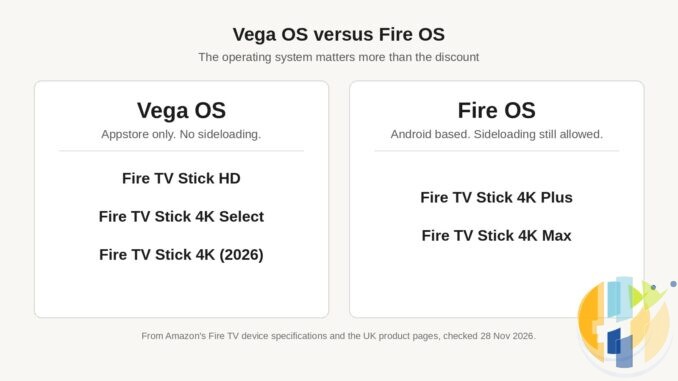
Three of these five sticks run Vega OS, Amazon’s own system. The other two run Fire OS, which is based on Android. On the home screen they look almost identical. Underneath, they are very different animals. Amazon’s Fire TV device specifications list the Fire TV Stick HD (2026), the Fire TV Stick 4K Select (2025) and the Fire TV Stick 4K (3rd Gen, 2026) as running Vega OS 2.0. The same page lists the Fire TV Stick 4K Plus (2025) and the Fire TV Stick 4K Max (2nd Gen) as running Fire OS 8, which is based on Android 11.
Amazon’s own UK listings for the HD, the 4K Select and the new 4K say, in Amazon’s words, that for enhanced security the device prevents sideloading or installing apps from unknown sources, and that only apps from the Fire TV Amazon Appstore are available for download. That means no Downloader, no APK files, and no Kodi unless Amazon decides otherwise. Cord Busters puts the Vega app library at around 3,000 apps, against more than 30,000 on Fire OS. All the big UK services are there: BBC iPlayer, ITVX, Channel 4, Netflix, Prime Video, Disney+ and YouTube are all named on Amazon’s own listings. Smaller apps and niche players may simply not exist yet.
I covered exactly what stops working in detail in my Vega OS “what stops working” post, so I will not repeat the whole list here. And if you saw the viral claims that Amazon banned every Fire TV app, here is what actually happened.
The short version for Black Friday shoppers:
- Vega OS (Appstore only): Fire TV Stick HD, Fire TV Stick 4K Select, Fire TV Stick 4K (2026).
- Fire OS (Android based, sideloading still allowed): Fire TV Stick 4K Plus, Fire TV Stick 4K Max.
Annoyingly, the name “Fire TV Stick 4K” used to belong to the Android stick that is now called the 4K Plus. So a relative who says “just get the 4K one” may be describing a completely different device from the one you end up buying. Thank you, Amazon naming department. Never change. Actually, please change.
Which stick to buy, and which to skip
Fire TV Stick 4K Plus at £34.99: the one I would buy for a main TV
You get 4K with Dolby Vision, HDR10+ and Dolby Atmos, plus Wi-Fi 6, and it runs Fire OS. It is £3 more than the new Vega 4K stick and does more. The catch: Cord Busters says Amazon has dropped it from the line-up and is selling off remaining stock. It is not as cheap as last year’s £24.99 either. If you want an Android-based Fire Stick that can still run an app outside the Appstore, this is the cheapest one left in the sale.
Fire TV Stick 4K Max at £46.99: buy it if you want it to last
Wi-Fi 6E, Dolby Vision and Atmos, 16GB of storage (double the other sticks, by Amazon’s own listing), the Ambient Experience art mode, and the Xbox app for cloud gaming. It is also, per Cord Busters, the only Android-based stick Amazon still makes. If the 4K Plus sells out, this is your Fire OS option. Skip it if you have an older router and a modest telly, because £12 extra over the Plus buys you headroom you may never use. One small tip: Amazon UK also lists an “International Version” of the 4K Max at the same price, so check the listing title before you click buy.
Gamers, read my Xbox Cloud Gaming hour limits post before you buy any stick as a “console”. The cloud now comes with a meter.
Fire TV Stick 4K (2026) at £31.99: fine for mainstream apps only
Amazon lists 4K with HDR10+, Wi-Fi 6, a redesigned Fire TV Remote and power straight from your TV’s USB port. Cord Busters notes it has 8GB of storage and no Dolby Vision or Dolby Atmos. It runs Vega OS. If you only ever open Netflix, iPlayer and Prime Video, it is a reasonable buy at its lowest price yet. If you have ever installed anything from outside the Appstore, skip it.
Fire TV Stick 4K Select at £21.99: a spare-room stick, with eyes open
The cheapest 4K Fire Stick. Cord Busters lists Wi-Fi 5, 1GB of RAM, no Dolby Vision and the old micro-USB power port, and says it has been dropped from the line-up. It runs Vega OS. Good enough for a bedroom or kitchen TV running the big services. Not good enough for anything else.
Fire TV Stick HD at £17.99: only for an HD telly that will stay HD
Full HD, Wi-Fi 6 and powered by the TV, according to Amazon’s listing. It runs Vega OS. A decent stocking filler for an older set or a travel bag. If there is any chance it ends up on a 4K TV, the Select is £4 more.
Who should buy a Google TV box instead
Skip the whole Fire TV range if any of these sound like you:
- You rely on an app that is on Google Play but not in Amazon’s Appstore.
- You want a box behind the TV with Ethernet, more storage and a proper certified Android TV or Google TV system.
- You use a legal IPTV player app from your own provider and you are not sure it exists for Vega OS.
- You are tired of a home screen that is mostly adverts for things Amazon would like you to watch.
I ranked the alternatives in What I’d Buy Instead of a Fire Stick in 2026, and the current shortlist is right below.
Best IPTV boxes to buy this month from Amazon
These are media boxes and sticks that can run players and licensed apps. The first six are Google certified Android TV or Google TV devices with Google Play. The three Fire TV Sticks run Amazon’s own systems with the Appstore instead of Google Play: the 4K Max and 4K Plus run Fire OS, which is Android based, while the new Fire TV Stick 4K (2026) runs Vega OS, which does not allow sideloading Android apps, only Appstore apps. The last one, the Formuler, runs its own Android and is not certified. They are not pirate hardware. They do not come with channels or playlists. I am not claiming I personally lab-tested every SKU this month.
Pick a Google TV box when you want Play Store apps on a proper TV OS or a dedicated player behind the sofa. Pick a Fire TV Stick when Prime Video and the Appstore already cover what you watch. If you need an Android player from outside the Appstore, skip the Vega OS stick.
- NVIDIA SHIELD TV Pro: the premium pick, a certified Android TV player with AI upscaling, Dolby Vision/Atmos and Gigabit Ethernet for the main living-room telly. Amazon UK | Amazon US | Amazon DE | Amazon FR | Amazon IT
- Google TV Streamer 4K: solid Google TV living-room default with Ethernet, 32GB storage and Dolby Vision/Atmos. Amazon UK | Amazon US | Amazon DE | Amazon FR | Amazon IT
- Xiaomi TV Box S (3rd Gen): Google TV box with 32GB storage, Wi-Fi 6 and Dolby Vision/Atmos, the cheaper box route than the Streamer. Amazon UK | Amazon US | Amazon DE | Amazon FR | Amazon IT
- Xiaomi TV Stick 4K (2nd Gen): budget Google TV stick with Wi-Fi 6 and Dolby Vision/Atmos when you want HDMI-simple, not a full box. Amazon UK | Amazon US | Amazon DE | Amazon FR | Amazon IT
- STRONG LEAP-NOVA: a certified Google TV stick with Android 14, 32GB storage, Wi-Fi 6 and Dolby Vision, a cheaper stick for a second telly. Amazon UK | Amazon DE | Amazon FR | Amazon IT
- RockTek GX1: a certified Google TV box with 4GB RAM, 32GB storage, Wi-Fi 6, Ethernet and Dolby Vision/Atmos for a dedicated player behind the sofa. Amazon UK | Amazon US | Amazon DE | Amazon FR | Amazon IT
- Fire TV Stick 4K Max: the most powerful Fire TV Stick, with Wi-Fi 6E, Dolby Vision/Atmos and 16GB storage. It runs Fire OS, which is Android based, so you get Appstore apps and can still sideload an Android player. Amazon UK | Amazon US | Amazon DE
- Fire TV Stick 4K Plus: the older Fire OS stick with Wi-Fi 6 and Dolby Vision/Atmos. It is being phased out, so buy it only while stock lasts. Like the Max, it can still sideload Android apps. Amazon UK | Amazon US | Amazon DE | Amazon FR | Amazon IT
- Fire TV Stick 4K (2026): the newest and slimmest 4K stick, with a new remote. It runs Vega OS, which does not allow sideloading Android apps, only Appstore apps, so check your player is in the Appstore before you buy. Amazon UK | Amazon US | Amazon DE | Amazon FR | Amazon IT
- Formuler Z12 Ultra SE: the newest Formuler box, built around MYTVOnline 4 for IPTV playlists. It runs Formuler’s own Android rather than certified Google TV, so there is no Netflix in HD and no Google certification. Formuler Z12 Ultra SE (Amazon UK) | Formuler Z12 Ultra SE (Amazon US) | Formuler Z12 Ultra SE (Amazon DE) | Formuler Z12 Ultra SE (Amazon FR) | Formuler Z12 Ultra SE (Amazon IT)
Whichever you pick, check that the app you need is in its store before you pay. And none of these boxes or sticks magically make unlicensed streams legal.
How to check a Black Friday deal in two minutes
- Ignore the RRP. Compare with the last sale price instead. For Fire TV, the October Big Deal Days prices above are the honest benchmark.
- Check the price history. Free trackers such as camelcamelcamel and Keepa show what a product has really sold for on Amazon UK over time. If a “deal” matches the last three sales, it is a normal price wearing a party hat.
- Read the deal terms. On each Fire TV page, hover over the small info icon by the deal badge. That is where Amazon says when it ends and that it lasts only while promotional stock lasts.
- Check the operating system before the price. A cheaper stick that cannot run the app you need is not a saving.
- Check your apps. If you use a VPN on your TV, make sure your provider’s app is in the Appstore for that exact stick before you buy. My VPN comparison covers the main providers, and if you go with Surfshark, use my Surfshark link for Fire TV.
Who should skip all of this
If your TV already has a smart platform that runs the apps you use without wheezing, you may not need a stick at all. That is the cheapest deal of the weekend. If you already own a working Fire OS stick, do not swap it for a Vega OS one just because the new one is £31.99. You would be paying to lose sideloading.
What I would do before Monday night
Write down the apps you actually use on your TV. If every one of them is a big mainstream service, buy whichever stick matches your TV: the HD for an HD set, the 4K Plus for a main 4K TV while stock lasts, or the 4K Max if you want an Android-based stick Amazon still makes. If even one of them is a less common app, choose the 4K Plus or 4K Max, or go Google TV. And open the product page one last time before you pay, because “while promotional stock lasts” is Amazon’s way of saying “we reserve the right to ruin your plan”.
Written by Dr Husham Memar