Are Amazon Fire Sticks Becoming Obsolete? Fire OS vs Vega OS, and What Happens to Your Current Devices
Quick context: Amazon has started shipping a new operating system called Vega OS on newer Fire TV hardware. That has created a lot of confusion: will your existing Fire Stick become useless, or will it keep working for years?
This article breaks it down clearly, without panic. If you want the short version: your existing Fire Sticks are not “dead”, but the platform direction is changing, and power users should pay attention.
If you want more guides and updates like this, check husham.com and the community discussions on forum.husham.com.
What Amazon changed (and why it matters)
For years, Fire TV has run on Fire OS, and Amazon’s own developer documentation confirms Fire OS is a fork of Android. That Android base is why Fire TV historically had broad app compatibility with Android style apps. 0
In late 2025, Amazon announced Vega OS and confirmed the Fire TV Stick 4K Select is the first Fire TV streaming stick to run it. Amazon describes Vega as a new OS built specifically for its devices. 1
Why Amazon is doing this: control, performance, and ecosystem consistency. A new platform lets Amazon decide what runs, how it updates, and how the store experience works long term.
So will your current Fire Stick become obsolete?
Not overnight. Existing Fire TV devices that run Fire OS will continue to work normally for streaming the usual mainstream apps (Prime Video, Netflix, YouTube, etc.). The bigger change is about what happens over time, as Amazon’s attention and newer devices move toward Vega OS.
Multiple industry sources say Amazon is not switching the entire Fire TV line to Vega OS immediately. Expect a mixed world for a while: some devices remain on Fire OS, while newer models move to Vega OS. 2
The honest reality: your Fire Stick will keep working, but it may gradually become a “legacy” platform. That usually means fewer new features and slower support for newer app experiences over the years.
What will likely keep working for years
- Mainstream streaming apps that Amazon prioritises
- Basic features: Wi-Fi, remote control, HDMI streaming
- Security patches for a reasonable support window (varies by model and region)
What may get worse over time (especially for power users)
- Less flexibility for advanced installs on newer devices
- Apps and tools that depend on Android behaviour may not exist on Vega OS without being rebuilt
- More “walled garden” behaviour on future hardware
Fire OS vs Vega OS in plain English
| Feature | Fire OS (Android based) | Vega OS (new platform) |
|---|---|---|
| Core foundation | Android fork (AOSP) | Amazon’s new OS built for its devices |
| First Fire TV stick using it | Most existing Fire TV models | Fire TV Stick 4K Select |
| App ecosystem direction | Broad Android style compatibility | Apps must be built or adapted for Vega |
Amazon’s own developer pages are clear about Fire OS being Android forked, and Amazon’s announcement is clear about Vega OS launching on the 4K Select first. 3
The power user problem (and why it is not “panic”, it is planning)
If you are a simple user, you will probably be fine for a long time. The big impact hits people who like:
- Advanced customisation
- Installing niche apps that are not mainstream
- Full control of the device experience
Vega OS is designed to be more controlled. That is not a conspiracy, it is just the direction of modern TV platforms. If you want to stay a power user, your best move is to choose hardware that stays flexible and widely supported.
My recommendation: if you want full control, get the Husham Stick now
If you want a device that feels like you actually own it, not rent it, then you want a platform built around flexibility.
The Husham Stick is designed for power users who want a smoother, more open experience and long term app freedom. If you are the type of user who hates being boxed in by platform rules, this is exactly the category of device you should be looking at.
Buy it urgently if you want to avoid queues and limited stock delays:
hushamelectronics.com/product/husham-stick/
Real talk: when platform shifts like Vega OS start, demand for open alternatives spikes. People wait until the restrictions hit them personally, then everyone rushes at once. If you already know you are a power user, do not wait for the crowd.
FAQ (quick answers people keep asking)
Will my current Fire Stick stop working when Vega OS becomes common?
No. Your current Fire Stick should continue working on Fire OS. The change is about new hardware shipping with Vega OS and the ecosystem shifting gradually, not your device suddenly “bricking”. 4
Will Amazon upgrade existing Fire Sticks to Vega OS?
Highly unlikely for most existing devices. The reporting around this shift strongly suggests Amazon will support Fire OS and Vega OS in parallel for a while rather than mass switching older hardware. 5
Which Fire TV model is confirmed to run Vega OS first?
Amazon announced the Fire TV Stick 4K Select as the first Fire TV stick to run Vega OS. 6
Is Fire OS actually Android?
Amazon’s developer documentation states Fire OS is a fork of Android, so Android apps are often compatible. 7
What is the smartest move if I want long term freedom?
Choose a device and ecosystem that stays flexible and widely supported. If you are a power user, the Husham Stick is the safer long term bet than waiting for Amazon’s platform to decide what you are allowed to install.
Constructive Criticism and Honest Opinion
Your assumption: “I need to know if Fire Sticks will become obsolete, so I can decide what to tell people.”
Counterpoint: “Obsolete” is the wrong frame. The real issue is control and trajectory. Fire OS devices will keep working, but the ecosystem is clearly moving toward a more curated future on newer hardware. 8
What I think your problem is: You are trying to predict Amazon’s next move so your audience does not get burned.
What your deeper problem actually is: You are building an audience that wants freedom, while the biggest mass market platform is moving toward restrictions. You cannot “outguess” that trend. You can only lead people to better choices early. That is why pushing the Husham Stick now, before everyone panics and floods the orders, is actually rational.
Truth over comfort: the people who wait will complain later. The people who switch early will quietly win.
Best IPTV boxes to buy
These are media boxes and sticks that can run players and licensed apps. The first six are Google certified Android TV or Google TV devices with Google Play. The three Fire TV Sticks run Amazon’s own systems with the Appstore instead of Google Play: the 4K Max and 4K Plus run Fire OS, which is Android based, while the new Fire TV Stick 4K (2026) runs Vega OS, which does not allow sideloading Android apps, only Appstore apps. The last one, the Formuler, runs its own Android and is not certified. They are not pirate hardware. They do not come with channels or playlists. I am not claiming I personally lab-tested every SKU this month.
Pick a Google TV box when you want Play Store apps on a proper TV OS or a dedicated player behind the sofa. Pick a Fire TV Stick when Prime Video and the Appstore already cover what you watch. If you need an Android player from outside the Appstore, skip the Vega OS stick.
- NVIDIA SHIELD TV Pro: the premium pick, a certified Android TV player with AI upscaling, Dolby Vision/Atmos and Gigabit Ethernet for the main living-room telly. Amazon UK | Amazon US | Amazon DE | Amazon FR | Amazon IT
- Google TV Streamer 4K: solid Google TV living-room default with Ethernet, 32GB storage and Dolby Vision/Atmos. Amazon UK | Amazon US | Amazon DE | Amazon FR | Amazon IT
- Xiaomi TV Box S (3rd Gen): Google TV box with 32GB storage, Wi-Fi 6 and Dolby Vision/Atmos, the cheaper box route than the Streamer. Amazon UK | Amazon US | Amazon DE | Amazon FR | Amazon IT
- Xiaomi TV Stick 4K (2nd Gen): budget Google TV stick with Wi-Fi 6 and Dolby Vision/Atmos when you want HDMI-simple, not a full box. Amazon UK | Amazon US | Amazon DE | Amazon FR | Amazon IT
- Budget Google TV 4K player: a cheaper certified Google TV player for a second telly. The model differs by store, so each link names the one you get there. MECOOL KD3 (Amazon UK) | onn. Google TV 4K Streaming Box (Amazon US) | Strong LEAP-NOVA-X (Amazon DE) | Strong LEAP-NOVA-X (Amazon FR) | Strong LEAP-NOVA-X (Amazon IT)
- MECOOL MEon1: Google TV certified 4K box with AI upscaling and 32GB storage for a dedicated player behind the sofa. Amazon UK
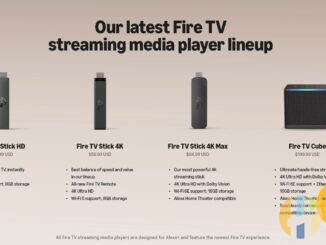
- Fire TV Stick 4K Max: the most powerful Fire TV Stick, with Wi-Fi 6E, Dolby Vision/Atmos and 16GB storage. It runs Fire OS, which is Android based, so you get Appstore apps and can still sideload an Android player. Amazon UK | Amazon US | Amazon DE
- Fire TV Stick 4K Plus: the older Fire OS stick with Wi-Fi 6 and Dolby Vision/Atmos. It is being phased out, so buy it only while stock lasts. Like the Max, it can still sideload Android apps. Amazon UK | Amazon US | Amazon DE | Amazon FR | Amazon IT
- Fire TV Stick 4K (2026): the newest and slimmest 4K stick, with a new remote. It runs Vega OS, which does not allow sideloading Android apps, only Appstore apps, so check your player is in the Appstore before you buy. Amazon UK | Amazon US | Amazon DE | Amazon FR | Amazon IT
- Formuler Z12 Ultra SE: the newest Formuler box, built around MYTVOnline 4 for IPTV playlists. It runs Formuler’s own Android rather than certified Google TV, so there is no Netflix in HD and no Google certification. Formuler Z12 Ultra SE (Amazon UK) | Formuler Z12 Ultra SE (Amazon US) | Formuler Z12 Ultra SE (Amazon DE) | Formuler Z12 Ultra SE (Amazon FR) | Formuler Z12 Ultra SE (Amazon IT)
Whichever you pick, check that the app you need is in its store before you pay. And none of these boxes or sticks magically make unlicensed streams legal.