If your Disney+ bill looks a bit chunkier this month, no, your bank has not made a typo. From Wednesday 18 November 2026, existing UK monthly subscribers have been moving to the new Disney+ prices on their next billing date. Annual subscribers get a short stay of execution until Wednesday 2 December.
Back in October I told you the regular monthly price rise for existing customers had no confirmed date, and that you should not plan around a guess. Well, the guessing is over. Disney put the new prices on its UK homepage, MoneySavingExpert set out the dates, and the money has been leaving accounts since 18 November. If you want the background, my earlier piece on the October saver deadline and the US bills is still there. This one is about what you pay now, and the few honest ways to pay less.
The new Disney+ UK prices
| Plan | Old price | New price | Change |
|---|---|---|---|
| Standard with Ads (monthly) | £5.99 | £6.99 | +£1 a month |
| Standard (monthly) | £9.99 | £11.99 | +£2 a month |
| Premium (monthly) | £14.99 | £15.99 | +£1 a month |
| Standard (annual) | £99.90 | £119.90 | +£20 a year |
| Premium (annual) | £149.90 | £159.90 | +£10 a year |
Yes, the plan in the middle gets the biggest slap. Standard, the one most people pick because it is “just Disney+ without adverts”, goes up by 20%. Premium only goes up by a pound, which I am sure is a complete coincidence and has nothing to do with nudging you towards the 4K plan.
Standard with Ads still has no annual option. Disney would very much like you to keep watching those adverts one month at a time.
When the new price hits you
- New subscribers: have been paying the new prices since 14 October 2026.
- Monthly subscribers: the new price applies from your next billing date on or after 18 November 2026. So if you are billed on the 25th, the 25 November payment is the first one at the higher price.
- Annual subscribers: the new price applies from your next renewal on or after 2 December 2026. If your annual renewal lands before 2 December, MoneySavingExpert says you keep the old price for another year. Lucky you.
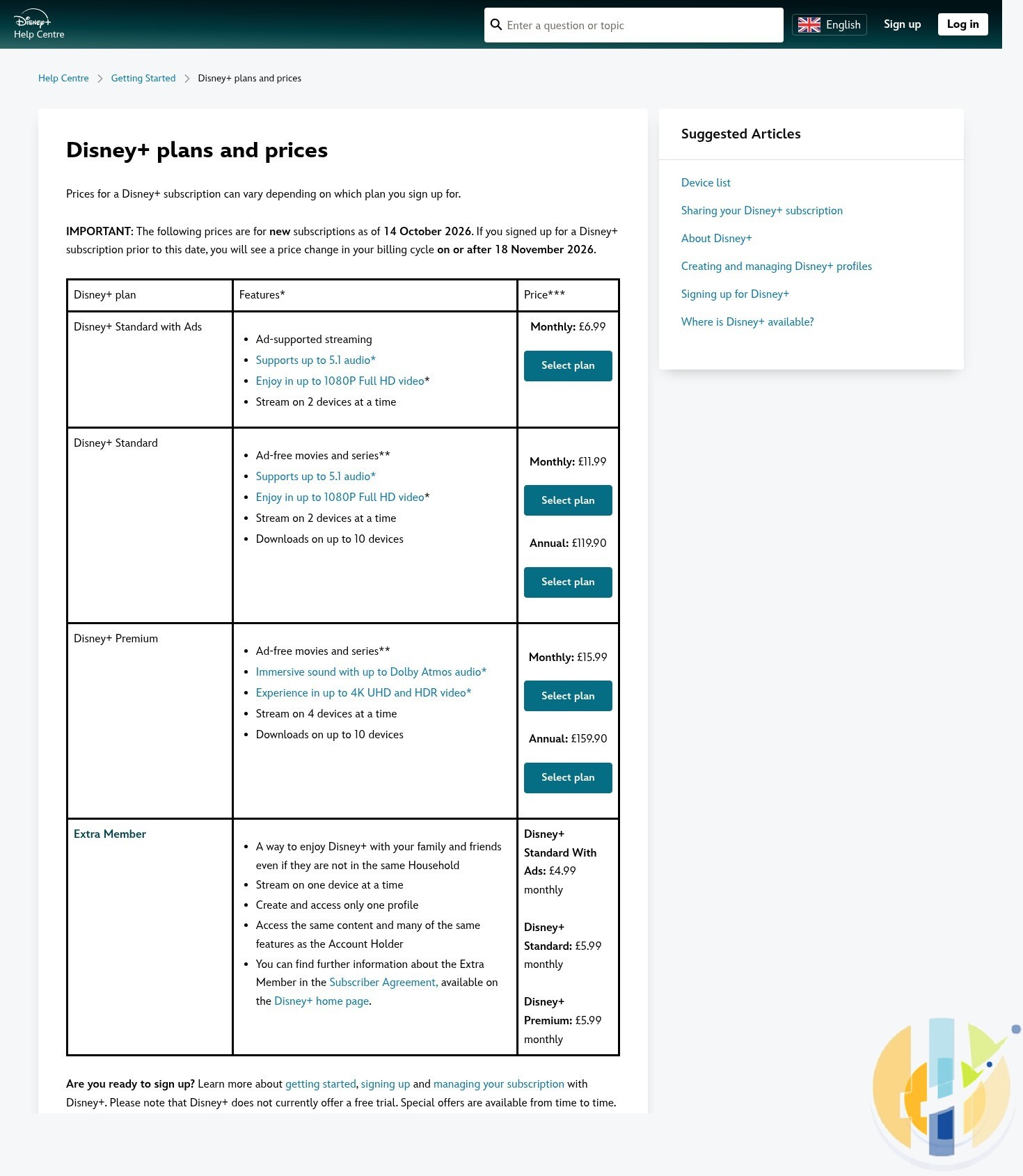
Disney’s own UK Help Centre has finally caught up. It now lists the new prices, and it tells anyone who signed up before 14 October that the change lands on a billing cycle on or after 18 November 2026. It still does not mention 2 December for annual renewals, which MoneySavingExpert set out in October. So the help page has caught up with the monthly bill, and is still a little shy about the yearly one.
If you pay through Sky, Virgin Media, O2, Vodafone, Lloyds or through Apple or Google billing on a device, the timing and the amount can be different. Disney’s own terms say timing on partner platforms may vary, so check the price increase notice or email from whoever actually takes your money.
Four honest ways to pay less
1. Pay yearly, if you really watch all year
Twelve months of Standard at £11.99 is £143.88. The annual Standard plan is £119.90, so you save £23.98. On Premium, twelve months at £15.99 is £191.88 against £159.90 a year, a saving of £31.98. The catch is obvious: you pay up front, and if you only watch Disney+ when a new Marvel series lands, you have just pre-paid for ten months of not watching it.
2. The six-month saver plan
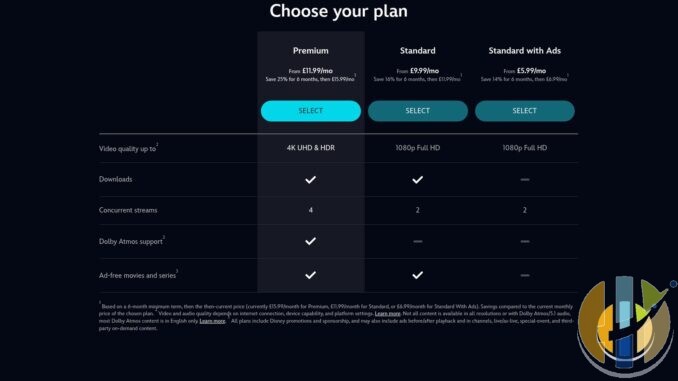
Disney’s six-month saver plans cost £5.99 a month for Standard with Ads, £9.99 for Standard and £11.99 for Premium, with a six-month minimum term. After that they roll on to the full monthly price unless you cancel. MoneySavingExpert says existing subscribers can take one once their current subscription ends. That means cancelling, letting the month run out, then signing up again. Saving £2 a month on Standard is real money, but set a reminder for month six, because Disney certainly will not send you one saying “now would be a great time to leave”.
3. Drop a tier
Premium buys you 4K, HDR, Dolby Atmos and four screens. If your TV, stick or soundbar cannot actually show or play those, you are paying for a badge. Going from monthly Standard to Standard with Ads saves £5 a month, £60 a year, if you can live with up to four minutes of adverts per hour on TV shows. Before you downgrade, have a look at what the ad tiers actually change on Google TV sticks.
4. Rotate, or check your bundles
Disney+ is a rolling monthly contract, so you can cancel when you have watched what you wanted and come back later. If you cancel mid-cycle you keep access until the next billing date, but you do not get a refund for the unused days. Also check whether you already get Disney+ through a bank account, phone contract or TV package. Plenty of people pay twice without realising, which is the most generous thing anyone can do for a media giant.
The Extra Member add-on, for someone outside your household, is listed on Disney’s UK Help Centre at £4.99 a month on Standard with Ads, and £5.99 a month on Standard or Premium. If you are paying for a second full account for a family member, read how Extra Member works before the next bill.
Who should just ignore all this
If you get Disney+ free with a bank account or phone plan, check the terms, but you may not see any change. If you are on an annual plan that renews before 2 December, you are already sorted for another year. And if you only keep Disney+ for one show a year, the cheapest plan is the one you cancel the day the finale drops.
How Disney+ now compares
For context, Netflix Standard with Ads is £7.99 a month after its own September 2026 UK price rise, so Disney+ Standard with Ads is still £1 cheaper. Netflix Standard is £13.99 against Disney+ Standard at £11.99. Both companies are clearly reading the same spreadsheet, just a few weeks apart.
What to do today
- Open Disney+ on a browser, go to Account, then Subscription, and check your plan and next billing date.
- If you pay through a partner (Sky, Virgin Media, O2, Vodafone, Apple, Google), check their notice instead.
- Decide: stay, switch to annual, drop a tier, or cancel and take a saver plan later.
- If you cancel, put the next billing date in your calendar so you know when access ends.
Whatever you pick, a streaming box that runs the official Disney+ app properly matters more than any tier. If you are shopping for one this Black Friday, here are the boxes I would look at.
Best IPTV boxes to buy this month from Amazon
These are media boxes and sticks that can run players and licensed apps. The first six are Google certified Android TV or Google TV devices with Google Play. The three Fire TV Sticks run Amazon’s own systems with the Appstore instead of Google Play: the 4K Max and 4K Plus run Fire OS, which is Android based, while the new Fire TV Stick 4K (2026) runs Vega OS, which does not allow sideloading Android apps, only Appstore apps. The last one, the Formuler, runs its own Android and is not certified. They are not pirate hardware. They do not come with channels or playlists. I am not claiming I personally lab-tested every SKU this month.
Pick a Google TV box when you want Play Store apps on a proper TV OS or a dedicated player behind the sofa. Pick a Fire TV Stick when Prime Video and the Appstore already cover what you watch. If you need an Android player from outside the Appstore, skip the Vega OS stick.
- NVIDIA SHIELD TV Pro: the premium pick, a certified Android TV player with AI upscaling, Dolby Vision/Atmos and Gigabit Ethernet for the main living-room telly. Amazon UK | Amazon US | Amazon DE | Amazon FR | Amazon IT
- Google TV Streamer 4K: solid Google TV living-room default with Ethernet, 32GB storage and Dolby Vision/Atmos. Amazon UK | Amazon US | Amazon DE | Amazon FR | Amazon IT
- Xiaomi TV Box S (3rd Gen): Google TV box with 32GB storage, Wi-Fi 6 and Dolby Vision/Atmos, the cheaper box route than the Streamer. Amazon UK | Amazon US | Amazon DE | Amazon FR | Amazon IT
- Xiaomi TV Stick 4K (2nd Gen): budget Google TV stick with Wi-Fi 6 and Dolby Vision/Atmos when you want HDMI-simple, not a full box. Amazon UK | Amazon US | Amazon DE | Amazon FR | Amazon IT
- STRONG LEAP-NOVA: a certified Google TV stick with Android 14, 32GB storage, Wi-Fi 6 and Dolby Vision, a cheaper stick for a second telly. Amazon UK | Amazon DE | Amazon FR | Amazon IT
- RockTek GX1: a certified Google TV box with 4GB RAM, 32GB storage, Wi-Fi 6, Ethernet and Dolby Vision/Atmos for a dedicated player behind the sofa. Amazon UK | Amazon US | Amazon DE | Amazon FR | Amazon IT
- Fire TV Stick 4K Max: the most powerful Fire TV Stick, with Wi-Fi 6E, Dolby Vision/Atmos and 16GB storage. It runs Fire OS, which is Android based, so you get Appstore apps and can still sideload an Android player. Amazon UK | Amazon US | Amazon DE
- Fire TV Stick 4K Plus: the older Fire OS stick with Wi-Fi 6 and Dolby Vision/Atmos. It is being phased out, so buy it only while stock lasts. Like the Max, it can still sideload Android apps. Amazon UK | Amazon US | Amazon DE | Amazon FR | Amazon IT
- Fire TV Stick 4K (2026): the newest and slimmest 4K stick, with a new remote. It runs Vega OS, which does not allow sideloading Android apps, only Appstore apps, so check your player is in the Appstore before you buy. Amazon UK | Amazon US | Amazon DE | Amazon FR | Amazon IT
- Formuler Z12 Ultra SE: the newest Formuler box, built around MYTVOnline 4 for IPTV playlists. It runs Formuler’s own Android rather than certified Google TV, so there is no Netflix in HD and no Google certification. Formuler Z12 Ultra SE (Amazon UK) | Formuler Z12 Ultra SE (Amazon US) | Formuler Z12 Ultra SE (Amazon DE) | Formuler Z12 Ultra SE (Amazon FR) | Formuler Z12 Ultra SE (Amazon IT)
Whichever you pick, check that the app you need is in its store before you pay. And none of these boxes or sticks magically make unlicensed streams legal.
How to get a VPN (for privacy, not for cheaper Disney+)
A VPN is useful for privacy on public Wi-Fi, in hotels and on trains. It will not get you a cheaper Disney+ price, and Disney’s terms do not love people trying. With that asterisk in place, these are the services I point people to: NordVPN, Surfshark, IPVanish, CyberGhost, PureVPN and Ivacy. And if all your streaming passwords are the same one, NordPass is a better use of a few quid than another subscription.
Are you keeping Disney+ at the new price, dropping to the ad tier, or cancelling until the next big series? Tell me in the comments.
Update (20 November 2026)
Written by Dr Husham Memar