HushTok Version 1.0 Free Windows App to Download TikTok Videos as MP4 or MP3
Hey everyone, I just finished something I had a lot of fun building and I wanted to share it with you right away. Meet HushTok Version 1.0, a clean Windows application that lets you download TikTok videos as high quality MP4 or extract the audio as MP3. No browser extensions, no shady websites, just a simple desktop tool that does the job safely.
This whole project started because of a request on the forum. A member posted looking for a safe TikTok to MP3 converter and asked for suggestions. You can still see the original thread here: Looking for a safe TikTok to MP3 converter. I decided to build one myself instead of recommending random online tools. Version 1.0 is the result and it works exactly the way I wanted it to.
What HushTok Can Do
HushTok is a lightweight Windows app designed for one clear purpose. You drop TikTok links into it and it handles the rest. You can choose between two formats:
- MP4 – best video quality available from the original post
- MP3 – high quality audio at 320 kbps
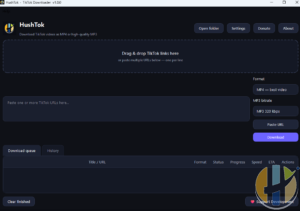
The interface is dark and simple. There is a big drag and drop area at the top, a text box where you can paste multiple links (one per line), format buttons on the right, and a download queue with progress, speed and ETA. You also get a History tab so you can find previous downloads later.
How to Download HushTok Version 1.0
The official download page is right here on the site:
Just head over, grab the latest build and install it like any normal Windows program. No extra software or runtimes are required. Once installed you will see the HushTok window ready to go.
How to Use HushTok (Step by Step)
Using the app is straightforward. Here is the exact process I follow every time:
- Open HushTok.
- Copy the TikTok video link from the TikTok app or website.
- Either drag the link into the big drop zone or paste it into the text box (you can paste several links at once, one per line).
- Choose the format on the right side. Pick MP4 – best video if you want the full video, or select the MP3 320 kbps option if you only need the audio.
- Click the purple Download button.
- Watch the progress in the Download queue. You will see the title, format, status, progress bar, speed and estimated time remaining.
- When it finishes, the file is saved in the folder you set (you can change the save location under Settings or with the Open folder button).
That is it. No complicated settings, no account required, and no watermarks added by the tool itself.
A Few Extra Notes
This is Version 1.0. It is the first public release and it already does everything I needed for daily use. I built it mainly for personal use and for the people who asked for a safer alternative to random online converters. Because it runs fully on your own computer, your links and downloads stay private.
If you try it and find it useful, I would really appreciate any support to keep improving it. You can send a small donation to the Bitcoin address below. Every contribution helps me spend more time on new features and bug fixes.
BTC: 347J69ejbgr7zppRKckadPd7EQ5ASsA5TT
Making this application was honestly a lot of fun. Turning a simple forum request into a working tool that people can actually use feels great. I hope you find HushTok Version 1.0 helpful.
Grab it here and let me know what you think: www.husham.com/hushtiktokv1
Enjoy and happy downloading!