Every few weeks someone on the internet announces that running AI on your own computer is now “basically free”. Then you look up the graphics card they used and discover it costs roughly the same as a reliable second hand hatchback, assuming you can find one that has not been bought by a bot at 3am. So before you hand over that kind of money, it would be nice to know one simple thing: how fast will it actually feel?
That is exactly the itch llmspeed scratches. It turned up on Hacker News on Saturday 17 October as a Show HN (about 144 points and 51 comments when I checked that afternoon), and it is one of the most practical little tools I have seen this year. You pick a GPU or a Mac, pick a model, and it streams a fake answer at the speed that hardware should manage. No download, no sign up, no 20GB model file eating your broadband.
I went through the site, the source code and the data file behind it, so here is what it really does, where its numbers come from, and how much you should trust them before your bank card comes out.
What llmspeed actually is
llmspeed is a free web simulator, open source under the MIT licence, with the code on GitHub. It is a small TypeScript and Preact site, fully static, and the repository only dates back to late August 2026, so it is young and changing fast. Its own tagline sums it up: feel how fast a local LLM runs before you buy the hardware.
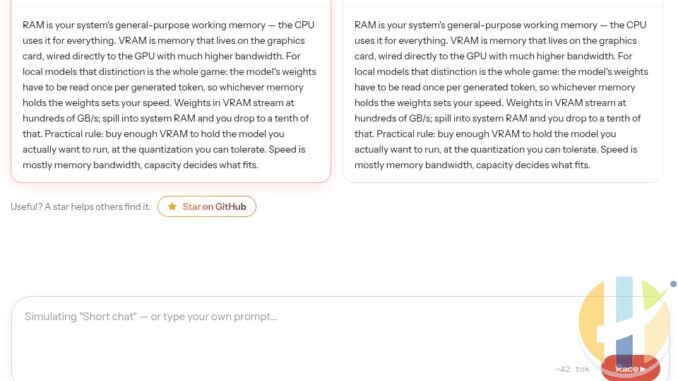
It does not run a model. Nothing is being “thought” when you press Run. It takes a prepared answer and plays it back token by token at the predicted speed, after a predicted wait for the first token. One Hacker News commenter was confused when it kept giving the same answer about RAM, and that is the point: it is a speed simulator, not a chatbot. Think of it as a test drive in a very convincing driving simulator rather than the real car.
Out of the box it covers 30 devices and 15 popular open models. The hardware list runs from an RTX 3060 12GB and an RTX 5060 Ti 16GB up through the RTX 3090, 4090 and 5090, AMD cards like the RX 7900 XTX and RX 9070 XT, the Ryzen AI Max+ 395 “Strix Halo” with 128GB, NVIDIA’s DGX Spark, a run of MacBooks and Mac Studios up to the M3 Ultra and M5 Ultra with 512GB, a plain Ryzen 9 9950X with no GPU at all, and a few cloud cards (A100, H100, H200) for comparison. Models include Llama 3.1 8B, Qwen 3.5 9B, Qwen 3.6/3.8 27B, Qwen 3.5/3.6 35B A3B, Gemma 4 26B A4B and 31B, GPT-OSS 20B and 120B, DeepSeek V4 Flash and GLM-5.3 Flash.
What tokens per second feels like in real life
Every local AI conversation eventually becomes a fight about tokens per second, usually between people who have never agreed on anything. A token is a chunk of a word; in English one token is roughly three quarters of a word. Here is how the numbers translate when you are sat in front of the screen:
- Under 5 tokens per second: slower than you read. It feels like watching someone type with one finger while eating crisps with the other hand.
- 5 to 10 tokens per second: about reading pace. Fine for chat if you are patient, painful for anything long.
- 10 to 30 tokens per second: comfortable. The answer stays ahead of your eyes.
- 30 to 60 tokens per second: snappy. This is where local AI starts to feel like the cloud services.
- 100 plus: you stop reading as it streams and just glance at the result. This matters most for coding tools and agents, where the model writes a lot of text that nobody reads line by line.
The second number llmspeed shows is time to first token (TTFT), and honestly it is the one that catches people out. Before a model writes anything it has to read your whole prompt, which is called prefill. For a one line question that takes a fraction of a second. Paste in a 20 page contract and some machines sit there thinking for over a minute before the first word appears. Generation speed depends mostly on memory bandwidth; prefill depends mostly on raw compute. That is why two machines with similar generation speeds can feel completely different the moment you feed them a long document.
How to use llmspeed, step by step
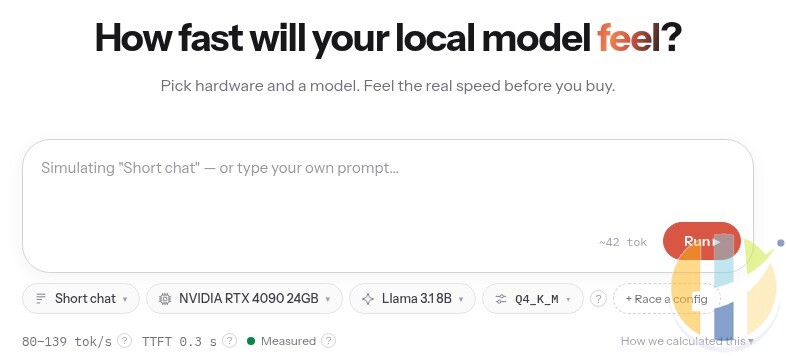
- Open llmspeed.dev. The default setup is an RTX 4090 running Llama 3.1 8B at Q4_K_M, which shows as 80 to 139 tokens per second with a 0.3 second first token, labelled Measured.
- Pick a prompt size. There are four presets: Short chat (about 42 tokens), Email draft (about 290), Code file (about 1,800) and 20 page doc (about 12,500). You can also type your own prompt and it estimates the length. Always try the 20 page doc preset if you plan to work with files, because that is where TTFT bites.
- Choose your hardware, model and quantisation from the three buttons under the box. Q4_K_M is the usual 4 bit sweet spot, Q8_0 is closer to full quality, FP16 is the full fat version that needs double the memory again.
- Press Run and watch it stream. If the combination does not fit, it tells you how much memory the model needs against how much is usable, and whether it would run with part of the model spilled into system RAM.
- Click “Race a config” to put two setups side by side. This is the fun bit: RTX 5090 against a Mac Studio, a used 3090 against a Strix Halo mini PC, whatever settles the argument in your group chat.
- Check the label next to the speed. Measured, Derived or Projected. I will explain why that word matters more than the number below.
- Share creates a link to your exact setup or race, handy for sending to the friend who keeps insisting a 3060 is “plenty”.
Where the numbers come from
This is the part most people skip, and it is the part that decides whether the tool saves you money. According to the project README, every estimate carries one of three labels:
- Measured: benchmarked on that exact hardware, model and quantisation, collected from places like r/LocalLLaMA, localscore.ai and llama.cpp discussions.
- Derived: interpolated from measured benchmarks of similar setups.
- Projected: calculated from hardware specs, for example unreleased hardware or setups nobody has measured.
When there is no benchmark, it falls back to first principles. Generation speed is treated as memory bandwidth bound, because every token reads the active weights once, and for mixture of experts models only the active parameters count. Prefill is treated as compute bound. Both are tuned with per backend efficiency figures (CUDA, Metal, ROCm, Vulkan, CPU) calibrated against the measured results, with a slowdown as context grows. Memory fit counts the model weights, the KV cache and some overhead against usable memory, which it sets at about 93% of VRAM on a graphics card and about 75% of unified memory on a Mac.
I opened the data file the site runs on, and the honest headline is this: of 1,446 hardware, model and quantisation combinations, only 76 are labelled Measured. Another 385 are Derived, and the other 985 are marked as not fitting in the device’s memory (some of those can still limp along with part of the model in system RAM). Projected figures appear when a model has to spill into system RAM, when the hardware is not out yet, or when nothing better exists. So a lot of what you are feeling is an educated guess, which is fine, as long as you know it.
Real numbers from the tool
Here is a selection straight from llmspeed for the Short chat preset, plus how long the first token takes on the 20 page doc preset. Ranges are the tool’s own low to high estimate.
| Hardware | Model (quant) | Tokens per second | Label | First token, 20 page doc |
|---|---|---|---|---|
| RTX 4090 24GB | Llama 3.1 8B (Q4_K_M) | 80 to 139 | Measured | about 2 seconds |
| RTX 5060 Ti 16GB | Llama 3.1 8B (Q4_K_M) | 42 to 72 | Measured | about 5 seconds |
| Ryzen 9 9950X, CPU only | Llama 3.1 8B (Q4_K_M) | 5 to 15 | Measured | about 63 seconds |
| RTX 3090 24GB | Qwen 3.6/3.8 27B (Q4_K_M) | 8 to 37 | Derived | about 14 seconds |
| RTX 5090 32GB | Qwen 3.6/3.8 27B (Q4_K_M) | 16 to 70 | Derived | about 5 seconds |
| Mac Studio M4 Max 128GB | Qwen 3.6/3.8 27B (Q4_K_M) | 10 to 24 | Derived | about 74 seconds |
| Ryzen AI Max+ 395 128GB (Strix Halo) | Qwen 3.5/3.6 35B A3B (Q4_K_M) | 46 to 60 | Measured | about 11 seconds |
| Ryzen AI Max+ 395 128GB (Strix Halo) | GPT-OSS 120B (MXFP4) | 46 to 58 | Measured | about 18 seconds |
| DGX Spark 128GB | GPT-OSS 120B (MXFP4) | 14 to 65 | Derived | about 2 seconds |
| RTX 4090 24GB | GPT-OSS 120B (MXFP4) | Will not run: needs about 64GB, the card has about 22GB usable | ||
A few things jump out. First, the gap between generation speed and first token wait. The M4 Max and a 3090 are in the same rough area for writing speed on the 27B model, but hand the Mac a long document and it sits there for over a minute before saying a word. Second, the 128GB machines (Strix Halo, DGX Spark, big Macs) are not the fastest, but they can load models that a 24GB gaming card cannot even open. Third, look at how wide some of those Derived ranges are. “Somewhere between 14 and 65 tokens per second” is less a forecast and more a horoscope.
The race in the screenshot at the top of this article is a nice example of the trade off. An RTX 3090 against a Strix Halo on Qwen 3.5/3.6 35B A3B: the model needs about 22.9GB and the 3090 has about 22.3GB usable, so a sliver spills into system RAM and the tool switches to a Projected 68 to 289 tokens per second. The Strix Halo fits it comfortably and shows a Measured 46 to 60. The 3090 finished first, but notice which number you can actually bank on.
And here is my favourite oddity. In the current data, the Measured figure for an RTX 5090 on Llama 3.1 8B (50 to 87 tokens per second) is lower than the Measured figure for an RTX 4090 on the same model (80 to 139). Nobody seriously believes the newer, more expensive card is slower at this job. It simply shows that community benchmarks come from different people, drivers, engines and settings, and the numbers inherit all of that mess.
A reality check from Apple’s own Mac Studio numbers
Handily, Apple’s machine learning team published real Mac Studio measurements on 15 October using its open source MLX framework, so I could compare like with like. Apple measured Qwen 3.8 27B at 16 bit precision with 8,192 tokens of context: 12.46 tokens per second on an M3 Ultra and 19.69 on the new M5 Ultra, with the first token arriving after 18.2 and 4.1 seconds respectively.
I set up the same thing in llmspeed (Qwen 3.6/3.8 27B, FP16, an 8,192 token prompt). It estimates 4 to 10 tokens per second on the M3 Ultra and 8 to 11 on the M5 Ultra, with first tokens at about 28 and 13 seconds. So on this test the simulator is roughly half as optimistic as Apple’s own figures, and it still labels the M5 Ultra as Projected. That fits with one Hacker News reader who said his M2 Ultra runs nearly twice as fast as the tool reports for an M3 Ultra. The likely reason is that the tool’s Mac data leans on llama.cpp style benchmarks, while Apple used MLX, which is tuned for its own chips. Apple’s speeds come from its own lab, so treat them as best case, but the lesson stands: the engine you use can move the numbers a lot.
For the “what if money were no object” crowd, Apple also ran Meta’s Muse Spark Open, an 816 billion parameter model with 42 billion active, across four M5 Ultra Mac Studios linked by Thunderbolt 5, and got 36.73 tokens per second. Apple says a single M5 Ultra Mac Studio peaks at about 300W while running these models. Four of them on your desk is still technically “local”, in the same way a private jet is technically “a car with wings”.
The caveats that actually matter
- Estimates are not measurements. Always look at the label. Measured is somebody’s real benchmark; Derived is an interpolation; Projected is maths. The README itself says drivers, engine versions, flash attention, power limits and thermals can move real numbers by 10 to 30%.
- Quantisation changes everything. The same model at Q4 needs roughly a third of the memory of FP16 and runs much faster, at some cost to quality. The tool lets you flip between them, which is exactly how you should use it: find the smallest quant that fits with room to spare.
- Context length is the silent killer. The core estimates are built around short prompts, and generation slows as the conversation grows. Several commenters pointed out that coding agents and tools need 32,000 to 65,000 tokens of context or more, and the KV cache that holds that context eats memory fast. One reader also questioned the tool’s KV cache sizes for some models, so leave yourself headroom.
- Single device only. No dual GPUs, no two Strix Halos, no NVLink. If you plan to run two cards, the tool cannot help yet.
- “Will not run” is sometimes too strict. One user with a 16GB RX 9070 XT was told a 27B model at FP16 will not run, even though llama.cpp can split it between GPU and CPU. It runs, just slowly. The tool only models partial offload up to a point.
- Speed is not quality. A small model at 120 tokens per second that writes rubbish is just rubbish, delivered quickly. One commenter asked for a feel for quality too, and I am with them.
- Mixture of experts models flatter your hardware. Models with “A3B” or “A4B” in the name only activate about 3 or 4 billion parameters per token, so they run far faster than their total size suggests. Readers in the thread called these the sweet spot for normal hardware right now.
My buyer’s take, tier by tier
These are my opinions built on the tool’s numbers plus the community comments, not a lab test. Prices move weekly, so I am not quoting any; just assume GPUs cost more than you hoped.
- The card you already own (8GB to 12GB). Try it before you buy anything. A couple of Hacker News readers are happily running a 9B model and a small mixture of experts model on 8GB cards from 2016 and 2017 at around 16 to 20 tokens per second for scripts, summaries and home automation. Free is a very competitive price.
- 16GB cards (RTX 5060 Ti 16GB, RTX 5070 Ti, RX 9070 XT). Great for 8B to 14B models and some mixture of experts models. The 5060 Ti shows a Measured 42 to 72 tokens per second on Llama 3.1 8B. You will run out of memory before you run out of speed.
- 24GB (used RTX 3090, RTX 4090, RX 7900 XTX). Still the enthusiast sweet spot. Enough for a 27B model at Q4 with some context, or a 35B A3B model with a little offload. The used 3090 remains the internet’s favourite bargain for a reason.
- 32GB (RTX 5090). Fits the popular 35B A3B models fully on the card and gives you breathing room for context. Fast, expensive, and occasionally a space heater with opinions.
- 128GB unified memory (Strix Halo, DGX Spark, Mac with M4 Max or better). Slower per token than a top gaming card on smaller models, but they load things like GPT-OSS 120B that a 24GB card cannot touch. Check the 20 page doc preset: first token waits vary hugely between these boxes, and the DGX Spark is far quicker at reading long prompts than the Strix Halo.
- Mac Studio Ultra with 512GB. The “I want the giant models at home” option. Quiet, efficient, and priced like it knows that.
One more tip from the comments that I fully agree with: before buying anything, rent a cloud GPU for half an hour, or try the model through an online service. It costs pennies, and llmspeed plus a short real test is far better than either on its own. If you like the hardware side of all this, my piece on the chip architectures behind modern AI explains why memory bandwidth keeps coming up.
How to make the numbers better
The project actively asks for real measurements. If you own any of this hardware, run llama.cpp’s benchmark (llama-bench -m your-model.gguf -p 512 -n 128), then open a pull request that adds a row to benchmarks/submissions.csv with your hardware, model, quant, backend, engine version, results and a link to the full output. Results from MLX, vLLM and ExLlama are welcome too. The developer was replying to feedback in the Hacker News thread, asking people for their model and quant so they could check odd numbers, and said a Qwen 3.8 Flash Next entry is on the way.
So is llmspeed worth five minutes before you spend serious money on a GPU or a Mac? Absolutely. Just use it the right way: as a feel for the difference between 10 and 60 tokens per second, and between a 1 second and a 70 second wait, rather than a promise. Look for the Measured label, try the long prompt preset, and remember that the cheapest upgrade is often a smaller model that actually fits.
Best IPTV boxes to buy
These are media boxes and sticks that can run players and licensed apps. The first six are Google certified Android TV or Google TV devices with Google Play; the last one, the Formuler, runs its own Android and is not certified. They are not pirate hardware. They do not come with channels or playlists. I am not claiming I personally lab-tested every SKU this month.
Buy one of these when: Fire TV sideload is a hassle on your model, you want Play Store apps on a proper TV OS, or you want a dedicated player shell behind the sofa. No Fire TV device is on this shortlist.
- NVIDIA SHIELD TV Pro: the premium pick, a certified Android TV player with AI upscaling, Dolby Vision/Atmos and Gigabit Ethernet for the main living-room telly. Amazon UK | Amazon US | Amazon DE | Amazon FR | Amazon IT
- Google TV Streamer 4K: solid Google TV living-room default with Ethernet, 32GB storage and Dolby Vision/Atmos. Amazon UK | Amazon US | Amazon DE | Amazon FR | Amazon IT
- Xiaomi TV Box S (3rd Gen): Google TV box with 32GB storage, Wi-Fi 6 and Dolby Vision/Atmos, the cheaper box route than the Streamer. Amazon UK | Amazon US | Amazon DE | Amazon FR | Amazon IT
- Xiaomi TV Stick 4K (2nd Gen): budget Google TV stick with Wi-Fi 6 and Dolby Vision/Atmos when you want HDMI-simple, not a full box. Amazon UK | Amazon US | Amazon DE | Amazon FR | Amazon IT
- Budget Google TV 4K player: a cheaper certified Google TV player for a second telly. The model differs by store, so each link names the one you get there. MECOOL KD3 (Amazon UK) | onn. Google TV 4K Streaming Box (Amazon US) | Strong LEAP-NOVA-X (Amazon DE) | Strong LEAP-NOVA-X (Amazon FR) | Strong LEAP-NOVA-X (Amazon IT)
- MECOOL MEon1: Google TV certified 4K box with AI upscaling and 32GB storage for a dedicated player behind the sofa. Amazon UK
- Formuler Z12 Ultra SE: the newest Formuler box, built around MYTVOnline 4 for IPTV playlists. It runs Formuler’s own Android rather than certified Google TV, so there is no Netflix in HD and it is the one box here without Google certification. Formuler Z12 Ultra SE (Amazon UK) | Formuler Z12 Ultra SE (Amazon US) | Formuler Z12 Ultra SE (Amazon DE) | Formuler Z12 Ultra SE (Amazon FR) | Formuler Z12 Ultra SE (Amazon IT)
Still shopping for a Fire TV device? Fine for Prime Video and the Appstore universe. Not the shortlist above. And none of these boxes magically make unlicensed streams legal.
Written by Dr Husham Memar