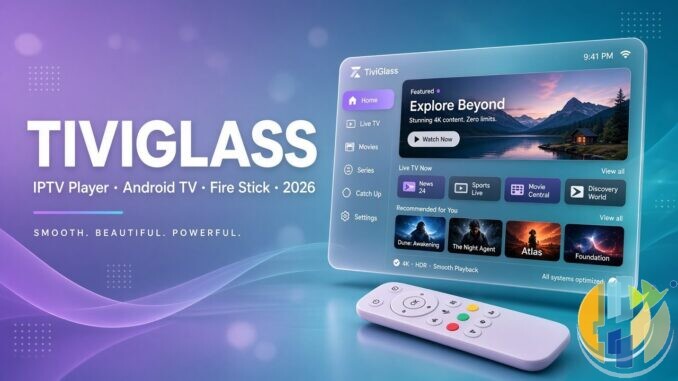
Readers keep asking me for “one more IPTV player that doesn’t feel like a phone app glued onto a Fire Stick.” Fair request. I have already covered a few TV-first clients this week, and TiviGlass kept showing up in the same inbox threads, so I went straight to the official site and wrote down what it actually claims.
Official home is tiviglass.com. The pitch is blunt: a living-room player for Fire TV, Google TV, Nvidia Shield and generic Android TV boxes. One signed APK. You bring your own provider. The app organises live TV, catch-up (when the provider supports it), movies and shows around a remote, not a touchscreen.
Player only, every time: TiviGlass does not provide, host, sell or resell channels, playlists or media subscriptions. You add legal sources you are authorised to use. No playlist means nothing to watch. That is their wording, and it is mine too.
Also worth saying early, because the naming swirl online gets messy: this is not a rebadge of StreamVault, Trinity TV Player, or Lumora. Different site, different freemium stack, different install path. Soft-linking those reviews so you can compare apples to apples, not clones.
What TiviGlass actually is
From the official homepage and features pages, TiviGlass is a freemium IPTV client. Free to install and watch with no account and no card required for the basics. Paid tiers unlock recordings, Sports Hub tools, cloud sync, multi-view and deeper customisation. Checkout is framed as happening on your phone via their billing flow, not as a Google Play or Amazon Appstore purchase.
The download page is clear on distribution: not on Google Play. Same APK covers TV, phone and tablet. Future builds can arrive in-app. That sideload model is normal for this class of player, and it means you should treat the official site as the source of truth rather than random “APK mirror” blogs.
- Platforms claimed: Amazon Fire TV / Fire Stick, Google TV, Android TV, Nvidia Shield, compatible generic boxes, plus phones and tablets with the same package
- Provider formats: Xtream Codes, Stalker / Ministra, and M3U with optional XMLTV guide data
- Free core: live TV, full EPG, catch-up where supported, movies/shows libraries from your provider, multiple playlists, parental controls, automatic app updates
- Organisation tools: hide groups, rename channels, favourites, keep playlists separate (changes live on the TV, not on the provider)
Playlist types and the guide
Setup is the usual three doors, explained properly on their setup guide:
- Xtream Codes: server address, username and password
- Stalker / Ministra: portal address, MAC, and sometimes an STB profile
- M3U + XMLTV: playlist URL with optional programme-guide data
Multiple playlists sit in the free tier. Official copy says you can keep providers separate and switch without rebuilding the whole app state. That matters if you run a personal legal service on one profile and a second authorised catalogue on another.
EPG is a first-class free feature on their features page: now/next, a readable grid, D-pad navigation, live preview while browsing, and catch-up launched from the guide when the provider exposes archive. If the guide arrives blank, their learn centre points at EPG sources, XMLTV URLs, offsets and refresh rather than pretending magic will invent programme data. Sensible. Empty guide usually means empty data, not a broken remote.
Movies and shows are framed as catalogues supplied by your provider, with posters, details, seasons, search and resume state. In other words, TiviGlass is dressing the feed your login already unlocks. It is not inventing a film shelf out of thin air.
Free versus Essentials versus Premium
I like when a site puts the money bits in pounds without hiding them. Official pricing (checked on tiviglass.com/pricing) looks like this:
- Free (£0): live TV, full programme guide, catch-up, movies/shows, Xtream / Stalker / M3U, multiple playlists, parental controls, app updates
- Essentials (£25, one payment): recordings and Series Links, Sports Hub with fixtures/reminders, advanced playback controls. Official note says you can upgrade to Premium later and pay only the difference
- Premium Lifetime (£39.99, one payment, recommended on the site): everything in Essentials, plus cloud sync and scheduled backup, multi-view, filters, colour themes, channel auto-rename, external player handoff, home layout customisation, and more across every TV signed into the account
- Premium yearly: £19.99, auto-renews until cancelled
There is also a 7-day Premium trial with no card required on the pricing page. That is a cleaner try-before-you-buy story than half the freemium players I see, where “trial” quietly means card-on-file and a reminder email you never asked for.
Important billing disclaimer from their own terms framing: buying Premium unlocks software features. It does not include a playlist, stream package or third-party IPTV service. If someone sells you “TiviGlass channels,” walk away. Wrong product category entirely.
How I’d install it (official path only)
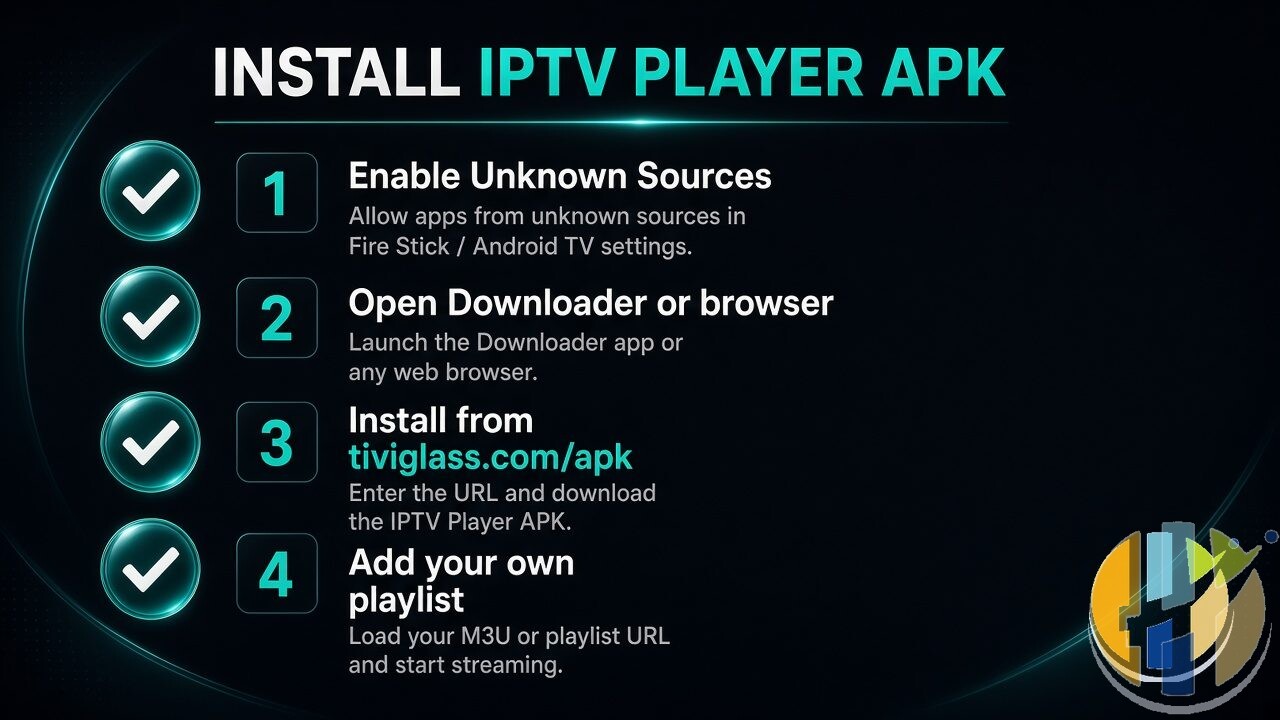
I am not inventing Downloader numeric codes. The official download and setup pages tell you to open Downloader and enter the address tiviglass.com/apk, then approve the unknown-sources prompt and install. You can also take the signed APK directly from their download flow if you prefer a USB stick or another installer.
Rough living-room route that matches their guide:
- Enable apps from unknown sources for your installer of choice on Fire TV / Google TV / Android TV
- Open Downloader (or sideload the APK another clean way)
- Enter
tiviglass.com/apkas they document, install, launch - Pick Xtream, Stalker / Ministra, or M3U and enter the details your provider already gave you
- Wait for categories, channels, VOD/series and guide data to populate
- Optional: scan the phone sign-in QR if you want account tools, portal playlist sync or paid features
Favourites, hide unwanted groups, and a parental PIN are available once you are in. That parental layer is listed as a free core feature, which is the right default for a shared living-room stick.
If Downloader “cannot find the app,” their troubleshooting note is useful: put tiviglass.com/apk in the address field, not a random search box, and confirm the TV is online. Simple, but people trip on it constantly.
Where it sits next to the other players I reviewed
Quick orientation for regulars of this site:
- StreamVault is a free, GitHub-distributed TV-first client with a heavy DVR / multiview toolkit and Jellyfin support in its own docs.
- Trinity leans into a distinct living-room UI plus an optional Enhanced lane for cloud backup and web manager sync.
- Lumora is the merge play: IPTV plus Jellyfin/Plex in one lightweight interface.
TiviGlass is its own freemium product with a polished official marketing site, GBP-priced Essentials / Premium ladders, Sports Hub as a paid add-on lane, and an explicit “one APK for Fire, Google and Android TV” story. Different itch. If you already love one of the others, you do not need to hop just because a new logo appeared on Reddit.
Who this is for
If you already pay for a legal IPTV or similar service that hands you Xtream, Stalker or M3U credentials, and you want a remote-first client on a Fire Stick, Google TV box or Shield, TiviGlass is aimed at you. The free tier looks usable on paper for day-to-day live TV and VOD browsing. Paid upgrades make more sense if you care about recordings, Sports Hub reminders, multi-view or syncing settings across several TVs.
If you only want Netflix from the Amazon store, you do not need it. If you expected channels built in, wrong kind of software. If a stranger messages you an “official” APK from a random file host, ignore them and stick to tiviglass.com/download.
I will keep an eye on how the free guide and paid recording tools feel after a longer stretch on a real stick. Feature pages are tidy. Living with a messy playlist at 11pm is the real exam.
Use only sources you are legally authorised to access. Player is not content.
Also useful: a compact Google TV stick or box to run this on the big screen.
- Xiaomi TV Stick 4K (2nd Gen): a compact Google TV stick that plugs straight into the TV. Amazon UK | Amazon US | Amazon DE | Amazon FR | Amazon IT
- Google TV Streamer 4K: a simple Google TV box with Ethernet and the full Play Store. Amazon UK | Amazon US | Amazon DE | Amazon FR | Amazon IT
Best IPTV boxes to buy
These are media boxes and sticks that can run players and licensed apps. The first six are Google certified Android TV or Google TV devices with Google Play; the last one, the Formuler, runs its own Android and is not certified. They are not pirate hardware. They do not come with channels or playlists. I am not claiming I personally lab-tested every SKU this month.
Buy one of these when: Fire TV sideload is a hassle on your model, you want Play Store apps on a proper TV OS, or you want a dedicated player shell behind the sofa. No Fire TV device is on this shortlist.
- NVIDIA SHIELD TV Pro: the premium pick, a certified Android TV player with AI upscaling, Dolby Vision/Atmos and Gigabit Ethernet for the main living-room telly. Amazon UK | Amazon US | Amazon DE | Amazon FR | Amazon IT
- Google TV Streamer 4K: solid Google TV living-room default with Ethernet, 32GB storage and Dolby Vision/Atmos. Amazon UK | Amazon US | Amazon DE | Amazon FR | Amazon IT
- Xiaomi TV Box S (3rd Gen): Google TV box with 32GB storage, Wi-Fi 6 and Dolby Vision/Atmos, the cheaper box route than the Streamer. Amazon UK | Amazon US | Amazon DE | Amazon FR | Amazon IT
- Xiaomi TV Stick 4K (2nd Gen): budget Google TV stick with Wi-Fi 6 and Dolby Vision/Atmos when you want HDMI-simple, not a full box. Amazon UK | Amazon US | Amazon DE | Amazon FR | Amazon IT
- Budget Google TV 4K player: a cheaper certified Google TV player for a second telly. The model differs by store, so each link names the one you get there. MECOOL KD3 (Amazon UK) | onn. Google TV 4K Streaming Box (Amazon US) | Strong LEAP-NOVA-X (Amazon DE) | Strong LEAP-NOVA-X (Amazon FR) | Strong LEAP-NOVA-X (Amazon IT)
- MECOOL MEon1: Google TV certified 4K box with AI upscaling and 32GB storage for a dedicated player behind the sofa. Amazon UK
- Formuler Z12 Ultra SE: the newest Formuler box, built around MYTVOnline 4 for IPTV playlists. It runs Formuler’s own Android rather than certified Google TV, so there is no Netflix in HD and it is the one box here without Google certification. Formuler Z12 Ultra SE (Amazon UK) | Formuler Z12 Ultra SE (Amazon US) | Formuler Z12 Ultra SE (Amazon DE) | Formuler Z12 Ultra SE (Amazon FR) | Formuler Z12 Ultra SE (Amazon IT)
Still shopping for a Fire TV device? Fine for Prime Video and the Appstore universe. Not the shortlist above. And none of these boxes magically make unlicensed streams legal.
YouTube: @husham122
About / contact: www.husham.com/about
Article ID: HUSHAM-20260909-TG27