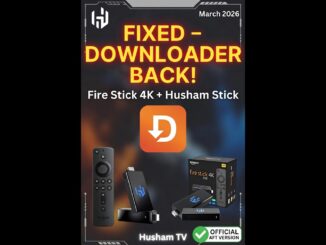
Why You Cannot Install Downloader on Fire TV Stick Select (And What to Buy Instead in 2026)
Hey everyone, if you bought a new Fire TV Stick and cannot find or install Downloader, you are not alone. The issue is not you – it is the device.
The **Fire TV Stick Select** (also called Fire TV Stick 4K Select) runs on Amazon’s new Vega OS instead of the usual Fire OS. This change blocks normal sideloading, so Downloader will not install and most custom apps will not work. In this clear guide, I explain why this happens and give you better options to buy instead.
Why Downloader Will Not Install on Fire TV Stick Select
Regular Fire TV Sticks use Fire OS, which is based on Android. You can turn on unknown sources, install Downloader, and sideload any APK you want.
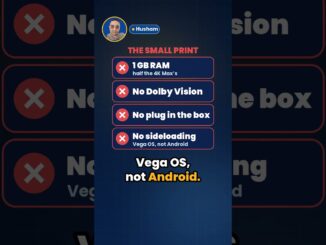
The Fire TV Stick Select uses **Vega OS**, a brand-new Linux-based system made by Amazon. Because it is not Android anymore:
- Downloader does not appear in the Appstore.
- There is no working “Apps from Unknown Sources” option.
- Normal Android APKs will not run.
Amazon made this change for better speed and control, but it removes the freedom that made Firesticks popular for custom streaming.
Other Reasons to Skip the Fire TV Stick Select
Besides the Downloader problem, here is what else you miss:
- Much smaller Appstore with fewer streaming and utility apps.
- No easy way to install Kodi, Stremio, or extra live TV tools.
- Limited RAM and sometimes slower menus compared to higher models.
- Less future-proof if you like customizing your setup.
It is the cheapest 4K option, but you lose a lot of flexibility.
What Should You Buy Instead? Best Alternatives in 2026
If you want to keep using Downloader and sideload apps, here are the top choices right now:
1. Fire TV Stick 4K Max (2nd Gen) – My Top Pick
Fastest Firestick with 16 GB storage, Wi-Fi 6E, and full Fire OS support. Downloader installs easily and performance is smooth even with heavy apps.
2. Fire TV Stick 4K Plus
Great middle option with solid speed and full sideloading. Cheaper than the Max but still much better than the Select.
3. Fire TV Stick 4K (2nd Gen)
Good budget choice that still runs regular Fire OS. Perfect if you want 4K without spending extra.
4. Fire TV Cube
Most powerful Amazon device with HDMI input and IR blaster. Ideal if you want the best performance and control.
5. Husham Stick – Best Android TV Alternative
If you want complete freedom from Amazon’s restrictions, get the **Husham Stick**. It runs full Android TV 10, so you can install Downloader, Kodi, any APK, and all your favorite apps without limits. It comes with 2 GB RAM and 16 GB storage, works great with IPTV, live TV, and everyday streaming.
Many readers switch to the Husham Stick and never look back because it feels more open and reliable for custom setups.
Quick Comparison: Fire TV Stick Select vs Better Options
| Feature | Fire TV Stick Select (Avoid) | Fire TV Stick 4K Max | Husham Stick |
|---|---|---|---|
| Operating System | Vega OS (Linux) | Fire OS (Android-based) | Full Android TV 10 |
| Downloader & Sideloading | Not possible | Full support | Full support + any APK |
| Storage | Limited | 16 GB | 16 GB |
| RAM | 1 GB | 2 GB+ | 2 GB |
| App Freedom | Only official Appstore | High | Complete freedom |
| Best For | Basic Prime Video only | Fast Firestick experience | Full custom streaming & IPTV |
Always check the exact model name and description before you buy. Look for “Fire OS” on Amazon Firesticks or choose the Husham Stick if you want pure Android TV freedom.
What to Do If You Already Own the Fire TV Stick Select
If you already have one, you are stuck with the official Appstore. Some people return it while the window is open. Others keep it for simple Netflix and Prime use only. For real custom streaming, it is better to switch to one of the options above.
Final Thoughts
The Fire TV Stick Select is Amazon’s way of making devices more locked down. It works for basic watching, but if you want Downloader, Kodi, or extra apps, skip it and get a better model or the Husham Stick.
Which device are you using right now? Did you run into the Select issue? Tell me in the comments – I read every one and will help if I can.
Stay safe and enjoy your streaming setup the way you want it!
Related Reads:
Also useful: the two devices I would compare if your current Fire TV device cannot run Downloader.
- Amazon Fire TV Stick 4K Max (newest gen): the current Wi-Fi 6E model; check the listing says Fire OS rather than Vega OS before you pay. Amazon UK | Amazon US | Amazon DE | Amazon FR | Amazon IT
- Google TV Streamer 4K: a simple Google TV box with Ethernet and the full Play Store. Amazon UK | Amazon US | Amazon DE | Amazon FR | Amazon IT
Best IPTV boxes to buy
These are media boxes and sticks that can run players and licensed apps. The first six are Google certified Android TV or Google TV devices with Google Play; the last one, the Formuler, runs its own Android and is not certified. They are not pirate hardware. They do not come with channels or playlists. I am not claiming I personally lab-tested every SKU this month.
Buy one of these when: Fire TV sideload is a hassle on your model, you want Play Store apps on a proper TV OS, or you want a dedicated player shell behind the sofa. No Fire TV device is on this shortlist.
- NVIDIA SHIELD TV Pro: the premium pick, a certified Android TV player with AI upscaling, Dolby Vision/Atmos and Gigabit Ethernet for the main living-room telly. Amazon UK | Amazon US | Amazon DE | Amazon FR | Amazon IT
- Google TV Streamer 4K: solid Google TV living-room default with Ethernet, 32GB storage and Dolby Vision/Atmos. Amazon UK | Amazon US | Amazon DE | Amazon FR | Amazon IT
- Xiaomi TV Box S (3rd Gen): Google TV box with 32GB storage, Wi-Fi 6 and Dolby Vision/Atmos, the cheaper box route than the Streamer. Amazon UK | Amazon US | Amazon DE | Amazon FR | Amazon IT
- Xiaomi TV Stick 4K (2nd Gen): budget Google TV stick with Wi-Fi 6 and Dolby Vision/Atmos when you want HDMI-simple, not a full box. Amazon UK | Amazon US | Amazon DE | Amazon FR | Amazon IT
- Budget Google TV 4K player: a cheaper certified Google TV player for a second telly. The model differs by store, so each link names the one you get there. MECOOL KD3 (Amazon UK) | onn. Google TV 4K Streaming Box (Amazon US) | Strong LEAP-NOVA-X (Amazon DE) | Strong LEAP-NOVA-X (Amazon FR) | Strong LEAP-NOVA-X (Amazon IT)
- MECOOL MEon1: Google TV certified 4K box with AI upscaling and 32GB storage for a dedicated player behind the sofa. Amazon UK
- Formuler Z12 Ultra SE: the newest Formuler box, built around MYTVOnline 4 for IPTV playlists. It runs Formuler’s own Android rather than certified Google TV, so there is no Netflix in HD and it is the one box here without Google certification. Formuler Z12 Ultra SE (Amazon UK) | Formuler Z12 Ultra SE (Amazon US) | Formuler Z12 Ultra SE (Amazon DE) | Formuler Z12 Ultra SE (Amazon FR) | Formuler Z12 Ultra SE (Amazon IT)
Still shopping for a Fire TV device? Fine for Prime Video and the Appstore universe. Not the shortlist above. And none of these boxes magically make unlicensed streams legal.