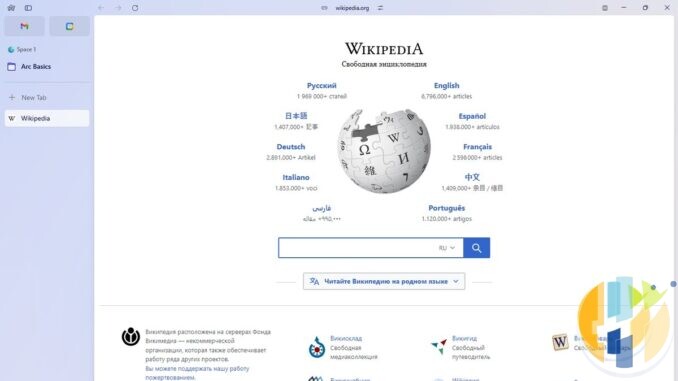
Every tech company eventually writes the same letter. It opens with how much they loved the product, pauses for a brave paragraph about security, and ends with a link to the thing they would rather you used instead. The Browser Company sent theirs on Thursday 22 October 2026: Arc, the browser with the sidebar that made people evangelical at dinner parties, stops working on Mac and Windows on Tuesday 22 December 2026. The replacement on offer is Dia, the company’s newer AI browser. Same team, new name, and a pricing page that cannot quite agree with itself (more on that shortly).
If you have years of Spaces, pinned tabs and folders in Arc, this is not a panic job, but it is a job with a deadline, and it lands in the week when most of us are wrapping presents with one hand and looking for the Sellotape with the other. Below: what is confirmed, what Dia brings over and what it quietly leaves behind, the catch for Intel Macs and Windows 10, how to get your stuff out if you are not going to Dia, and a dated checklist that works wherever you live.
What is confirmed, and what is not
| Question | Answer (checked 24 October 2026) | Source |
|---|---|---|
| When does Arc stop working? | Tuesday 22 December 2026, on macOS and Windows. You can no longer sign in, and all Arc services are switched off | Arc Help Center; arc.net |
| Can I still make a new Arc account? | No. New accounts stopped on 22 October 2026. Existing members carry on as normal for now | Arc Help Center |
| What happens on 23 November? | Arc Search on iPhone and Android loses Browse for Me and its other AI features, and you can no longer sign in or sync. It keeps working as a basic browser. Arc on Mac and Windows starts showing sunset reminders | Arc Help Center |
| Last day to request a copy of your Arc account data | Tuesday 15 December 2026 (this is account data, not your browsing history or passwords) | Arc Help Center |
| What happens to my data after 22 December? | Accounts are deactivated and personal data is deleted within 30 days. The company says it can no longer retrieve anything after that date | Arc Help Center |
| Arc Search for Android | Removed from Google Play and from the devices it is installed on, on 22 December | Arc Help Center |
| Arc Search for iPhone | Keeps working as a mobile browser after the sunset | Arc Help Center |
| Does Arc get updates until then? | Basic updates and fixes only. No new features, and support only looks at big problems like crashes | Arc Help Center |
| What time on 22 December does it switch off? | Not published in anything I read | None yet |
| Will Arc be open sourced? | No sign of it. TechCrunch quotes the CEO, Josh Miller, saying it cannot be done meaningfully without also open sourcing the engine Dia is built on | TechCrunch, 22 October 2026 |
The official reason is security. In the company’s words, keeping a browser secure “takes constant, dedicated work that is only increasing in the age of AI”, so the security team now works on Dia. That is a perfectly reasonable thing to say, and it also happens to be the exact sentence you would write if you wanted everyone on the browser you can charge for. Both things can be true at once.
Why the date matters more in Sydney than in San Francisco
The Browser Company gives a date, not a time. It is a New York company, so for reference only, here is when Tuesday 22 December begins in New York, shown in your own time. If the switch follows New York’s calendar, that is roughly when the lights could go out. If it follows yours, many of you lose Arc even earlier.
| Where you are | Midnight on 22 December in New York is |
|---|---|
| Los Angeles (US Pacific) | Mon 21 Dec, 9:00 pm |
| New York (US Eastern) | Tue 22 Dec, 00:00 |
| UK and Ireland (GMT) | Tue 22 Dec, 05:00 |
| Central Europe (Paris, Berlin, Rome, Madrid) | Tue 22 Dec, 06:00 |
| Dubai, Abu Dhabi (UAE) | Tue 22 Dec, 09:00 |
| India (IST) | Tue 22 Dec, 10:30 |
| Singapore | Tue 22 Dec, 13:00 |
| Tokyo | Tue 22 Dec, 14:00 |
| Sydney, Melbourne (AEDT) | Tue 22 Dec, 16:00 |
| Auckland (NZDT) | Tue 22 Dec, 18:00 |
My advice is boring and therefore correct: treat Monday 21 December, your local time, as the real deadline, and aim to be finished by the weekend of 12 and 13 December. A shutdown that “happens on a date” has a habit of happening at whatever moment you were about to copy that one important tab.
Moving to Dia: what comes over
If you are happy to go where the company points, the move is short. According to Arc’s own “Move from Arc to Dia” guide:
- Download Dia from diabrowser.com/download and open it. Keep Arc installed until the import finishes, because Dia reads your data through the Arc app.
- On Windows, quit Arc first. If you forget, Dia shows a “Cookies file locked” message and offers to close Arc for you.
- When Dia asks which browser to import from, pick Arc, then choose which extensions to install.
- Already using Dia? On a Mac go to Dia, then Import from Another Browser. On Windows open the Dia app menu and choose Import from another browser. Each Arc Space arrives as a new Profile, and nothing already in Dia changes.
What arrives: Spaces become Profiles, Favorites become icon only pinned tabs, pinned tabs stay pinned with their custom names, folders become pinned Tab Groups (folders inside folders become separate groups, because Dia does not nest), and GitHub Live Folders become Live Groups. Bookmarks, history, passwords, cookies (so you stay signed in), extensions and open tabs come too. Dia supports Chrome Web Store extensions, and when you import from Arc it switches itself to the sidebar layout so it looks familiar.
Three bits of small print the welcome mat does not shout about:
- You need a new account. Your Arc account does not carry over. You can use the same email address, but it is a separate Dia account.
- Importing is a one time copy. Arc and Dia do not stay in sync. Anything you add to Arc after importing will not appear in Dia, so either import late or stop using Arc once you have moved.
- Payment cards and autofill do not come over. Arc’s guide says Dia does not import saved payment methods or autofill data from any browser. Have your cards to hand for the Christmas shopping you were going to do in Arc.
What Dia leaves behind
Arc’s own FAQ lists the features that do not exist in Dia: Air Traffic Control, Boosts, Easels, Little Arc, Peek, TypeTravel and Instant Links. Easels and Boosts do not come over when you import, and Boosts cannot be exported at all. If you spent an afternoon making a site look less hideous with a Boost, take a screenshot and say goodbye.
Easels can be saved, one at a time. Arc’s export guide says to open the Easel, select the Share icon in the bottom right corner, then Share Via to save it as a PNG image. Easels live in your Arc account, so after 22 December they are gone, and they never move to Dia. If you used Air Traffic Control to send certain sites to certain Spaces automatically, you will now be switching Profiles yourself, like it is 2019.
Tab archiving changes too. Dia’s version is called Tidy Tabs, it is off by default, and when you turn it on it moves inactive tabs to Recently Closed once a day. If you relied on Arc tidying up behind you, switch Tidy Tabs on after the import or prepare for a very long tab bar by January.
The Intel Mac and Windows 10 catch
Here is the part the farewell page does not put in the headline. Dia’s own download page says it is “Currently available on macOS (Apple Silicon) and Windows 11.” The Homebrew listing for the current Mac release (version 1.54.2) also requires an ARM Mac on macOS 14 or later, and The Browser Company said macOS 14 and M1 or later when Dia launched on Mac in October 2025.
So if you run Arc on an Intel Mac, or on a PC that is still on Windows 10, the “move to Dia in a few clicks” plan does not apply to you. Microsoft ended free Windows 10 support in October 2025 anyway, so that PC already has bigger worries than its tab layout. Either way you will be exporting your data and moving to another browser, which the next section covers. Dia’s download page only lists Mac and Windows, so Arc Search users on phones are on their own as well.
Not going to Dia? Get your stuff out properly
Arc’s export is not a bookmarks file. It is a plain list of links, which is fine, as long as you know that before you try to import it into Chrome and nothing happens. The steps, from Arc’s export guide:
- Mac: Arc menu, Settings, Advanced, Export Data, then choose where to save.
- Windows: press Control and comma (or open the Arc menu and pick Settings), find Export Spaces and tabs in the Advanced section, select Export Data, then save.
Arc saves a file called Arc Data Export.md with a section for each Space, listing Favorites, pinned tabs, folders and other sidebar tabs as links. Open it in any text editor and re-add what you want to keep in your new browser. For a single folder, right click it in the sidebar and choose Copy All Links; on a Mac, hold Option with the menu open to get Copy All Links as Markdown, which keeps the titles. If you have not opened Arc in months, the farewell page says you can download it again and export from inside the app before 22 December.
Passwords
The export file does not include your passwords, and the data copy you can request by 15 December does not either (the company says it has no access to them). Arc is a Chromium browser underneath, and its password manager settings live at , where an Export passwords option downloads a CSV file. That address comes from SigmaOS’s Arc migration guide rather than Arc’s own help pages, so if it moves, look in Arc’s settings for the password manager.
A CSV of every password you own is a plain text file. Treat it like a house key left on the doormat: import it straight away, then delete it and empty the bin. A password manager is a better home for it than any single browser, because browser companies, as we have all just learned, come and go. NordPass, for example, imports a CSV under Settings, Import and Export, Import Items, Spreadsheet, according to its support pages; my NordPass explainer covers what it does, and you can get NordPass here.
Your account data
If you want the company’s own record of your account (name, email, join date and how you used Arc), request it through the chat button on the Arc Help Center by Tuesday 15 December. The same deadline applies if you would rather ask them to delete it now than wait for the automatic deletion within 30 days of 22 December.
Arc Search on your phone
The mobile app gets two different endings, depending on which phone you own:
- iPhone: from Monday 23 November, AI features including Browse for Me switch off and you can no longer sign in or sync. After that it carries on as a lite browser, even after 22 December.
- Android: the same changes on 23 November, then on 22 December the app is removed from Google Play and from the phones it is installed on. Not just unsupported. Removed.
To save your open tabs, Arc’s help pages say: on Android, open the Tab Switcher, then Settings, Storage, Export data. On iPhone, tap the Tab Switcher icon in the bottom left, then Settings, then Export Data. (Arc’s own farewell page also mentions an Export Open Tabs option in Settings on iPhone, so if the wording differs on your phone, that is why.) Do it before 23 November if you rely on sync, because after that date the tabs only exist on the phone in your hand.
Is Dia actually free?
The browser is. Arc’s FAQ says the Arc features you use are free in Dia and the AI is optional, and Dia’s plans page lists a free Better Browser tier with Profiles, tab groups, split view, picture in picture, a built in ad and tracker blocker and cross device sync. New users get a 14 day trial of the top plan with no card needed; when it ends, the AI features pause and Dia carries on as a free browser.
The AI plans are where the small print gets fun. On the same page, checked today, the price card for Better Answers says $10 a month while the FAQ underneath says $20 a month. Better Days is $100 a month in both places, with extra usage sold in $20 blocks. I have no idea which Better Answers number is right, and I suspect neither does the page. Check the checkout screen before you pay anything. The plans page also says paid plans are starting with new Mac users, existing Dia users get at least 30 days’ notice by email, and “Dia on Windows stays as it is for now”. Prices are shown in US dollars; I could not find local pound, euro, dirham, rupee or Australian dollar prices on the page, so expect the usual currency surprise at checkout if you do subscribe.
If you leave The Browser Company altogether
Plenty of Arc fans will take this as a sign. If that is you, pick a browser your hardware actually supports, then:
- Export your Spaces and tabs to Arc Data Export.md and save a copy somewhere that is not the Downloads folder.
- Export passwords to CSV, import them into your new browser or password manager, then delete the CSV.
- Write down your extensions from Arc’s extensions page and install them again in the new browser. Arc’s FAQ confirms they are Chrome Web Store extensions, so any Chromium browser can use the same ones.
- Save each Easel as a PNG and screenshot any Boost you will miss.
- Sign in to your important sites in the new browser (email, bank, work tools) while Arc still works, so you can copy a forgotten password across if you need to.
- Set the new browser as your default, and only then uninstall Arc. If you are trying Dia first, keep Arc installed until the import finishes.
Arc is not the only service packing up this season. If you also bought films on Vimeo, my Vimeo On Demand checklist has a deadline a month earlier, and the Marvel Unlimited shutdown guide follows the same save first, delete later rule.
Dated checklist
- This week: update Arc to the latest version (the farewell page says it adds the export option and a smoother Dia import). Check whether your Mac is Apple Silicon or Intel (Apple menu, About This Mac) and whether your PC is on Windows 10 or 11 (Settings, System, About).
- By Sunday 8 November: decide: Dia, or another browser. If Dia, install it and run a test import. Remember it is a one time copy, so you can repeat the import nearer the date if your tabs keep changing.
- By Sunday 22 November: on your phone, export Arc Search tabs before AI features, sign in and sync stop on Monday 23 November.
- By Sunday 6 December: export Spaces and tabs, export passwords to CSV and import them somewhere safe, save Easels as PNG, screenshot Boosts.
- By Tuesday 15 December: request a copy of your Arc account data, or ask for deletion, via the Arc Help Center chat.
- Weekend of 12 and 13 December: final import into Dia, or final export for your new browser. Check that your important logins work.
- Monday 21 December, your local time: treat this as the last safe day. Make Arc stop being your default browser so links from email and chat apps open in the new one.
- Tuesday 22 December: Arc stops working on Mac and Windows; Arc Search leaves Android phones. Uninstall Arc on desktop.
- By about Thursday 21 January 2027: 30 days after deactivation, the company says personal data is deleted.
The short version
Arc stops on Tuesday 22 December 2026, Arc Search loses its AI on Monday 23 November and the account data request window closes on Tuesday 15 December. On an Apple Silicon Mac or Windows 11 PC, Dia imports almost everything except Easels, Boosts, payment cards and autofill, but it needs its own account and it does not stay in sync. On an Intel Mac or Windows 10, Dia is not an option, so export your tabs to Arc Data Export.md, move your passwords via CSV and delete the file afterwards. And whatever you do, do not leave it until the morning of the 22nd, because that morning starts in Auckland while New York is still asleep.
Your browser is only one screen in the house. If the telly in the lounge is running an old smart TV platform that has also stopped getting updates, a streaming box that gets current apps from Google Play is the simple fix. Certified Google TV and Android TV boxes, like the SHIELD at the top of this list, get their apps from the Play Store, but check that the apps you rely on are in the store in your country before you buy. The Formuler at the end is an IPTV player box, which is a different job entirely.
Best IPTV boxes to buy
These are media boxes and sticks that can run players and licensed apps. The first six are Google certified Android TV or Google TV devices with Google Play; the last one, the Formuler, runs its own Android and is not certified. They are not pirate hardware. They do not come with channels or playlists. I am not claiming I personally lab-tested every SKU this month.
Buy one of these when: Fire TV sideload is a hassle on your model, you want Play Store apps on a proper TV OS, or you want a dedicated player shell behind the sofa. No Fire TV device is on this shortlist.
- NVIDIA SHIELD TV Pro: the premium pick, a certified Android TV player with AI upscaling, Dolby Vision/Atmos and Gigabit Ethernet for the main living-room telly. Amazon UK | Amazon US | Amazon DE | Amazon FR | Amazon IT
- Google TV Streamer 4K: solid Google TV living-room default with Ethernet, 32GB storage and Dolby Vision/Atmos. Amazon UK | Amazon US | Amazon DE | Amazon FR | Amazon IT
- Xiaomi TV Box S (3rd Gen): Google TV box with 32GB storage, Wi-Fi 6 and Dolby Vision/Atmos, the cheaper box route than the Streamer. Amazon UK | Amazon US | Amazon DE | Amazon FR | Amazon IT
- Xiaomi TV Stick 4K (2nd Gen): budget Google TV stick with Wi-Fi 6 and Dolby Vision/Atmos when you want HDMI-simple, not a full box. Amazon UK | Amazon US | Amazon DE | Amazon FR | Amazon IT
- Budget Google TV 4K player: a cheaper certified Google TV player for a second telly. The model differs by store, so each link names the one you get there. MECOOL KD3 (Amazon UK) | onn. Google TV 4K Streaming Box (Amazon US) | Strong LEAP-NOVA-X (Amazon DE) | Strong LEAP-NOVA-X (Amazon FR) | Strong LEAP-NOVA-X (Amazon IT)
- MECOOL MEon1: Google TV certified 4K box with AI upscaling and 32GB storage for a dedicated player behind the sofa. Amazon UK
- Formuler Z12 Ultra SE: the newest Formuler box, built around MYTVOnline 4 for IPTV playlists. It runs Formuler’s own Android rather than certified Google TV, so there is no Netflix in HD and it is the one box here without Google certification. Formuler Z12 Ultra SE (Amazon UK) | Formuler Z12 Ultra SE (Amazon US) | Formuler Z12 Ultra SE (Amazon DE) | Formuler Z12 Ultra SE (Amazon FR) | Formuler Z12 Ultra SE (Amazon IT)
Still shopping for a Fire TV device? Fine for Prime Video and the Appstore universe. Not the shortlist above. And none of these boxes magically make unlicensed streams legal.
Sources I read for this piece, all on 24 October 2026: “A farewell to Arc” on arc.net; the Arc Help Center articles “Arc Sunset: Key Dates and What to Expect”, “Arc Sunset: Frequently Asked Questions”, “Move from Arc to Dia” and “How Do I Export My Data from Arc?”; Dia’s download page and plans page on diabrowser.com; the Homebrew cask listing for Dia 1.54.2; TechCrunch, “Arc browser sunsets December 22 as The Browser Company doubles down on Dia” (22 October 2026); 9to5Mac on Dia’s Mac launch requirements (8 October 2025); SigmaOS’s Arc migration guide for the password export address; and NordPass support, “How to import passwords to NordPass”. Time zones converted with Python’s zoneinfo time zone database. Featured image: Arc for Windows 1.3.2 screenshot by Gawiłowski, Wikimedia Commons, CC0.
Written by Dr Husham Memar