Every AI coding tool on Earth promises to write your app while you make a cup of tea. Then you come back to 400 lines of confident nonsense, a deleted config file and a chatbot apologising like a footballer after a two footed tackle. On Thursday 22 October 2026 Google open sourced the thing it says thousands of its own engineers use to stop that happening: the Elephant-Goldfish Model plugin, or EGM. It lands in Google’s Antigravity, and also in Claude Code and Codex, which is a fun sentence to read from Google.
The idea is old fashioned in the best way: write the plan first, get it torn apart by critics who have never seen it before, and only then let the AI type code. The twist is that the critics are AI too, and they are deliberately given the memory of a goldfish. Here is what it is, who it is for, how to install it on each tool, a worked example on a small hobby project, and the small print Google’s announcement does not linger on.
Quick answer
- What it is: a free, open source plugin (Apache 2.0) that makes your AI coding agent write and stress test a design document before it writes any code.
- Elephant: one long, deep context session that interviews you and drafts the plan. No code allowed.
- Goldfish: fresh subagents with zero memory of your chat that read only the plan (and your code) and try to break it.
- The three commands:
/egm-brainstorm,/egm-draft,/egm-review. In Claude Code they become/egm:egm-brainstormand so on. - Works with: Antigravity, Claude Code and Codex pass Google’s own install and workflow tests. Claude Cowork and ChatGPT Work install but still have open verification gaps. Gemini CLI has no install route in the repository.
- Catch: it is “not an officially supported Google product”, it is version 0.1.0 with no published release, and every Goldfish review is another AI session eating your usage allowance.
What EGM actually is, in plain words
Think of building a garden shed. Most AI coding tools are a keen builder who starts sawing the moment you say the word “shed”. EGM makes the builder sit down with you first, draw the plan, and then hand that plan to three strangers who have never met you and ask: “Where does the door go? What is holding the roof up? Why is there a window in the floor?”
- The Elephant remembers everything. It is one long AI session that loads your project’s history and architecture, interviews you, argues with you about trade offs and drafts the design document. Google’s blog post is firm that no code is written here.
- The Goldfish remembers nothing. Each Goldfish is a separate, stateless subagent that reads only the draft spec and the live source code, with none of your conversation. Google’s point is that it shares no blind spots with the session that wrote the plan, so it spots the gaps you both stopped seeing.
- The human owns the outcome. The README puts it plainly: the AI is an exploration partner and an automated auditor, while you own the decisions.
Google calls the overall approach spec driven development, and the blog post quotes co author Dave Rensin’s line that “Design is the new code.” The stated goal is for the AI to produce the code you wanted “the first time after you press Enter”, which is a lovely sentence and also a promise every developer will want to test personally.
The three phases, and what you get
According to Google’s announcement and the repository README, the plugin walks you through three phases:
/egm-brainstorm(growing the Elephant): you explain the idea under a strict “no code” rule. The setup guide says it asks you to clarify the concept, then sends a six lens Goldfish swarm at it and writes aconcepts_brief.mdfile./egm-draft(drafting): turns that brief into a Markdown design document underdocs/designs/<feature>.md, section by section: the problem, the technical plan, the alternatives considered and an implementation plan that names the files to change./egm-review(the Goldfish Protocol): fresh Goldfish read the document. One must explain the plan back (if it cannot, the doc is ambiguous). Several play antagonistic reviewers hunting edge cases and hidden dependencies. A final one does a go or no go check that file paths, data structures and function signatures are all there.
The README lists four more skills: /egm-review-loop (runs reviewers in parallel), /egm-resolve (walks you through the findings and patches the doc), /egm-drift-report (checks whether your code has wandered away from the spec, which the setup guide suggests running weekly) and /egm-bootstrap (writes README files up through an existing codebase so the Elephant can find its way around). The reviewer personas include a Design Critic, Naive Reader, Tech Lead, Codebase Auditor, Structural Validator, Style Editor and Zoom Out Architect. It sounds like a very tense office party.
Who it is for (and who can skip it)
- Good fit: anyone who already uses an AI coding agent on something bigger than a single file, and keeps getting code that technically runs but does the wrong thing. Also small teams who want a design doc to review in a pull request before anyone builds.
- Also a fit: hobbyists who want to learn how to plan software. Google’s setup guide says you can practise the method by hand, with no install at all, and that “other than your time, it’s free”.
- Skip it for now: one line bug fixes (the setup guide itself says not to force the design first process when you can fix something in one go), anyone on a tight usage cap, and anyone whose favourite tool has no subagents (more on that below).
If you are already juggling several agents, my OpenBot review and Windows guide covers running Claude Code, Codex and friends side by side on one PC. EGM is a different idea: not more agents doing more work, but more agents arguing about the plan before anyone does any work.
Which tools it works with
This is where the headlines and the small print part company. Google’s blog says the plugin’s core goal is Antigravity, “with other development environments upcoming”. The repository has already gone further. Here is the status as written in its harness guide and test record, read on 26 October 2026:
| Tool | Install route in the repository | Status in Google’s own docs |
|---|---|---|
| Antigravity | agy plugin install with the GitHub URL, or /plugin in the IDE |
Passes install, reviewer isolation and end to end tests (Antigravity CLI 1.4.5, 22 October) |
| Claude Code | Plugin marketplace commands | Passes (Claude Code 2.1.308; review passed after a fix) |
| OpenAI Codex | Plugin marketplace commands | Passes (Codex 0.163.0) |
| Claude Cowork | claude.ai/plugins or the Cowork plugin panel | Installs; open verification gap (issue #105). A test run hit a usage limit partway through review |
| ChatGPT Work | Upload plugin archive, or workspace admin import | Installs; open verification gap (issue #106) |
| Gemini CLI | None listed | Not in the harness list. An early pull request that added a Gemini CLI manifest was closed without merging on 2 October |
Yes, Google’s new plugin has a tested install path for Anthropic’s and OpenAI’s coding tools and not for Google’s own Gemini CLI. One search engine summary I saw this morning confidently said Gemini CLI is supported. It is not listed anywhere in the repository, so treat that summary the way you would treat a Goldfish review: useful, occasionally wrong, never the final word.
How to install EGM, tool by tool
One rule first, from the harness guide: install the whole plugin. Skill only installers that copy just the skills/ folder break EGM, because the skills read the agents/ and resources/document_standards/ folders while they run. Every command below is copied from the repository’s README and harness guide, or from Google’s Antigravity plugin docs.
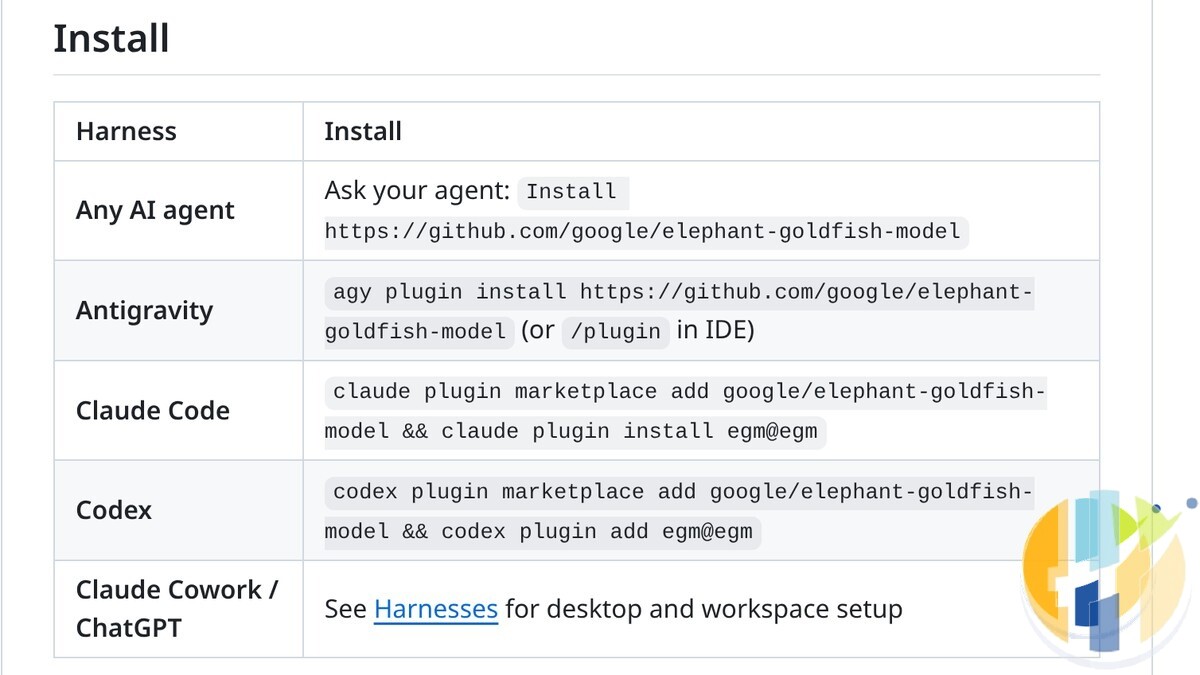
Antigravity (CLI, app or IDE)
- In a terminal, run:
agy plugin install https://github.com/google/elephant-goldfish-model - Or type
/pluginin the IDE, or inside an interactive Antigravity CLI session, to open the Plugins Manager. - Check it arrived with
agy plugin list. Antigravity’s docs sayagy plugin disable,agy plugin enableandagy plugin uninstallfollowed by the plugin name do what they say. - The IDE and app can also load a plugin folder placed in
.agents/plugins/in your project (that project only) or~/.gemini/config/plugins/(everywhere), according to the Antigravity plugin docs. If you go that way, copy the whole repository folder, not just the skills. - Start with
/egm-brainstorm.
Claude Code
- Run:
claude plugin marketplace add google/elephant-goldfish-model && claude plugin install egm@egm - Commands use a prefix in Claude Code, so it is
/egm:egm-brainstorm,/egm:egm-draftand/egm:egm-review. - Goldfish run through Claude’s Agent (Task) tool, as named, read only subagents.
OpenAI Codex
- Run:
codex plugin marketplace add google/elephant-goldfish-model && codex plugin add egm@egm - Note the different last word: Codex uses
plugin addwhere Claude Code usesplugin install. Tiny difference, classic way to lose ten minutes. - Codex does not get named personas. The harness guide says a general purpose subagent is told to read the persona file first.
Gemini CLI
There is no Gemini CLI command in the README or the harness guide, so I am not going to invent one. The README does have a catch all row for “any AI agent”: ask your agent to Install https://github.com/google/elephant-goldfish-model. That route is not in Google’s test record for Gemini CLI, and the harness guide is clear that if a tool has no way to start a fresh subagent, the review skills stop rather than review in the same context. Try it on a throwaway project, and keep an eye on the repository for a proper Gemini CLI entry.
Claude Cowork and ChatGPT
Cowork installs from claude.ai/plugins or the Cowork plugin panel, using the marketplace google/elephant-goldfish-model. ChatGPT is Plugins, Add, Upload plugin archive for personal testing, or an admin can import the marketplace from the repository URL with the path .agents/plugins. Both are marked as having open verification gaps, so treat them as the beta of a beta.
A worked example: a small Android TV helper
To make this concrete, here is how you would run EGM on a typical husham.com reader project. This is an illustration of the workflow from Google’s docs, not a transcript of a run. Say you want a small Python script on your PC that connects to your Google TV box over Wireless ADB every night, lists the apps using the most storage and emails you a short report. (If ADB on a TV is new to you, my wireless ADB guide for Android TV and Google TV covers the pairing part.)
- Brainstorm. In an empty project folder, run
/egm-brainstormand describe the idea in a paragraph. Expect questions back before anything else happens. The swarm then pokes the concept and you getconcepts_brief.md. - Draft. Run
/egm-draft. You end up withdocs/designs/tv-storage-report.md(the feature name is yours to choose), covering the problem, the plan, the alternatives and the exact files the script will need. - Review. Run
/egm-review docs/designs/tv-storage-report.md. This is the bit that earns its keep. The antagonistic reviewers are designed to hunt for exactly the things a hobby script forgets: what happens when the TV is asleep, when the Wireless Debugging port changes after a reboot (it can), or when your email password ends up sitting in plain text in the script. - Resolve. Run
/egm-resolveto go through the findings. Google’s setup guide warns the review gives “a lot” of feedback by design, and says to take what is relevant and ignore the rest. - Build. Tell your agent to implement the approved design doc. If it goes badly wrong, the guide says to fix the doc and try again rather than arguing with the code.
For a script this size, the honest answer is that you might not need all of it. Where EGM should pay off is the second and third feature, when the design docs already explain why the code looks the way it does, and /egm-drift-report can tell you when the code and the plan have stopped talking to each other.
If you already turned your Gemini Gems into skills, the format here will look familiar: EGM is built from the same SKILL.md style skills. My Gemini Gems to skills checklist explains how those work.
The catches
- “This is not an officially supported Google product.” That line is at the bottom of the README. Google’s blog says thousands of Googlers use the plugin every day to ship production code, and I have no reason to doubt it, but there is no support desk for the rest of us. You get GitHub issues and the Apache 2.0 licence, which, to be fair, is a proper open source licence with no catch on commercial use.
- It is early. The plugin manifest says version 0.1.0, and the GitHub page showed “No releases published” when I looked this morning. The repository was created on 13 September 2026. Expect things to move.
- Goldfish are not free. Every Goldfish is another full AI session. In Google’s own test record, one Antigravity review ran 16 reviewer subagents and one Codex test ran 15. The Claude Cowork test was cut short when it hit a usage limit. If you are on a capped plan, brainstorm and draft freely, then run the full review when it matters.
- Skill only installs break it. If a tool or a “skills marketplace” copies only the
skills/folder, EGM will fall over looking for its personas and document standards. Install the whole plugin. - No subagent tool, no Goldfish. The whole point is a fresh context. If your tool cannot start one, the review skills stop. The harness guide even tells you to check the actual tools available rather than trusting the product name.
- It writes files. Briefs, drafts and reports land in your working folder. The harness guide shows how to send them elsewhere by adding the line
EGM artifact directory: .dev/docsto your prompt or yourCLAUDE.mdorAGENTS.mdfile, then adding that folder to.gitignoreif you do not want it in git. - Some edges are rough. The test record notes validator warnings on the Antigravity install, and says the bootstrap skill is larger than the load limit in that test. Nothing scary, but not “finished” either.
Coding on café or hotel Wi-Fi?
AI coding agents sign in to your GitHub, your AI account and sometimes your cloud provider, all from your laptop. On shared Wi-Fi, that is a lot of keys being waved about in public. A VPN does not make bad code safe, but it does stop the café network seeing where your traffic goes. My hotel and public Wi-Fi guide explains the basics. The ones I link to: NordVPN, Surfshark, IPVanish, CyberGhost, PureVPN and Ivacy. And keep those API keys in a password manager such as NordPass, not in a plain text file that every agent on your PC can read.
Update (26 October 2026): what to watch next. Google says other development environments are “upcoming”; Gemini CLI is the obvious gap. Issues #105 (Claude Cowork) and #106 (ChatGPT Work) are still open. A pull request to document manual installation in the Antigravity IDE and VS Code (#117) has been approved in review and is waiting on Google’s contributor licence check. I will add dated updates here as those land.
The short version
EGM is Google’s answer to AI code that is fast and wrong: one deep context Elephant helps you write a plan, a swarm of zero memory Goldfish try to break it, and only then does anyone write code. It is free, Apache 2.0 and installs with one line in Antigravity, Claude Code and Codex. It is also version 0.1.0, not officially supported, hungry for usage when the Goldfish swarm runs, and missing a Gemini CLI install route. Try it on a small project you actually care about, read every Goldfish complaint, and keep the ones that make you wince. Those are the ones that would have cost you a weekend.
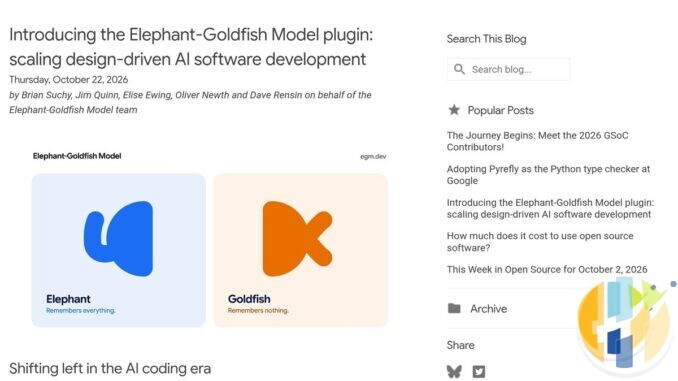
Sources I read for this piece, all on 26 October 2026: Google Open Source Blog, “Introducing the Elephant-Goldfish Model plugin: scaling design-driven AI software development” (22 October 2026); the google/elephant-goldfish-model repository on GitHub (README, docs/harnesses.md, docs/getting_started.md, TESTING.md, plugin.json, LICENSE and issues #8, #9, #105, #106 and #117); Google Antigravity Docs, “Plugins”; and BetaNews, “Google open sources its Elephant-Goldfish Model plugin for AI coding” (26 October 2026). Repository figures (about 1.3k stars and 111 forks) were seen on GitHub at about 9:15am UK time (GMT) on 26 October 2026. Images: screenshots of the Google Open Source Blog post and the GitHub README, captured 26 October 2026.
Your living room needs less planning than your code. If the AI tinkering ends with you on the sofa, a box that gets its apps from Google Play is the easy bit. Certified Google TV and Android TV boxes, like the SHIELD at the top of this list, get Play Store apps and are the sort of device the wireless ADB guide above works with, but check the apps you rely on are in the store in your country before you buy. The Formuler at the end is an IPTV player box, which is a different job entirely.
Best IPTV boxes to buy
These are media boxes and sticks that can run players and licensed apps. The first six are Google certified Android TV or Google TV devices with Google Play; the last one, the Formuler, runs its own Android and is not certified. They are not pirate hardware. They do not come with channels or playlists. I am not claiming I personally lab-tested every SKU this month.
Buy one of these when: Fire TV sideload is a hassle on your model, you want Play Store apps on a proper TV OS, or you want a dedicated player shell behind the sofa. No Fire TV device is on this shortlist.
- NVIDIA SHIELD TV Pro: the premium pick, a certified Android TV player with AI upscaling, Dolby Vision/Atmos and Gigabit Ethernet for the main living-room telly. Amazon UK | Amazon US | Amazon DE | Amazon FR | Amazon IT
- Google TV Streamer 4K: solid Google TV living-room default with Ethernet, 32GB storage and Dolby Vision/Atmos. Amazon UK | Amazon US | Amazon DE | Amazon FR | Amazon IT
- Xiaomi TV Box S (3rd Gen): Google TV box with 32GB storage, Wi-Fi 6 and Dolby Vision/Atmos, the cheaper box route than the Streamer. Amazon UK | Amazon US | Amazon DE | Amazon FR | Amazon IT
- Xiaomi TV Stick 4K (2nd Gen): budget Google TV stick with Wi-Fi 6 and Dolby Vision/Atmos when you want HDMI-simple, not a full box. Amazon UK | Amazon US | Amazon DE | Amazon FR | Amazon IT
- Budget Google TV 4K player: a cheaper certified Google TV player for a second telly. The model differs by store, so each link names the one you get there. MECOOL KD3 (Amazon UK) | onn. Google TV 4K Streaming Box (Amazon US) | Strong LEAP-NOVA-X (Amazon DE) | Strong LEAP-NOVA-X (Amazon FR) | Strong LEAP-NOVA-X (Amazon IT)
- MECOOL MEon1: Google TV certified 4K box with AI upscaling and 32GB storage for a dedicated player behind the sofa. Amazon UK
- Formuler Z12 Ultra SE: the newest Formuler box, built around MYTVOnline 4 for IPTV playlists. It runs Formuler’s own Android rather than certified Google TV, so there is no Netflix in HD and it is the one box here without Google certification. Formuler Z12 Ultra SE (Amazon UK) | Formuler Z12 Ultra SE (Amazon US) | Formuler Z12 Ultra SE (Amazon DE) | Formuler Z12 Ultra SE (Amazon FR) | Formuler Z12 Ultra SE (Amazon IT)
Still shopping for a Fire TV device? Fine for Prime Video and the Appstore universe. Not the shortlist above. And none of these boxes magically make unlicensed streams legal.
Would you let a swarm of goldfish review your code before you write it, or is a design doc the last thing you want from an AI tool? Tell me in the comments.
Written by Dr Husham Memar