I still get messages every week from people who think free UK catch-up died when the Hub branding went away. It did not. ITVX is still the official ITV app for live channels and on-demand shows, and the free tier is still real. You sit through ads, you sign in with an account, and you watch.
What changed for a lot of living rooms is the hardware path. Fire Stick owners, Samsung and LG smart TV owners, Freely boxes, Sky Stream, Virgin, Roku and NOW sticks all want the same simple answer: install the official app, sign in once, and stop fiddling. That is the job for September 2026.
This is not a rehash of the BBC iPlayer certification drama. If you need that Android TV / Google TV timeline, I already covered it separately. Here we stay on ITVX: what is free, what Premium actually buys, where the app is supported, and the login quirks that burn an evening.
What you get for free on ITVX
ITV’s own help pages are clear enough. The standard service is free in the UK and funded by advertising. You get live ITV channels plus a large on-demand library. You need an account. You do not need a paid plan to catch up on most of what aired on ITV.
The free tier is not “a teaser with three shows.” For a lot of households it is the whole product. Ads sit in the same mental bucket as watching ITV through an aerial. If that does not bother you, stay free and keep your money for something else.
Two practical notes I tell readers every time:
- UK only. Official troubleshooting still flags VPNs and location masking as a common reason streams fail. ITVX is built for UK viewing.
- Sign-in is required on TV. Open the app, pick something to watch, and ITVX asks you to register or sign in. That is normal, not a broken install.
ITVX Premium: the name, the price, the honest limits
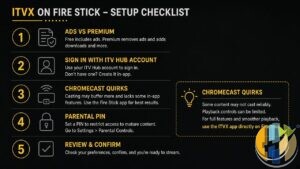
The paid tier is called ITVX Premium (not “Hub+” anymore, even if older emails still use that muscle memory). ITV’s help article lists the headline benefits:
- Hundreds more films and shows only on Premium
- The entire BritBox catalogue
- Ad-free streaming on most on-demand titles
- Downloads on the go (mobile versions of ITVX, with licensing limits)
- Cancel anytime before the next billing date
Official pricing on the same help pages: £5.99 a month or £59.99 a year. I am quoting those figures because they sit on ITV’s own Premium explainers. Always confirm the live price on the subscribe screen for your platform before you tap buy, especially if Amazon, Apple or a TV storefront is handling the bill.
Now the bit people email me about after they subscribe and still see ads.
ITV is explicit: ad-free applies to the on-demand library. Live TV still plays with ads. Some titles can still carry ITV promotions where contracts say so. Help pages even name examples such as Family Guy, Hart of Dixie and One Tree Hill as programmes that can keep promotions. So if you bought Premium expecting a totally silent live ITV1 evening, that expectation is wrong. Premium is mainly “cleaner catch-up plus BritBox plus mobile downloads,” not “broadcast ads vanish forever.”
If Premium looks active on the device you paid on, but another TV still shows full ads, ITV says it can take up to 24 hours to sync, and a sign-out / sign-in on the stubborn TV usually forces it. Check Settings and confirm the email matches the account you actually subscribed with. Wrong email, wrong ads. I have seen that one more times than I care to count.
Fire Stick and Fire TV: still a first-class door
Amazon Fire tablets, Cube, Stick and Fire TVs are on ITV’s supported platforms list. On a Fire Stick you install ITVX from the Amazon Appstore, open it, and sign in. If you want Premium through Amazon, ITV’s subscribe help says you open the app, head to the Watch ad-free style Premium section, and pick monthly or annual. Billing then sits on the Amazon account. Keep the app updated before you try to buy.
When Fire Stick ITVX misbehaves, I follow ITV’s own connected-device troubleshooting order rather than inventing folklore:
- Power-cycle the Stick (unplug for at least a minute) and reboot the router
- In the ITVX app, Settings → About → Reset, then sign in again
- On Fire TV: Settings → Applications → Manage Installed Applications → ITVX → Clear Cache / Clear Data
- Uninstall and reinstall from the Appstore if it is still sick
- Update Fire TV system software, and turn VPNs off while testing
Amazon community threads also keep pointing at Storage permission = Allow for ITVX when playback sticks on a spinner after a fresh install. That matches a lot of reader reports I have seen. Worth checking before you throw the Stick in a drawer.
Smart TVs and other official boxes
ITV’s “which TVs and platforms” article is the source of truth. Highlights that matter in most UK living rooms:
- Samsung Smart TVs: 2017 and newer for the full app story (2016 models are called out as on-demand only)
- LG Smart TVs: 2016 or later
- Google TV: Chromecast with Google TV and NVIDIA Shield are named
- Android TV: listed, with a note that some models are not supported
- Apple TV: tvOS 18 or later
- Freely, Freeview Play, Freesat, YouView, Sky Q / Glass / Stream, Virgin Media, PlayStation, Xbox, Roku, NOW sticks also appear on the official list, with model or firmware caveats on some of them
Roku and NOW owners should read the live ITV note about minimum firmware. The help page currently points people at a higher firmware floor for those sticks and boxes. Check the article before you blame the app for a black screen on ageing hardware.
If your built-in TV store will not show ITVX at all, the boring fix is usually a supported stick (Fire Stick, Chromecast with Google TV, Apple TV, Roku) rather than hunting sideloads. Official app on supported hardware is the path that survives support tickets.
Login and device quirks that waste your night
TV sign-in has three official routes:
- QR code with your phone camera (ITV warns against random third-party QR reader apps that can send you somewhere nasty)
- Numeric code at itv.com/pair (6 to 10 digits, only valid while shown on the TV, expires after an hour)
- Remote + email link (link valid for 15 minutes, one use)
If the code fails, do not hammer the same digits for twenty minutes. Leave the login screen, come back for a fresh code, and type carefully. Expired codes feel identical to “wrong password” from the sofa.
Concurrent streams: ITV says you can stream on up to four devices at the same time on one account. Hit the “too many devices” wall and you either sign out somewhere else or use a different account. That limit is the same story for free and Premium in the help article. Premium does not magically buy you a fifth simultaneous living room.
Household tip: one shared ITVX login across every Stick and smart TV is fine until someone leaves a fourth stream running in another room. Then everyone thinks the app “broke.” It did not. Someone is still watching Corrie on a tablet upstairs.
How ITVX sits next to BBC iPlayer (without rehashing that post)
In a normal UK free stack, BBC iPlayer and ITVX do different jobs. iPlayer is the BBC catalogue and live BBC channels under the TV Licence rules. ITVX is ITV’s live and catch-up world, with an optional paid BritBox-heavy Premium layer.
Device politics differ too. iPlayer has been tightening certified Android TV / Google TV paths (I wrote up that September 2026 timeline here: BBC iPlayer uncertified Android TV block). ITVX still publishes its own supported-platforms list, including Amazon Fire Stick and many smart TVs, with its own model caveats. Do not assume a box that struggles with one app automatically fails the other, and do not assume the reverse either. Check each broadcaster’s list.
My living-room default remains boring on purpose: official apps, supported sticks, same email everywhere, VPN off for UK free catch-up. That combo survives more evenings than clever sideloads.
What I would do tonight on a Fire Stick or smart TV
Search the device app store for ITVX, install the official build, and sign in with QR or itv.com/pair. Watch one on-demand episode on the free tier before you even look at Premium. If ads are fine, stop there.
If ads on catch-up drive you mad, or you specifically want BritBox inside the same app, check the live Premium price (£5.99 monthly / £59.99 yearly on ITV’s help pages as of the current articles) and remember live ads still exist. Subscribe on one platform only. Sign out and back in on the other TVs so Premium actually sticks.
If playback fails, work through restart → app reset → clear cache/data → reinstall → firmware update before you declare the Stick dead. And keep an eye on the official supported-devices page when a brand-new TV or stick arrives. Lists move.
Free ITVX on a supported Fire Stick or smart TV is still one of the easiest UK catch-up wins in September 2026. Pay only if Premium’s real extras earn the money. Otherwise enjoy the ads, finish the episode, and go to bed.
Also useful: if you are replacing an older Fire TV device, these are the two current options I would compare.
- Amazon Fire TV Stick 4K Max (newest gen): the current Wi-Fi 6E model; check the listing says Fire OS rather than Vega OS before you pay. Amazon UK | Amazon US | Amazon DE | Amazon FR | Amazon IT
- Google TV Streamer 4K: a simple Google TV box with Ethernet and the full Play Store. Amazon UK | Amazon US | Amazon DE | Amazon FR | Amazon IT
Best IPTV boxes to buy
These are media boxes and sticks that can run players and licensed apps. The first six are Google certified Android TV or Google TV devices with Google Play; the last one, the Formuler, runs its own Android and is not certified. They are not pirate hardware. They do not come with channels or playlists. I am not claiming I personally lab-tested every SKU this month.
Buy one of these when: Fire TV sideload is a hassle on your model, you want Play Store apps on a proper TV OS, or you want a dedicated player shell behind the sofa. No Fire TV device is on this shortlist.
- NVIDIA SHIELD TV Pro: the premium pick, a certified Android TV player with AI upscaling, Dolby Vision/Atmos and Gigabit Ethernet for the main living-room telly. Amazon UK | Amazon US | Amazon DE | Amazon FR | Amazon IT
- Google TV Streamer 4K: solid Google TV living-room default with Ethernet, 32GB storage and Dolby Vision/Atmos. Amazon UK | Amazon US | Amazon DE | Amazon FR | Amazon IT
- Xiaomi TV Box S (3rd Gen): Google TV box with 32GB storage, Wi-Fi 6 and Dolby Vision/Atmos, the cheaper box route than the Streamer. Amazon UK | Amazon US | Amazon DE | Amazon FR | Amazon IT
- Xiaomi TV Stick 4K (2nd Gen): budget Google TV stick with Wi-Fi 6 and Dolby Vision/Atmos when you want HDMI-simple, not a full box. Amazon UK | Amazon US | Amazon DE | Amazon FR | Amazon IT
- Budget Google TV 4K player: a cheaper certified Google TV player for a second telly. The model differs by store, so each link names the one you get there. MECOOL KD3 (Amazon UK) | onn. Google TV 4K Streaming Box (Amazon US) | Strong LEAP-NOVA-X (Amazon DE) | Strong LEAP-NOVA-X (Amazon FR) | Strong LEAP-NOVA-X (Amazon IT)
- MECOOL MEon1: Google TV certified 4K box with AI upscaling and 32GB storage for a dedicated player behind the sofa. Amazon UK
- Formuler Z12 Ultra SE: the newest Formuler box, built around MYTVOnline 4 for IPTV playlists. It runs Formuler’s own Android rather than certified Google TV, so there is no Netflix in HD and it is the one box here without Google certification. Formuler Z12 Ultra SE (Amazon UK) | Formuler Z12 Ultra SE (Amazon US) | Formuler Z12 Ultra SE (Amazon DE) | Formuler Z12 Ultra SE (Amazon FR) | Formuler Z12 Ultra SE (Amazon IT)
Still shopping for a Fire TV device? Fine for Prime Video and the Appstore universe. Not the shortlist above. And none of these boxes magically make unlicensed streams legal.
Article ID: HUSHAM-20260909-IX41