Your Freely box just got quieter to hide and louder on free channels. Manhattan’s Aero picked up software v20.1182.97 on 1 September 2026. Cord Busters and Sat & PC Guy both walked it. The headline bits: a proper TiVo Channels TV Guide, Bluetooth wake from standby, and Blacknut cloud gaming landing on the same puck.
If you bought the Aero for aerial-free BBC and ITV, this is the update that makes the free FAST side less of a scavenger hunt. If you bought it for Netflix icons only, still worth knowing what landed and what did not.
What v20 actually adds
- TiVo Channels TV Guide: now and next, plus about two days ahead on TiVo-delivered free channels. Favourites. Jump straight to a channel
- Bluetooth wake: remote can wake the box without IR line of sight, so the puck can sit behind the TV or in a ventilated cabinet
- TiVo+ renamed to TiVo Channels in the home sidebar naming clean-up
- Sports carousel for live / upcoming / on-demand sports tiles
- Voice channel tuning by number
- Low-battery warning on the remote
- Audio Guidance voice sounds more natural and covers more languages
- Bug fixes that matter: Auto Frame Rate fighting Disney+ / Prime, some HDMI oddities on Philips / Panasonic / JVC, a standby recovery flash bug, and the recessed reset button behaving again
Rollout is staged over the internet. Cord Busters noted it installs after standby once the box has downloaded it. Check Settings → System for the version string if you are impatient.
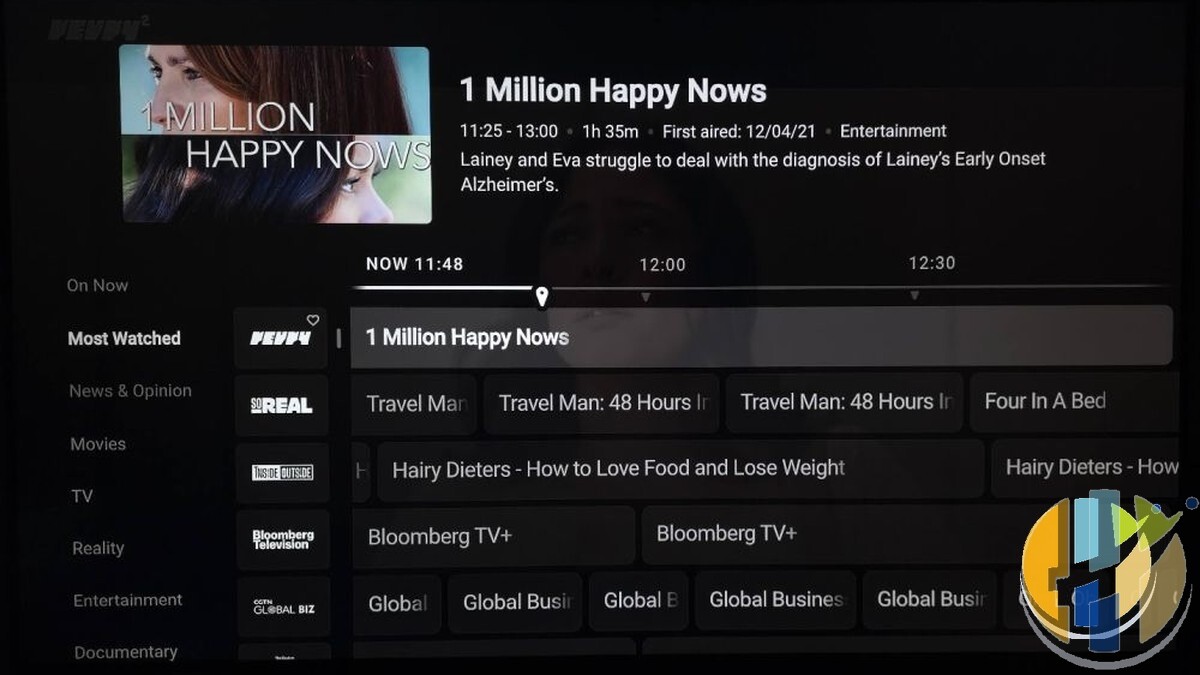
Two different “TiVo Channels” (yes, annoying)
This is the bit that will confuse people for a week.
- Home sidebar “TiVo Channels”: discovery hub. Thumbnails, free shows, and links that may open Plex / Tubi / Pluto / Rakuten content. Not the full grid guide
- TiVo Channels app (open with the remote’s +FREE button, or from My Apps): this is where the new guide lives. Mini guide first, then Go to Guide for the grid
The physical Guide button on the remote still opens Freely’s guide, not this one. Muscle memory will fight you once. Then it sticks.
The guide covers channels delivered directly through TiVo. The wider free pile (Plex, Tubi and friends) still lives in that discovery section. Between them you are looking at 400+ free streaming channels plus on-demand junk food. Sports, kids, news, Mr Bean channels, the lot.
Blacknut: games on a Freely box
Separately from the v20 polish, Blacknut showed up under All Apps. Cloud games streamed to the Aero. No console. Pair a Bluetooth pad under Devices → Bluetooth Accessories. Manhattan has validated DualSense and Xbox Series controllers. Phone-as-pad via Blacknut’s companion app is the fallback.
It is not free Freely. Blacknut is a paid subscription (UK coverage has been floating around £12.99 / month; confirm in the app before you commit). There is a short free try on eligible titles without an account. Netgem’s PLEIO already leaned hard into cloud games with a pad in the box. Aero catching up was inevitable. Whether you actually want to race cars on the same remote you use for The Chase is a different question.
Who should care (and who can ignore this)
Grab the update if:
- You already own an Aero and hate digging for free channels
- You want the box out of sight and IR wake was blocking that
- Disney+ Error 36 or Prime black screens after Auto Frame Rate switches have been biting you
Skip the excitement if:
- You still do not own Freely hardware and you mainly want Fire Stick sideloading. Different product. TiVo OS on Aero is curated. No sideload path
- You need NOW / Paramount+ / Apple TV on this box today. Cord Busters still flags those as missing, with NOW previously hinted for later
- You need a PVR. Freely does not record. Pause buffer is still the short live pause, not series record. Humax Aura EZ is the Freely recorder story, at a much higher price
RRP is now about £89.99 (it launched nearer £70). Still the cheap standalone Freely door versus PLEIO’s Android / Play Store / gaming kit pitch, and versus ISP add-ons like Wildanet’s TiVo bundle or Fibrus on PLEIO that need their broadband first.
Five-minute checklist
- Leave the Aero online and let it hit standby so v20 can install. Confirm version under Settings → System
- Press +FREE, open Go to Guide, favourite two channels you will actually watch
- If you hide the box, test Bluetooth wake once before you cable-tie it behind the panel
- Still on Disney+ / Prime glitches after Auto Frame Rate? Retest after the update before factory resetting
- Curious about Blacknut? Use the free try before you add another monthly line
Soft link for the Freely channel side of the sofa: the Channel 5 Freely list is still the practical “what number is Milkshake on” post.
Manhattan did not reinvent television. They fixed the free-channel map, let the remote wake the puck through a cabinet door, and stuck optional cloud games on a Freely box that used to be dead simple. That is enough. Update it, hide it if you want, and get back to the guide.