What do Samsung TV model numbers actually mean? Why are they so long?

Samsung TV comes with complicated model numbers and each seems to represent the tv and the information about the software as well. In most cases, you can even find the history of the tv or even find out if it is flat or plasma or even LCD screen. Generally speaking, a lot of users use the model for the size of the TV.
In Samsung Smart TV is not different either. The situation is simple. You look at the model at the back of the TV and you GET DIZZY, for one reason you just bend your neck and you are getting a headache, the other reason is WTF is all these numbers mean.
Based on questions left by fans in the Husham.com comments section in the last article regarding Samsung SMART TV removed SMART IPTV.
I am writing this article to users that need to know how to find out what the Model number mean and how do you even find out if your Model supported or not supported for the Smart IPTV Solution.
Where do you find the Serial number and Model of the TV?
The serial number, model and type of your TV can be found located on the back panel of your TV.
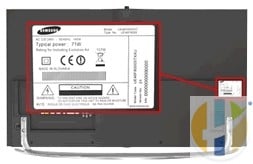
If you have a smart TV, you can also find the model code and serial number by going to:
Menu > Support > Contact SamsungÂ
SAMSUNG Model Number Codes meaning

Samsung TV model numbers use codes to describe the TVs. Once familiar with the codes you can learn a lot about a particular TV just from glancing at its model code.
Using model UE55F8000AFXZ as an example we can see that:
U = LED
EÂ = Produced for Europe
55 = Screen size (in inches)
F = Manufactured in 2013
8000 = Series. This will differ depending on the features for that individual model. You can find out the specifications for a particular model by entering the model code into the search area on the Samsung website.
A = Features or design
FXZ = Manufacturing information
If you have a UE55F8000BFXZ instead of the UE55F8000AFXZ used in the example the difference between the two models would be a design change, such as a different coloured bezel, but all the other specifications would be the same.
See the charts below to see what the other codes mean.
Models of the SAMSUNG TVs
| Example: UE55F8000AFXZ | Meaning: |
|---|---|
| U of UE55F8000AFXZ | Q = QLED
U = LED P = Plasma L = LCD H = DLP K = OLED |
| E of UE55F8000AFXZ | N = North America
E = Europe A = Asia |
| 55 of UE55F8000AFXZ | Size in inches |
| F of UE55F8000AFXZ | N = 2018
Q = 2017 QLED MU = 2017 UHD M = 2017 HD KS = 2016 SUHD KU =2016 UHD K =2016 L = 2015 H = 2014 HU = 2014 UHD F = 2013 E = 2012 D = 2011 C = 2010 B = 2009 A = 2008 |
| 8000 of UE55F8000AFXZ | This number designates the series. The exact specifications of each series will differ by model but generally the higher the series, the higher the specifications on that model. |
| A of UE55F8000AFXZ | Feature or Design e.g. this might designate a different stand |
| FXZ of UE55F8000AFXZ | Manufacturing information |
Older models (2007 and earlier)
| Example: LN-T4681FX/XA | Meaning: |
|---|---|
| LN of LN-T4681FX/XA | FPÂ or HP = Plasma
LN = LCD HL = DLP TXÂ = CRT |
| TÂ of LN-T4681FX/XA | Model year
TÂ = 2007 SÂ = 2006 RÂ = 2005 PÂ = 2004 NÂ = 2003 MÂ = 2002 |
| 46 of LN-T4681FX/XA | Size in inches |
| 81 of LN-T4681FX/XA | Series |
| F of LN-T4681FX/XA | Resolution indicator (Full HD) |
| X of LN-T4681FX/XA | Feature or design indicator |
| /XA of LN-T4681FX/XA | Manufacturing information |
Tell me below in the comment how helpful this information was.
Please a feedback in the forum if you need further information
Releated Articles
Kodi for smart TV(Opens in a new browser tab)
GTRO SMART TV – Chose the right Smart TV for KODI and IPTV + Freeview(Opens in a new browser tab)
Also useful: if your Samsung TV no longer supports the app, an external Google TV player and an HDMI cable get you running again.
- Amazon Basics 4K HDMI cable (1.8 m): a 4K at 60Hz cable to connect an external player to the TV. Amazon UK | Amazon US | Amazon DE | Amazon FR | Amazon IT
- Google TV Streamer 4K: a simple Google TV box with Ethernet and the full Play Store. Amazon UK | Amazon US | Amazon DE | Amazon FR | Amazon IT
- Xiaomi TV Stick 4K (2nd Gen): a compact Google TV stick that plugs straight into the TV. Amazon UK | Amazon US | Amazon DE | Amazon FR | Amazon IT
Best IPTV boxes to buy
These are media boxes and sticks that can run players and licensed apps. The first six are Google certified Android TV or Google TV devices with Google Play; the last one, the Formuler, runs its own Android and is not certified. They are not pirate hardware. They do not come with channels or playlists. I am not claiming I personally lab-tested every SKU this month.
Buy one of these when: Fire TV sideload is a hassle on your model, you want Play Store apps on a proper TV OS, or you want a dedicated player shell behind the sofa. No Fire TV device is on this shortlist.
- NVIDIA SHIELD TV Pro: the premium pick, a certified Android TV player with AI upscaling, Dolby Vision/Atmos and Gigabit Ethernet for the main living-room telly. Amazon UK | Amazon US | Amazon DE | Amazon FR | Amazon IT
- Google TV Streamer 4K: solid Google TV living-room default with Ethernet, 32GB storage and Dolby Vision/Atmos. Amazon UK | Amazon US | Amazon DE | Amazon FR | Amazon IT
- Xiaomi TV Box S (3rd Gen): Google TV box with 32GB storage, Wi-Fi 6 and Dolby Vision/Atmos, the cheaper box route than the Streamer. Amazon UK | Amazon US | Amazon DE | Amazon FR | Amazon IT
- Xiaomi TV Stick 4K (2nd Gen): budget Google TV stick with Wi-Fi 6 and Dolby Vision/Atmos when you want HDMI-simple, not a full box. Amazon UK | Amazon US | Amazon DE | Amazon FR | Amazon IT
- Budget Google TV 4K player: a cheaper certified Google TV player for a second telly. The model differs by store, so each link names the one you get there. MECOOL KD3 (Amazon UK) | onn. Google TV 4K Streaming Box (Amazon US) | Strong LEAP-NOVA-X (Amazon DE) | Strong LEAP-NOVA-X (Amazon FR) | Strong LEAP-NOVA-X (Amazon IT)
- MECOOL MEon1: Google TV certified 4K box with AI upscaling and 32GB storage for a dedicated player behind the sofa. Amazon UK
- Formuler Z12 Ultra SE: the newest Formuler box, built around MYTVOnline 4 for IPTV playlists. It runs Formuler’s own Android rather than certified Google TV, so there is no Netflix in HD and it is the one box here without Google certification. Formuler Z12 Ultra SE (Amazon UK) | Formuler Z12 Ultra SE (Amazon US) | Formuler Z12 Ultra SE (Amazon DE) | Formuler Z12 Ultra SE (Amazon FR) | Formuler Z12 Ultra SE (Amazon IT)
Still shopping for a Fire TV device? Fine for Prime Video and the Appstore universe. Not the shortlist above. And none of these boxes magically make unlicensed streams legal.